Advanced Captioning
Last updated: July 9, 2026
Introduction
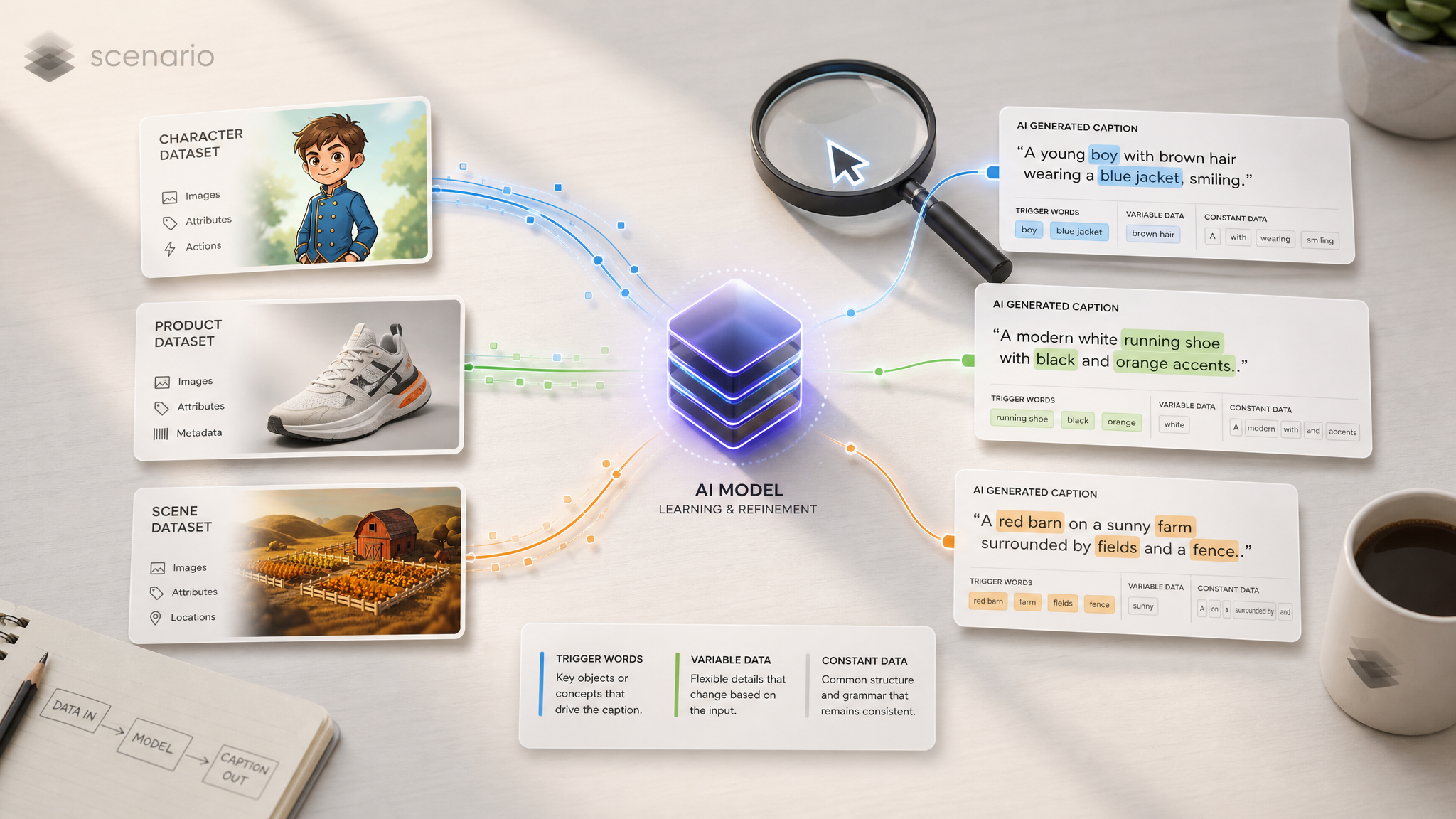
Captions tell the model what's in an image and, crucially, what's variable versus what's constant. Good captions make weak datasets perform well; bad captions can ruin great datasets. This article covers captioning patterns by training type, trigger word strategy, family-specific notes, and common pitfalls.
Auto-captioning is a starting point, not the end
Scenario auto-generates captions for every uploaded image. Use them as a baseline, not as the final input: auto-captions tend to be generic and miss the elements you actually want the model to learn.
Always review and refine before training. A 15-minute pass through your captions usually beats hours of parameter tuning.
Captioning by training type
The single most important thing about captions: they look completely different for different training types.
Single-image LoRAs (style, character, product, environment)
Captions are descriptive. They describe what's in the image so the model learns subject plus variations.
Training type | Lead with | Vary across images |
|---|---|---|
Style | The contents of the image (subject, scene, action) | Subject, framing, lighting; let the style be the constant the model picks up implicitly |
Character | Trigger word plus defining traits (face, hair, signature outfit) | Pose, expression, environment, framing |
Product / Object | Trigger word plus product features (material, branding, geometry) | Angle, lighting, background, scale context |
Environment | Trigger word plus signature elements of the place or style | Time of day, weather, camera angle, framing |
Key principle: the things you put in every caption become the constants the model learns. The things you vary become variables it can be prompted with at inference.
Edit LoRAs (Flux 2 Edit, Qwen Edit, Flux Kontext)
Captions are instructional. They describe the transformation, not the contents.
Pattern: [verb] [transformation description] [optional trigger word]
Examples:
Apply MYBRAND color grade to this photoConvert this wireframe into MYDESIGNSYSTEM interfaceReplace the person with MYCHARACTERTransform this realistic photo into MYSTYLE 3D render
Key principle: every caption in a dataset uses the same verb pattern and the same trigger word (or none, never partial). Inconsistency is the most common cause of weak edit LoRAs.
See Train an Edit LoRA Overview and Building Edit LoRA Training Sets for more.
Trigger words
A trigger word is a unique token that activates the LoRA, typically all-caps and made-up so it doesn't collide with real words (such as Vendalixia, MYSTYLE, AURA_X9, KAEL_07).
When to use one:
Always for character, product, and environment LoRAs. Triggers give you precise activation control and prevent the model from interpreting your subject as something generic.
Optional for style LoRAs. With small or subtle styles, a trigger helps. With large diverse style datasets (50+ images), the model often learns the style organically without one.
Optional for edit LoRAs. Either include one in every caption or none in any, never partial. Triggers add specificity at inference; their absence makes the LoRA respond to natural language requests.
How to write good ones:
Make them unique: invented words avoid collision with concepts the base model already knows.
Keep them short and consistent: same exact spelling in every caption.
Use them in inference prompts if you trained with them. A LoRA trained with
MYSTYLEactivates more reliably when the prompt also saysMYSTYLE.

Example of a captioned dataset using the trigger word “Vendalixia” (the name chosen for this character)
Family-specific notes
The captioning rules above hold across all current families, but each has tendencies worth knowing.
Flux 2 (Dev / Klein 9B / Klein 4B)
Handles longer, more descriptive captions comfortably.
For large, diverse style datasets, you can omit captions for style: the model picks up the aesthetic implicitly. Smaller datasets benefit from descriptive captions.
Detailed feature descriptions in the caption beginning help with character and product fidelity.
Qwen Image (Qwen Image / 2512)
Strong prompt adherence: captions carry more weight than in some other families.
Investing time in caption quality usually pays back more than parameter tuning.
Concise, precise captions tend to outperform sprawling ones.
Z-Image (Z-Image / Z-Image Turbo)
Handles descriptive captions well.
The same caption set works across both variants because LoRAs are cross-compatible. See Z-Image Cross-Compatibility.
Flux 2 Edit / Qwen Edit / Flux Kontext
Captions are instructional: verb-led, not descriptive. This is the biggest single rule.
Consistency across all pairs is mandatory. Same verb structure, same trigger word usage, same sentence shape.
Qwen Edit in particular benefits from captions that imply the surrounding context should stay intact: wording like "replace [X] with [Y]" works better than "transform the whole scene."
What to put in captions, and what to leave out
Put in | Leave out |
|---|---|
The subject and identity (for character / product / environment) | The style itself, when training a style LoRA |
The action or pose | Boilerplate adjectives that don't add information ("beautiful," "stunning") |
Distinctive constant features (color, material, brand) | Camera and lens specs unless they're truly part of the variable space |
What varies in this specific image (lighting, framing, angle) | Filler that's identical across all captions and adds no signal |
Trigger word (when used) | The trigger word in some captions but not others; be consistent |
Common pitfalls
Auto-captions left untouched. They're generic and often wrong about distinctive features. Always review.
Describing the style when training a style LoRA. This makes the model associate the style with words rather than learning it implicitly. Describe the contents instead.
Omitting the trigger word in some captions. Partial triggering equals unreliable activation. Audit before training.
Different verbs across edit LoRA captions. "Apply X" / "Transform X" / "Convert X" used randomly weakens the pattern. Pick one structure and reuse it.
Captions that contradict the image. Auto-caption says "sunset" when the image is high noon: the model gets confused. Verify accuracy.
Same caption on every image. The model has nothing to vary against. Differentiate the variable parts (pose, framing, lighting, etc.) per image.
Quick audit before training
Before you hit Start, scan your captions for these:
Trigger word in every caption (or none, if you're going trigger-free).
Defining features that should stay constant appear in every caption.
Variable elements (pose, lighting, framing) differ per image.
For edit LoRAs: same verb structure across all pairs.
No auto-caption boilerplate left over ("an image of a...").
Captions accurately describe what's in each image.