Pricing & Plans
Last updated: November 3, 2026
Introduction
Scenario offers flexible pricing plans to suit creators of all sizes, from solo artists to large studios with hundreds of users. Whether you’re just starting out or managing a collaborative team, there’s a plan for you.
Pricing Plans Overview
Scenario provides 4 paid plans (plus a Free plan):
Starter (from $15/month): Ideal for casual creators who love to explore AI. This plan includes 1 user workspace, 1,500 compute units, access to all optimized models, edit with Kontext or Gemini, Community support and up to 50GB storage.
Pro (from 45$/month): Created for demanding creators who need high performance or custom models. The plan includes 1 user workspace, 5,000 compute units, high-performance models & custom trainings with Flux (or more), and Organization Analytics. It also includes advanced AI tooling (Retouch, Edit with GPT and Gen-4). This tier supports priority queue, and relaxed generations in the web app once your Compute Units run out (see Relax mode). It also includes ticket support and up to 500GB storage. Plus, Pro Plan accounts get a 10% compute discount.
Max (from $75/month): Designed for small to mid-sized teams scaling together. It includes 10,000 Compute Units. It includes multi-user workspaces with a fee per seat from $30/month. It includes access to Scenario’s full suite of top-performing models. This tier adds high priority queue, relaxed generations in the web app once your Compute Units run out, and priority ticket support. It also supports up to 1 TB storage + 1 TB per seat. Max Plan accounts get a 20% compute discount.
Enterprise (from 125$/user/month): For organizations, running AI at scale. Scenario offers Enterprise level user management, white glove support with an account team, slack support and customized onboarding. This plan also supports custom features or integrations, and all add-ons (SOC2, SSO/SAML, etc.). It supports up to 10 TB Storage + 1 TB per additional seat. Enterprise Plan accounts get a 30% compute discount + pay-as-you-go option.
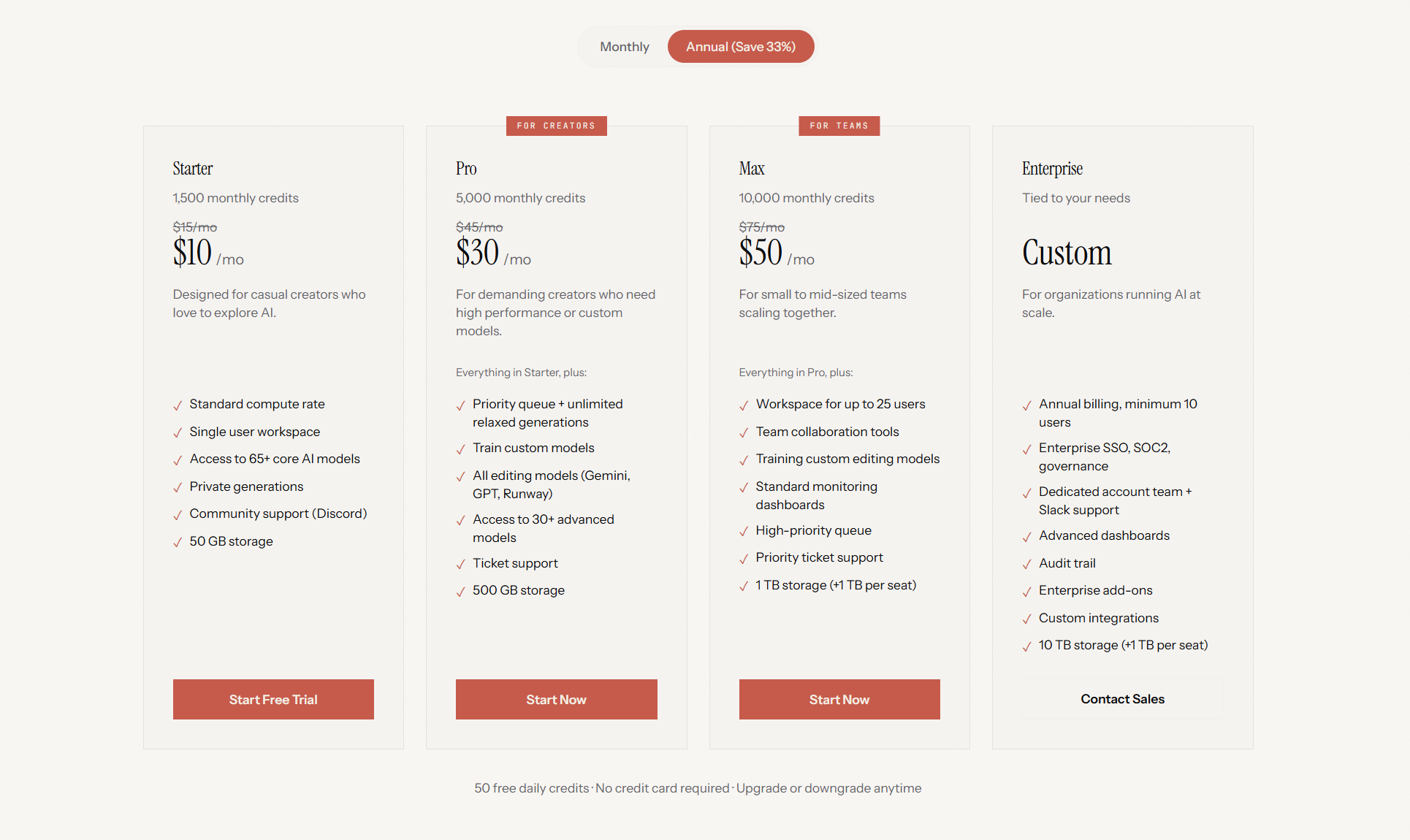
Scenario also offers a Free plan for everyone, which includes 50 daily credits. See The Free plan below.
The Free plan
The Free plan lets you try Scenario without a credit card. It includes:
50 Compute Units (CU) per day for your organization.
One seat and one project.
Up to 2 images per generation, one generation at a time.
The models available on Free. Other models are marked with a crown (see below).
Daily limits and reset time
Your 50 daily CU reset every day at 00:00 UTC. In local time that is, for example, 2:00 in Paris and 17:00 the day before in San Francisco during summer time (one hour earlier in winter).
Unused daily CU do not carry over to the next day.
When they run out, a window says "You’ve used all your daily free credits". Wait for the reset, or upgrade to keep going. The Free plan does not include Relax mode, and you cannot buy extra CU on it.
What needs a paid plan
Some models. A model you cannot use on Free has a crown badge with the tooltip "Upgrade your plan to use this model". If you try to use it, an Unlock window names the plan that unlocks the model.
Some tools need Starter or higher: background removal, vectorizing, texture generation, reframing, pixelating and uploading your own models.
Canvas and model training need Pro or higher. Trying them opens an Available in higher plans window.
The API. API keys do not work on Free.
Commercial use. Free plan outputs are for personal and evaluation use only. Upgrading does not extend commercial rights back to images, videos or other assets you generated on the Free plan: to use a design commercially, regenerate it once you are on a paid plan. You can use your earlier assets as references for the new generations. Assets you create while on a paid plan keep their commercial rights if you later cancel.
Content checks on uploads and prompts
On the Free plan, every image you upload is checked automatically. An image that appears to contain sexual content is rejected with "This image was rejected because it appears to contain sexual content." and is not saved.
Prompts are also checked for sexual content involving minors, on every plan except Max and Enterprise. A blocked prompt shows "This prompt was rejected because it appears to reference sexual content involving minors."
Upgrade from Free
Organization admins can upgrade from Settings → Organization → Billing: pick a plan card and click Subscribe Now. The Unlock and Available in higher plans windows also show the plans you can choose from, with Compare Plans for the full comparison.
Understanding Seats and Compute Units
Seats
Each plan includes a set number of seats, representing individual user licenses.
Seats are personal to the individual user and cannot be shared between people. Sharing seats is strictly against Scenario’s Terms & Conditions and may result in suspension or closure of the account. Please don’t risk your access, each team member should have their own seat to ensure compliance and security.
Compute Units (CUs)
They are used for tasks like training models or generating assets. For example:
Generating an image with Flux model might use 5 CUs, so 1,500 CUs could yield 300 Flux images.
Upscaling an image might cost 15 CUs, so 1,500 CUs could cover 100 upscales.
Compute Units renew monthly on your billing date and do not roll over to the next month (on the Free plan, they renew every day at 00:00 UTC). If you need more CUs before your next renewal, you can purchase additional units at any time on a paid plan to keep your projects moving without interruption. On Pro, Max and Enterprise, running out also starts Relax mode, so you can keep generating in the web app with a wait between jobs.
Yearly Discount
Choosing an annual subscription saves you 33% on all plans, making it a cost-effective option for long-term use.
Trusted by Industry Leaders
Scenario powers the creative workflows of top studios including Scopely, Tripledot Studios, Metacore, Unity, Innogames, Ubisoft, Age of Learning, Superside, and many more. These teams rely on Scenario for consistent, high-quality game assets, produced quickly and at scale.
Get Started Today
Find the plan that fits your creative needs! Visit our pricing page to explore all plans, or contact our team to request a demo or discuss enterprise solutions.