ElevenLabs Voice Isolator and Voice Changer: The Essentials
Last updated: June 8, 2026
Covers ElevenLabs Voice Isolator and ElevenLabs Voice Changer
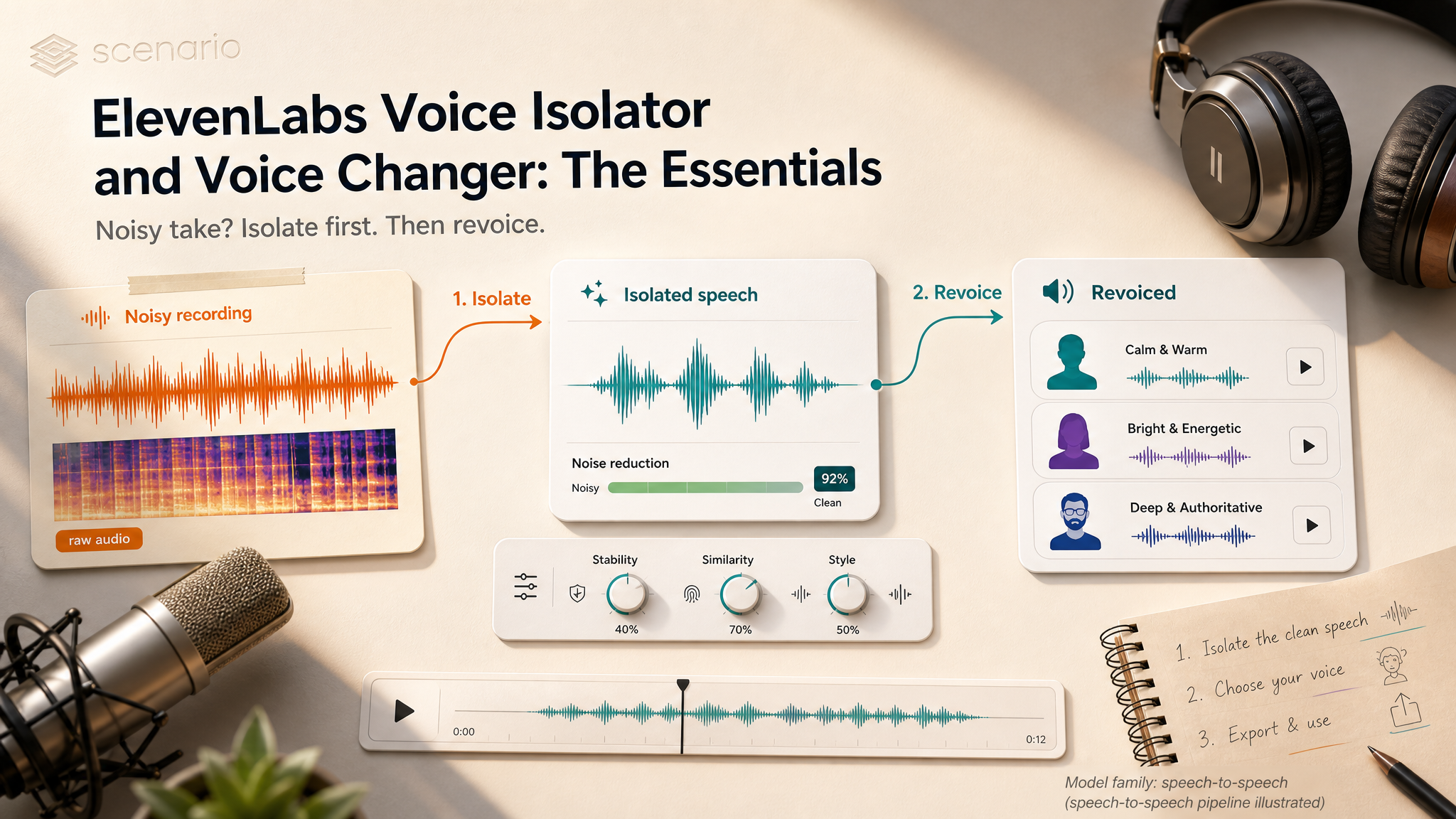
Two ElevenLabs audio tools on Scenario, built to work as a pair. Voice Isolator strips background noise, music, and reverb so only a clean voice remains. Voice Changer takes that voice (or any clean recording) and replaces the speaker while keeping the exact words, timing, and emotion.
The short version
Noisy take? Run Voice Isolator first.
Different character voice? Feed the result into Voice Changer.
Neither model uses a text prompt. Both are speech-to-speech: audio in, audio out.
Which Model Should I Use?
Model | ID | Input | Best for |
|---|---|---|---|
ElevenLabs Voice Isolator Editing |
| Audio or video | Remove music, noise, and room tone; keep speech only |
ElevenLabs Voice Changer Editing |
| Audio | Swap the speaker to a preset or cloned voice without re-recording |
Use Voice Isolator when the mix is the problem. Use Voice Changer when the performance is right but the voice is wrong. For heavy noise, isolate before you change. For clean studio takes, skip straight to Voice Changer.
Parameters
Voice Isolator
Audio (required). The recording to clean. Built for speech: there must be a voice to extract. Accepts encoded files (MP3, WAV, and similar) and can take a video asset directly; Scenario pulls the audio track for you.
Input File Format. Leave on Encoded (MP3, WAV, etc.) for normal uploads. Switch to PCM 16-bit 16 kHz mono only if your file is already in that raw format for slightly faster processing.
Voice Changer
Audio (required). The performance to transform. Words, pauses, and emotion stay tied to the original read.
Voice or Public Voice (one required). Pick a cloned ElevenLabs voice from your project, or choose one of 21 presets (Adam, Bella, Charlie, Liam, Sarah, and others). If both are set, the cloned voice wins.
Remove Background Noise. Optional cleanup before conversion. Useful on noisy sources; skip it when the input is already studio-clean or you ran Voice Isolator first.
Stability, Similarity Boost, Style Exaggeration. Optional dials from 0 to 1. Leave empty for the voice defaults. Lower stability adds expressiveness. Higher similarity locks to the target voice. Higher style exaggeration pushes emotion but can reduce steadiness. Change one dial at a time when tuning.
Speaker Boost. Optional. Makes the output sound more like the chosen voice at the cost of slightly slower processing.
Output Format. Default
mp3_44100_128is a solid balance. Usemp3_44100_192or Opus 192 kbps for final delivery; lower bitrates for quick iteration.Seed. Optional. Lock a number to reproduce the same output on repeat runs with identical settings.
Input File Format. Same Encoded vs PCM choice as Voice Isolator.
How Voice Isolator Works
Upload audio or video, run the model, and get back an isolated speech track. Music, crowd noise, HVAC hum, and room reverb are stripped while timing and delivery stay intact.
Removes background music from speech recordings
Removes ambient noise (traffic, crowds, fans, AC)
Reduces reverb from echoey rooms
Preserves natural timing, tone, and emotion in the voice
Not a voice changer. Voice Isolator keeps the original speaker. To swap identity, run Voice Changer on the isolated file.
How Voice Changer Works
Upload a recording, pick a target voice, and generate. The model converts identity, not script: mispronunciations, breaths, and pacing from the source carry through unless you fix them upstream.
21 preset voices for instant character variety
Cloned voices for project-specific characters (create clones with ElevenLabs Voice Clone on Scenario)
Optional in-model noise removal when you skip the isolator step
MP3 or Opus export at multiple bitrates
Using the Two Models Together
Raw recording (noisy or mixed)
  → ElevenLabs Voice Isolator
    → ElevenLabs Voice Changer (preset or cloned voice)
      → Delivery-ready audio for game, film, or podcast
Capture the take. Record the line in any environment, even a noisy one.
Isolate. Run Voice Isolator. Music and room tone drop out; speech remains.
Recast. Feed the clean file into Voice Changer. Pick a preset or clone.
Place in the edit. Export MP3 or Opus and drop into your timeline, game engine, or lipsync pipeline.
Examples
Game dialogue from director reads. Record lines in a small office. Isolate to remove hum, then Voice Changer with three cloned voices for three NPCs.
Podcast guest from a noisy cafe. Phone recording with cafe ambience. Voice Isolator alone can be enough; no recast required.
Animatic voice swap. Placeholder reads with the right emotion. Voice Changer recasts each line into final character voices for a test screening.
Music vocal extraction. Isolate a forward lead vocal for sampling or lipsync input. Works best on dry, upfront vocals.
Archival restoration. Old interview with tape hiss and HVAC noise. Isolate for a clean republish; optionally recast if the project needs a modern narrator tone.
Use Cases
Game development: prototype dialogue from director reads, recast into shipping character voices.
Animation and film previz: scratch tracks that sound final enough for animatic review.
Podcast and interview production: field captures cleaned to broadcast quality.
Music and remix: vocal extraction from existing songs.
Voice AI pipelines: clean speech for lipsync, transcription, or downstream models.
Marketing: A/B the same script across multiple brand voices without re-recording.
Archival restoration: clean legacy audio and optionally re-voice.
Tips for Better Results
Isolate before you change on noisy sources. Voice Changer's built-in noise removal helps, but Voice Isolator is stronger on music and heavy ambience.
Test a 30 second clip first. Validate isolation or voice match before processing a long file.
Read with the emotion you want kept. Voice Changer swaps the speaker, not the performance. Urgent lines should be read urgently.
Use clones for recurring characters. Presets are fast for exploration; clones stay consistent across a season or game.
Lock the seed when comparing voices. Same seed, same settings: the only variable is the target voice.
Add room tone back in the mix if needed. Isolated speech can feel dry for film. Blend a little ambience in your DAW after isolation.
Start from video when the audio only lives in a clip. Feed the video into Voice Isolator instead of extracting manually first.
Known Limitations
Voice Isolator needs speech to isolate. Pure music or crowd-only recordings have no voice target.
Heavily processed vocals are harder to split. Deep reverb tails, vocoder effects, and dense harmonies reduce fidelity.
Voice Changer is not a re-recorder. Pops, clipping, and mispronunciations in the source persist in the output.
No partial-file control. Both models process the full upload uniformly.
Cloning happens upstream. Create voices with ElevenLabs Voice Clone before selecting them in Voice Changer.
Plan access may apply. Both models carry access restrictions on some workspaces.
Open the models directly: ElevenLabs Voice Isolator · ElevenLabs Voice Changer