SAM 3.1 Image by Meta
Last updated: April 23, 2026
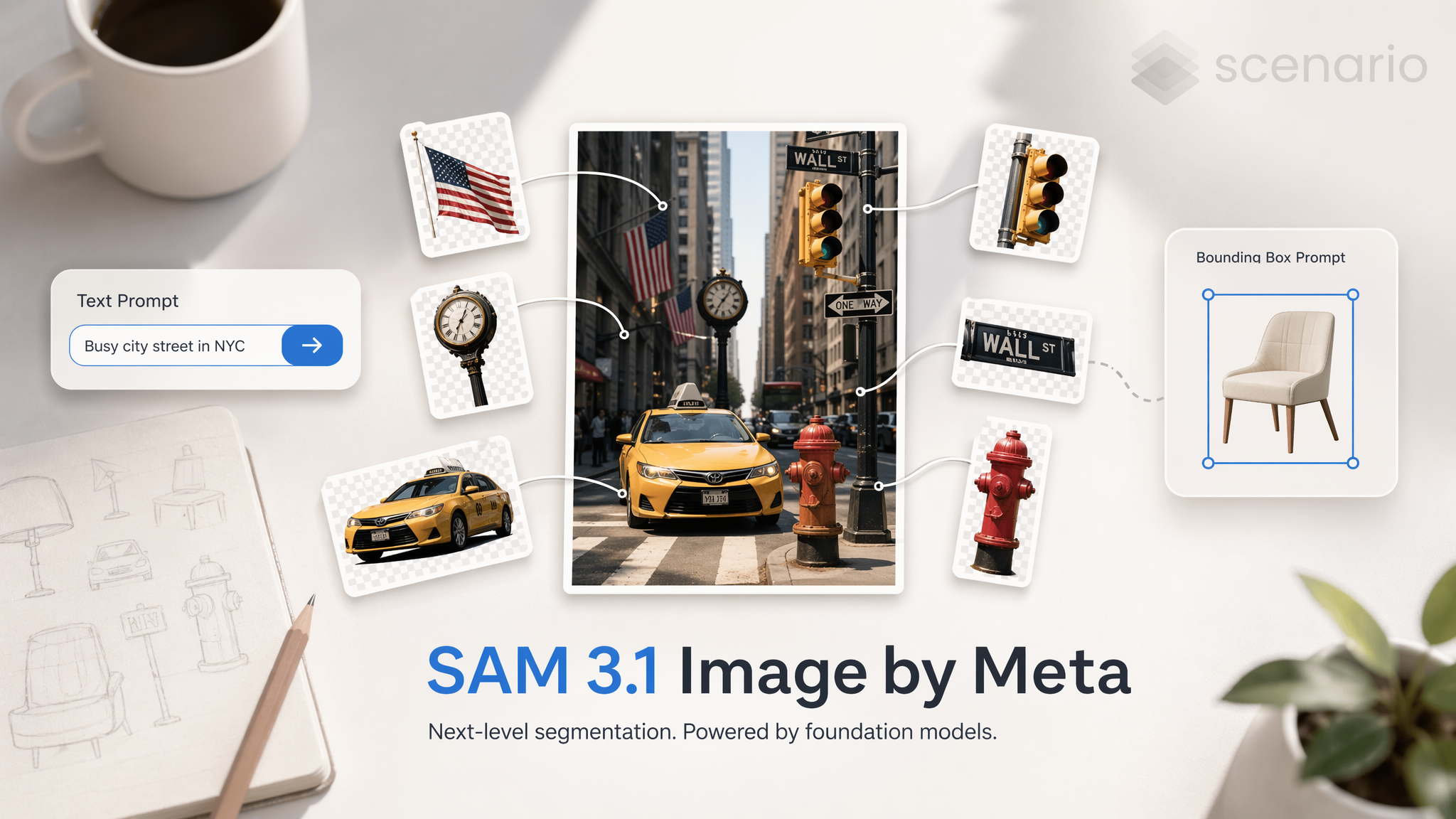
SAM 3.1 Image is Meta's precision image segmentation utility, available on Scenario. It takes any still image as input and returns a set of isolated PNG masks, delivering one mask per detected object automatically. Output count scales with scene complexity, from a handful of masks on a simple composition to over 90 on a dense scene.
Overview
SAM 3.1 Image is not a generative model. It does not create images from a text prompt. Instead, it analyzes an existing image and returns a clean PNG mask for every distinct object it identifies. This makes it a utility step inside a larger production pipeline rather than a standalone creative tool.
Detection is fully automatic by default. You can optionally guide it by providing a text prompt that names the object category you want to isolate, or by supplying up to 10 bounding boxes that define specific regions to examine. Both guidance methods can be combined in a single request for maximum precision.
SAM 3.1 Image is available as a third-party model on Scenario. It is well suited for artists, developers, and pipeline engineers who need clean object cutouts at scale without manual selection or tracing work.
What It Does
Automatic object segmentation: Upload any image and receive one PNG mask per detected object, with no manual selection required.
Text-guided segmentation: Provide a text prompt naming the object category you want to isolate. The model focuses detection on matching objects and ignores the rest.
Bounding box segmentation: Draw up to 10 rectangular regions to tell the model exactly where to look. Each box produces a focused segmentation result for that area.
Key Features
Segments any photo or illustration into isolated PNG object masks
Optional text prompt to target a specific object category
Optional bounding box guidance: up to 10 boxes per image
Output count scales with scene complexity: tested from 7 masks on a small group scene to 91 masks on a dense underwater composition
One output asset per detected object, not one combined mask layer
No manual selection or tracing required
Parameters
Here is a quick rundown of what each setting does and how to get the most out of it.
Image
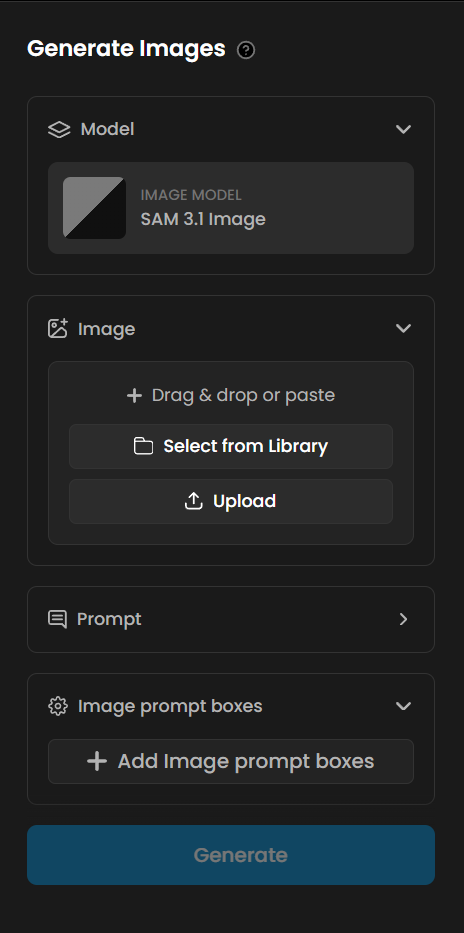
The only required input. Upload the source image you want to segment. The model processes the full frame and identifies all distinct objects present. Any photo or illustration works. Inputs with clear object boundaries and good contrast between subjects and background produce the cleanest masks.
Text Prompt
An optional word or short phrase naming the object category to isolate. When provided, the model focuses detection on objects matching that category and ignores everything else. Use generic, visual category terms such as "person", "car", "flower", "robot", or "character". Specific names, fictional descriptors, and overly narrow phrases cause the model to return no detections. See Known Limitations for details and workarounds.
Bounding Boxes
An optional set of up to 10 rectangular regions that tell the model exactly where to look. Each box produces a focused segmentation result for that area of the image. Bounding boxes are most useful in dense scenes where a text prompt alone is not specific enough to isolate a single object, or when you want to target a background element that the model might otherwise deprioritize. You can use bounding boxes together with a text prompt in the same request.
Tips for Better Results
Use generic category terms in your text prompt. Terms like "person", "car", "flower", "robot", "fish", and "character" work reliably. Specific names and fictional or stylized descriptors cause the model to return a "No objects detected" error. When in doubt, use the nearest common noun for the object type.
Start without a prompt to see everything. Running SAM 3.1 Image with no text prompt and no bounding boxes returns a mask for every detected object in the scene. This is a good first step to inventory what the model can identify before deciding which objects to isolate.
Combine a text prompt with bounding boxes for precision. In scenes with many object types, a text prompt narrows the category and bounding boxes narrow the region. Using both together gives the most targeted output on complex compositions.
Plan for a variable number of output assets. SAM 3.1 Image returns one PNG mask per detected object. A scene with 10 fish produces 10 separate mask assets. There is no way to request exactly N masks. Build your downstream workflow to handle a range of output counts rather than a fixed number.
Pair with a generative model for a complete asset extraction pipeline. Generate an image with any model on Scenario, then pass it directly to SAM 3.1 Image. The segmentation step is automatic and requires no manual masking, regardless of the visual style or complexity of the generated image.
Use Cases
Games: Extract character and prop cutouts from concept art, rendered frames, or illustrated assets. Feed the PNG masks directly into a compositor to place objects on new backgrounds without any manual selection. Run on a batch of generated images to produce a full asset library in one step.
Marketing and e-commerce: Isolate products from lifestyle photography at scale. Each image returns one mask per detected product, ready for white-background or custom-scene compositing without manual masking. Ideal for catalog production pipelines.
Film and pre-production: Extract subjects from storyboard frames or concept illustrations for use in animatics and mood boards. Use bounding boxes to isolate a specific character or prop from a busy composition.
AI training data: Annotate image datasets automatically. The per-object PNG mask output is directly usable as segmentation ground truth for object detection and instance segmentation model training pipelines.
Content creation: Remove or replace backgrounds from any image without a green screen or manual masking step. The model handles complex edges, overlapping subjects, and stylized artwork equally well.
Known Limitations
Specific or fictional object names cause detection failures. The model relies on broad visual categories. Prompts like "ice goblin", "crystal warrior", or overly specific descriptors return a "No objects detected" error. Use the nearest generic category: "character" instead of "ice goblin", "person" instead of a character name, "vehicle" instead of a fictional vehicle type.
Output count is not directly controllable. The model returns one mask per detected object. You cannot request exactly N masks from a scene with more objects. Use bounding boxes to limit detection to specific regions, or accept the full output and select the masks you need downstream.
SAM 3.1 Image is a segmentation utility, not a generative model. It cannot create images from a text prompt. An input image is always required. It is a step inside a pipeline, not the starting point of one.
Low-contrast or heavily overlapping objects may be merged or missed. Objects that are very close in color to their surroundings, or that overlap significantly, may be detected as a single object or skipped. Inputs with clear object boundaries and distinct separation produce the most reliable results.
No fine-tuning or LoRA training is supported. SAM 3.1 Image is a third-party model available as-is on Scenario. Custom training is not available for this model.