Scenario Audio Studio: The Essentials
Last updated: November 16, 2026
Covers Scenario Audio Studio and Audio Stem Separation
Scenario Audio Studio makes music and sound effects by writing them as code. Claude Opus 5.5 composes each piece as a short program in Strudel, a music live-coding language, renders it, listens to the result and revises it, then returns the audio together with the program. Because the result is a program and not only a sound file, you can send it back to change one part, or open it in Strudel and edit it yourself.
You can start from a text prompt, an image to score, a reference recording to accompany or rebuild, a video to soundtrack, up to eight of your own samples, or a program from an earlier run. Results last up to 180 seconds and come as MP3, WAV or FLAC.
Its companion, Audio Stem Separation, does the opposite job: it takes a finished song of up to 10 minutes and splits it into vocals, drums, bass and other instruments, one audio file each.
Which Model Should I Use?
Model | You give it | You get | Best for |
|---|---|---|---|
Scenario Audio Studio | A prompt, and optionally an image, a reference audio or a video, your own samples, or a Strudel program | One audio file of up to 180 seconds and the Strudel program that plays it; with a video, also the video with its new soundtrack | Game loops and menu themes, interface and pickup sounds, ambiences, scores for images and videos, music you want to keep editing |
Audio Stem Separation | A finished song of up to 10 minutes | Up to four audio files: vocals, drums, bass and other | Instrumentals and a cappellas, remixes, practice tracks, isolating a part to reuse |
Audio Studio does not sing: everything it plays comes from its program, through Strudel's synthesizers and drum and instrument sounds, or through the samples you give it. For songs with lyrics and realistic vocals, see Introduction to Audio Generation on Scenario. To pull out one specific instrument, such as guitar or keys, which Audio Stem Separation puts in other, use ACE-Step 1.5 Edit Stem Extract (see ACE-Step 1.5: The Essentials).
How to Use the Models
Scenario Audio Studio
Open Scenario Audio Studio in the web app, or call it through the API or the Scenario MCP with the model ID model_scenario-audio-studio. Pick Music or Sound Effects as the Type, describe what you want, add any media, and run it.
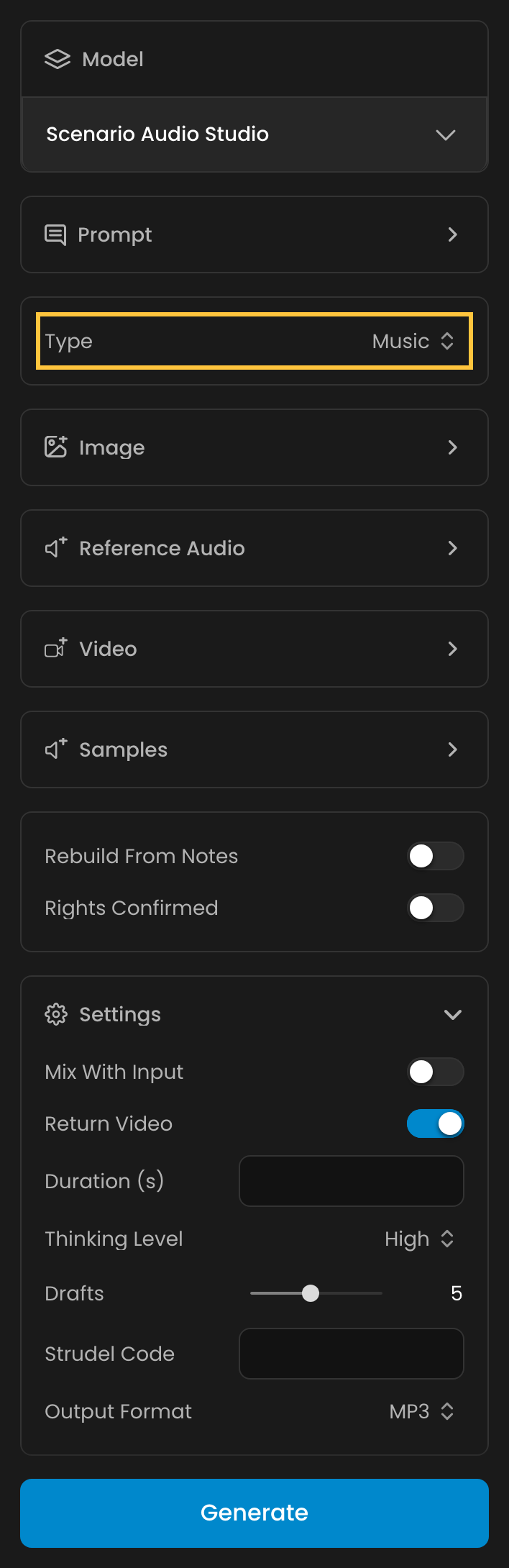
Each run works like a small composing session. Claude writes a first draft of the program, renders it, listens to the audio and revises the program, up to the number of Drafts you allow (5 by default, the final render included). Thinking Level sets how much Claude thinks before each draft. Both settings make the arrangement richer and the run more expensive.
What you can start from:
A prompt only. Name the style, mood, instruments, tempo, key and structure: "warm lo-fi hip-hop at 80 BPM with a dusty piano", or, for a sound effect, "a retro coin pickup". A prompt can be up to 4,000 characters.
An image. The music follows the image's mood and setting. Add a prompt to steer the style.
A video. Audio Studio writes a soundtrack whose hits land on the video's cuts and, with Return Video on (the default), also returns the video with its new soundtrack. Without a Duration, the result matches the video's length, up to 180 seconds.
A reference audio. The result follows the recording's tempo and key and starts on its first beat, so it can accompany it, match it or replace it. Turn on Mix With Input to keep the recording under the result. You can add a reference audio or a video to a run, not both.
Rebuild From Notes. With a reference audio, this splits the recording into stems, transcribes their notes and plays them again on new instruments in the style of your prompt. It needs Rights Confirmed: you confirm that the music is yours to use or in the public domain.
Your own samples. Add up to 8 sounds: one-shots such as a drum hit or a single note, loops or phrases. The program plays them as
sample1,sample2and so on, in the order you added them. A single note is tuned and turned into melodies and chords, a loop plays at its own tempo, and loops and phrases can be chopped. Each sample keeps its first 60 seconds.A Strudel program. Paste a program, such as one a previous run returned, into Strudel Code. On its own it is rendered as is. With a prompt or media, Claude revises it, for example "make the chorus brighter and add a shaker", instead of starting over.
What comes back. An audio asset in the format you chose (MP3 by default, or WAV or FLAC) and, for a video, the video with its new soundtrack. The program and the title Claude gave the piece are part of the job's result: through the API or the Scenario MCP, read code and title in the job's output. Keep the program to iterate on the piece later, or paste it into the Strudel editor to play and edit it in your browser.
Audio Stem Separation
Open Audio Stem Separation, or call model_scenario-audio-stems, and add the song to split: up to 10 minutes and 100 MB. By default it returns four audio assets, one per stem: vocals, drums, bass and other. Guitars, keyboards, strings and everything else that is not vocals, drums or bass end up in other. Choose fewer stems to get only the ones you need, for example vocals alone for an a cappella.
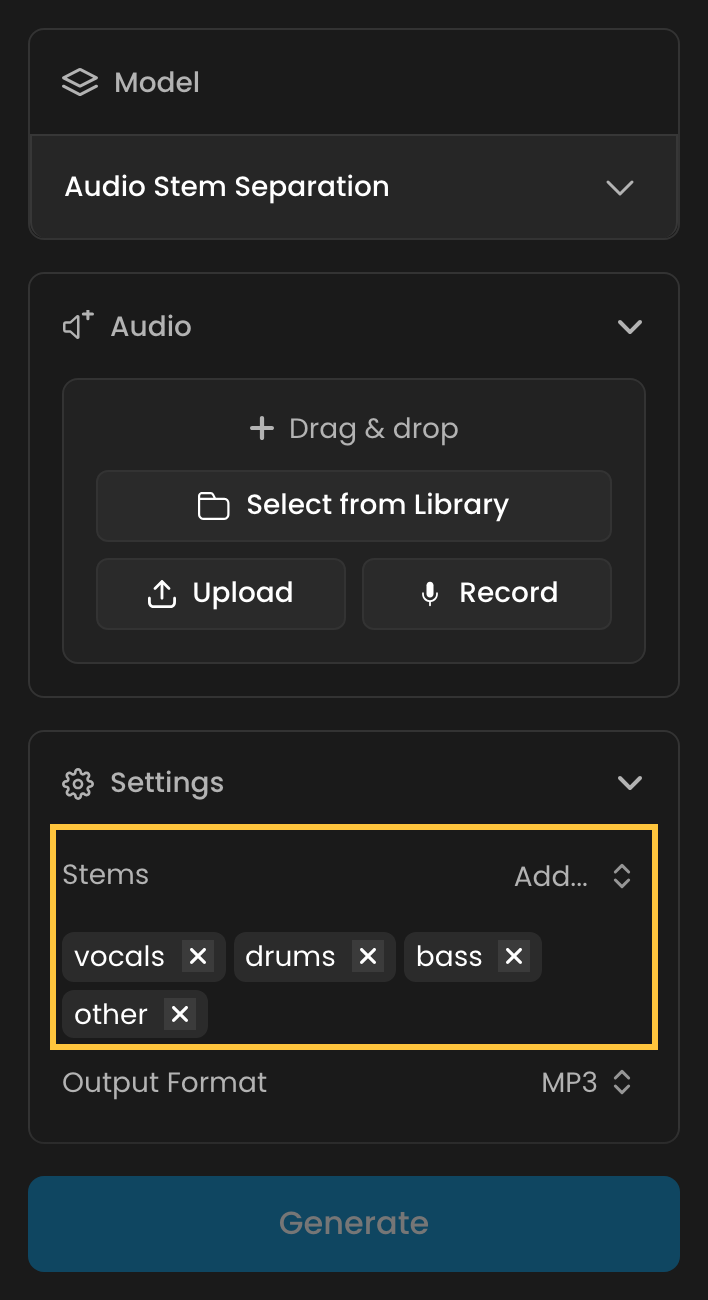
Stems in WAV or FLAC keep the bit depth of the source, up to 24-bit. MP3 is the default.
Parameters
Each parameter is shown with its API name and, in parentheses where it differs, its label in the web app.
Scenario Audio Studio
prompt
(Prompt) What to make, up to 4,000 characters. Optional when you add an image, a reference audio, a video, samples or a Strudel program; a run with none of these is refused.
audioType
(Type) music (Music, the default) or sfx (Sound Effects). Without a duration, music lasts 30 seconds and a sound effect 3 seconds.
image
(Image) An image to score, up to 20 MB. The music follows its mood and setting.
audio
(Reference Audio) A recording to accompany, match or rebuild, up to 10 minutes and 100 MB. The result follows its tempo and key. Cannot be combined with a video.
video
(Video) A video to score, up to 10 minutes and 500 MB. Hits land on its cuts. Cannot be combined with a reference audio. Adds 10 CU.
samples
(Samples) Up to 8 of your own sounds, each up to 50 MB, played as sample1 to sample8 in order. Only the first 60 seconds of each is used.
transcribeAudio
(Rebuild From Notes) Off by default. With a reference audio, splits it into stems, transcribes their notes and replays them on new instruments in the style of the prompt. Requires rightsConfirmed. Adds 10 CU.
rightsConfirmed
(Rights Confirmed) Confirms that the music rebuilt from the reference audio is yours to use, or in the public domain. Required by Rebuild From Notes.
mixWithInput
(Mix With Input) Off by default. Keeps the reference audio, or the video's own sound, under the result. Needs a reference audio or a video.
returnVideo
(Return Video) On by default. With a video, also returns the video with its new soundtrack.
duration
(Duration (s)) From 0.5 to 180 seconds, in steps of 0.5. Leave it empty to match the video or the reference audio (up to 180 seconds), or to get the 30 or 3 second default. Longer results cost more.
thinkingLevel
(Thinking Level) low, medium, high (the default) or xhigh (Extra High). Higher levels write richer arrangements and cost more; Extra High costs the most.
maxIterations
(Drafts) How many times Claude may render, listen to and revise the piece, the final render included: 1 to 10, 5 by default. The price is set by this maximum, not by the number of drafts a run ends up using.
code
(Strudel Code) A Strudel program of up to 20,000 characters. Rendered as is when there is no prompt or media, revised by Claude when there is.
outputFormat
(Output Format) mp3 (the default), wav or flac.
Audio Stem Separation
audio
(Audio) Required. The song to split, up to 10 minutes and 100 MB.
stems
(Stems) Any of vocals, drums, bass and other, at least one. All four by default. Each comes back as its own audio asset.
outputFormat
(Output Format) mp3 (the default), wav or flac. WAV and FLAC keep the source's bit depth, up to 24-bit.
Cost
Audio Stem Separation costs a flat 10 CU per run, whatever the song's length and the number of stems.
The price of an Audio Studio run depends on the result's length, the Thinking Level and the number of Drafts you allow, plus 10 CU for a video and 10 CU for Rebuild From Notes. To get the exact price of a run without running it, call the API with the dryRun=true query parameter, or the Scenario MCP's model_run with dry_run. Some reference points:
Audio Studio run | Cost |
|---|---|
30 seconds of music, Low, 1 draft | 13 CU |
3-second sound effect, default settings (High, 5 drafts) | 32 CU |
30 seconds of music, default settings (High, 5 drafts) | 56 CU |
60 seconds of music, High, 5 drafts | 83 CU |
180 seconds of music, Extra High, 10 drafts (the maximum) | 945 CU |
To explore cheaply, start with a short Duration, a Low or Medium Thinking Level and 1 or 2 Drafts, then raise them for the version you keep.
Use Cases
Use case: game music. Write menu themes, level loops and boss cues from a short brief, then keep the program to make a calmer or faster variant of the same theme later.
Use case: interface and gameplay sounds. Make coin pickups, button clicks, spell charges and impacts in seconds, in the length and format your engine needs.
Use case: scoring images and videos. Give it concept art, a trailer shot or a social clip and get music that follows the mood and lands its hits on the cuts.
Use case: your own sound palette. Turn a sound from your game into a melody, a beat or a jingle, so the music shares its identity.
Use case: stems for remixing. Split a finished song with Audio Stem Separation to get an instrumental, an a cappella, or the bass line alone to build on.
Examples
Every example below ran in Scenario's Public Data workspace. Each shows the prompt exactly as it was written, the settings that differ from the defaults, and what the run cost.
Music from a prompt
Lo-fi hip-hop, default settings (30 seconds)
Warm lo-fi hip-hop at 80 BPM in D minor with a dusty upright piano playing seventh chords, a soft vinyl crackle, a relaxed boom-bap kick and snare with swung hi-hats, and a mellow upright bass walking under the changes. 4 bars intro with piano only, then drums and bass enter, a short breakdown at 20 s with only piano and crackle, then the full groove returns and fades out. Instrumental, no vocals, no spoken words.
Scenario Audio Studio, Music, Duration 30, High, 5 drafts, 56 CU · Open on Scenario
This track is reused below as the input of the reference audio, Rebuild From Notes and program examples.
Synthwave night drive (60 seconds)
Retro-futuristic synthwave night-drive track at 118 BPM in A minor: a pulsing analog bass arpeggio, gated reverb snare, bright detuned saw-lead melody entering at 16 seconds, warm pad chords and a rising filter sweep into a big chorus at 36 seconds, then a clean outro. Wide stereo, glossy 1980s film-score energy, instrumental only, no vocals.
Scenario Audio Studio, Music, Duration 60, High, 5 drafts, 83 CU · Open on Scenario
Claude titled this piece "Neon Overpass". These are the first lines of the program it returned, and the part that plays the kick drum, unchanged:
setcpm(118/4)
const P = "<Am F C G>"
const arpPat = "[0 12 0 12 0 12 7 12]*2"
const bassA = note(arpPat.add("<33 29 36 31>")).s("sawtooth")
  .decay(.13).sustain(0).lpenv(2.5).lpdecay(.1).lpq(5).hpf(55)

kick: arrange(
  [4, silence],
  [4, s("bd ~ bd ~")],
  [8, s("bd*4")],
  [2, s("bd*4")],
  [8, s("bd*4")],
  [4, s("<bd*4 bd ~ ~ ~ ~ ~>")]
).bank("tr909").gain(.42).orbit(3).duckorbit(2).duckdepth(.5)
Each part of the arrangement is a named line (bass, pad, kick, lead...), and arrange lists how many bars each section lasts. That is what makes a targeted revision possible: asking for "no kick in the intro" changes one line.
Orchestral adventure theme, WAV (90 seconds)
A heroic orchestral adventure theme at 120 BPM in E minor for a fantasy expedition. Opens with solo harp arpeggios and low strings, a french horn states the main melody at 15 seconds, then timpani and a full string section build through a rising ostinato to a triumphant climax around 60 seconds with brass fanfares and cymbal swells, and resolves on a warm major cadence with a gentle ritardando. Cinematic, wide, instrumental only, no choir, no vocals.
Scenario Audio Studio, Music, Duration 90, High, 5 drafts, Output Format WAV, 110 CU · Open on Scenario
Jazz trio ballad at Extra High (75 seconds)
A late-night jazz trio ballad at 70 BPM in Eb major: brushed drums, a warm walking upright bass and a lyrical grand piano playing a singing melody with rich extended chords and tasteful reharmonization in the second chorus. Smoky club mood, a piano solo in the middle, a rubato last phrase and a held final chord. Instrumental, no vocals.
Scenario Audio Studio, Music, Duration 75, Extra High, 5 drafts, 252 CU · Open on Scenario
Extra High suits pieces that need harmonic detail, such as this reharmonized second chorus, but it costs more than twice as much: the same run at High would have cost 97 CU.
Sound effects
8-bit coin pickup (no Duration)
A retro 8-bit coin pickup sound effect: two quick rising square-wave blips, bright and short, with a tiny sparkle tail. Sound effect only, no music.
Scenario Audio Studio, Sound Effects, no Duration, Output Format FLAC, 32 CU · Open on Scenario
Without a Duration the run is priced as a 3-second effect. The prompt asked for a short sound, and it came back under 2 seconds long. It is reused below as a sample.
Longsword draw and shield clash (3 seconds)
A heavy steel longsword being drawn from a leather scabbard with a rising metallic scrape, then clashing once against a shield with a bright ringing impact and a short ringing tail. Sound effect only, no music.
Scenario Audio Studio, Sound Effects, Duration 3, 32 CU · Open on Scenario
Old door creak in a stone hall (5 seconds)
An old heavy wooden door creaking slowly open on rusty iron hinges in an empty stone hall, one long groaning creak with a small wooden knock at the end and faint room echo. Sound effect only, no music.
Scenario Audio Studio, Sound Effects, Duration 5, 34 CU · Open on Scenario
Music for an image
The input: a lighthouse keeper with a lantern on a cliff.
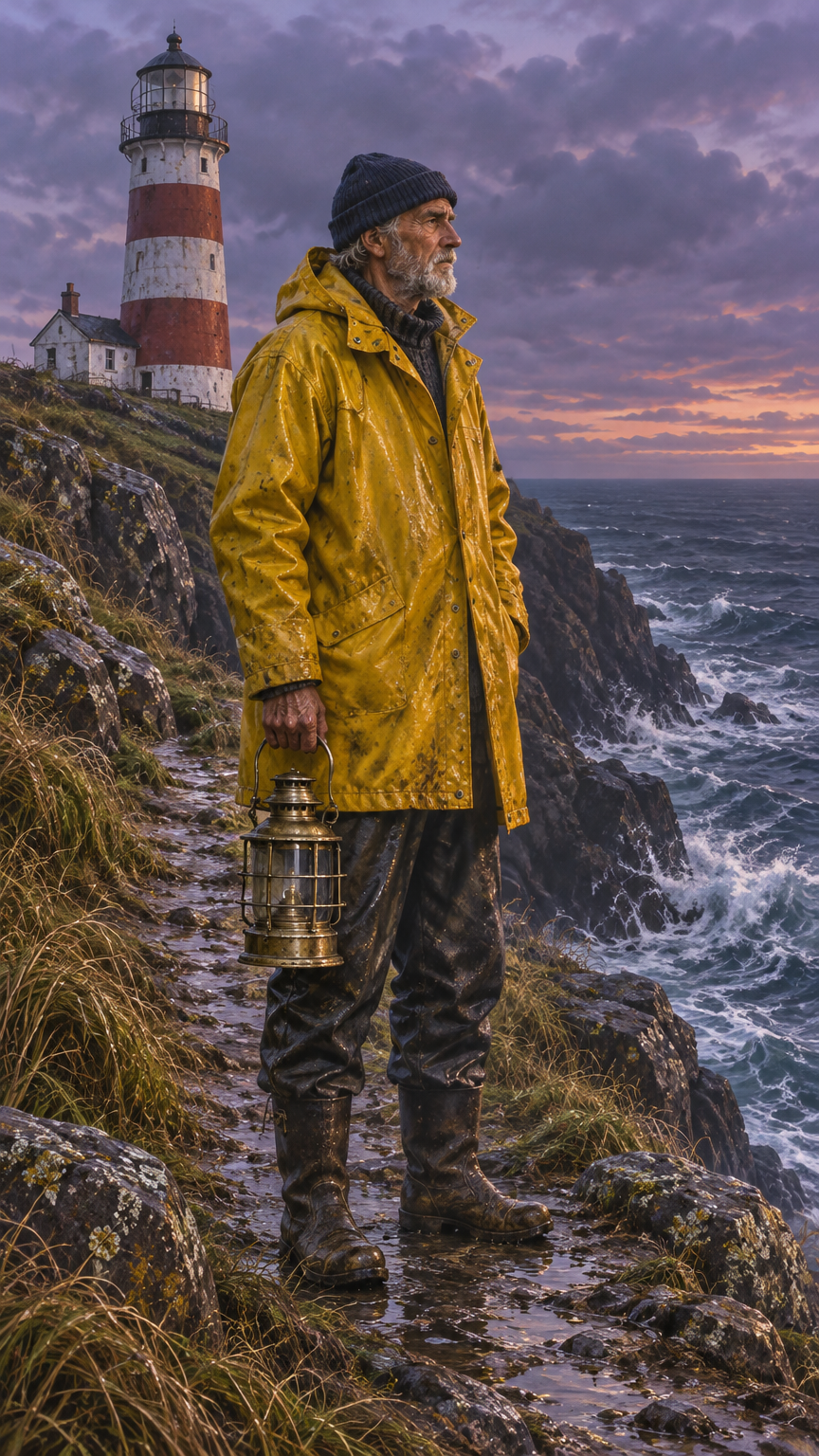
Score this image as a quiet, windswept maritime theme: slow cello and solo violin over low sustained strings, a distant bell buoy tone and soft rolling timpani like waves, minor key and patient, building slightly toward the lighthouse. Instrumental, no vocals.
Scenario Audio Studio, Music, Image, Duration 45, 70 CU · Open on Scenario
Soundtracks for a video
With a video and Return Video on, the run returns the video with its new soundtrack, shown here. No Duration was set, so each soundtrack matches its video's 10 or 12 seconds.
Rainy kitchen
Score this rainy kitchen scene with a gentle, intimate piano and soft felt-mallet texture at a slow tempo around 70 BPM in A minor, a small hush at the camera pull back, and a light playful pizzicato touch when the cat hops down near the 5 second mark. Calm, cozy, no drums, no vocals.
Scenario Audio Studio, Music, Video, Return Video on, 49 CU · Open on Scenario
The lighthouse keeper's walk
Score this lighthouse keeper's walk with a hushed, lonely sea-shanty-inspired theme: a low drone from a hurdy-gurdy-like bowed instrument, sparse fingerpicked guitar for the footsteps, a soft rising swell of strings when the lantern is lit, and a hint of distant surf. Minor key, patient, no vocals.
Scenario Audio Studio, Music, Video, Return Video on, 50 CU · Open on Scenario
Working from the lo-fi track
The next three examples all start from the lo-fi hip-hop track at the top of this section.
Play along, with Mix With Input
Play along with this lo-fi groove: add a new dreamy vibraphone countermelody and a soft string pad in the same tempo and key, starting on the first beat, leaving space for the piano. Instrumental only.
Scenario Audio Studio, Music, Reference Audio (the lo-fi track), Mix With Input on, 57 CU · Open on Scenario
Rebuild From Notes as a string quartet
Rebuild this track from its notes as a chamber string quartet piece: violin, viola and cello playing the piano and bass lines with expressive vibrato, and a soft pizzicato part replacing the drums. Keep the structure and tempo. Instrumental only.
Scenario Audio Studio, Music, Reference Audio (the lo-fi track), Rebuild From Notes and Rights Confirmed on, 67 CU · Open on Scenario
Revise the program
The Strudel Code field held a shortened version of the lo-fi track's program, with this prompt:
Revise this program: speed it up to 90 BPM, brighten the piano by opening the low-pass filter, add a second airy lead melody an octave higher in the second half, and keep the breakdown. Keep it instrumental.
Scenario Audio Studio, Music, Strudel Code, Duration 30, 56 CU · Open on Scenario
Music from your own sample
The only sample was the 8-bit coin pickup from the sound effects above.
Build a bouncy chiptune loop at 130 BPM that plays sample1 (the coin pickup blip) as a tuned lead melody and as a rhythmic chopped accent, adding a square-wave bass line, a noise-channel snare and kick, and an arpeggiated triangle pad. Playful platformer mood, instrumental, loops cleanly.
Scenario Audio Studio, Music, Samples (1), Duration 24, 51 CU · Open on Scenario
Audio Stem Separation
The input: a 2-minute folk song with a lead vocal, made with MiniMax Music 3.0.
The input song, 123 seconds
Vocals only
Audio Stem Separation, Stems: vocals, 10 CU · Open on Scenario
Bass only, WAV
Audio Stem Separation, Stems: bass, Output Format WAV, 10 CU · Open on Scenario
Each stem lasts exactly as long as the song, so the stems line up when you layer them again in an editor.
Tips for Better Results
Write it like a brief to a composer. Give the tempo in BPM, the key, the instruments and the structure with timings ("a big chorus at 36 seconds"). Every example above does.
Explore cheaply, then polish. Try ideas at a Low Thinking Level with 1 or 2 Drafts, then run the version you like at High with more drafts.
Iterate on the program, not from scratch. Send a previous program back in Strudel Code with a short change request. Claude revises that program instead of composing a new piece, so the parts you did not mention can stay as they were.
Ask for a loop when you need one. Say "loops cleanly" for in-game music, as in the chiptune example.
Use WAV or FLAC for editing. Pick them when the audio goes on to a sound editor or a game engine; MP3 is fine for previews.
Describe the scene in the prompt too. With an image or a video, name the moments you want the music to mark ("a pizzicato touch when the cat hops down near the 5 second mark").
Known Limitations
No singing. Audio Studio plays synthesized instruments and samples; it does not sing lyrics.
180 seconds at most. A longer video or reference audio is matched up to 180 seconds.
One reference at a time. A run takes a reference audio or a video, not both, and Mix With Input needs one of them.
Runs take minutes. Claude renders and listens to each draft: the 60-second synthwave example took about four minutes.
Four fixed stems. Audio Stem Separation returns vocals, drums, bass and other; guitars, keys and strings are not separated from each other.