Rodin Gen-2.5 Fast: The Essentials
Last updated: June 22, 2026
Covers Rodin Hyper3D Gen-2.5 Fast (Image to 3D) and Rodin Hyper3D Gen-2.5 Text to 3D Fast
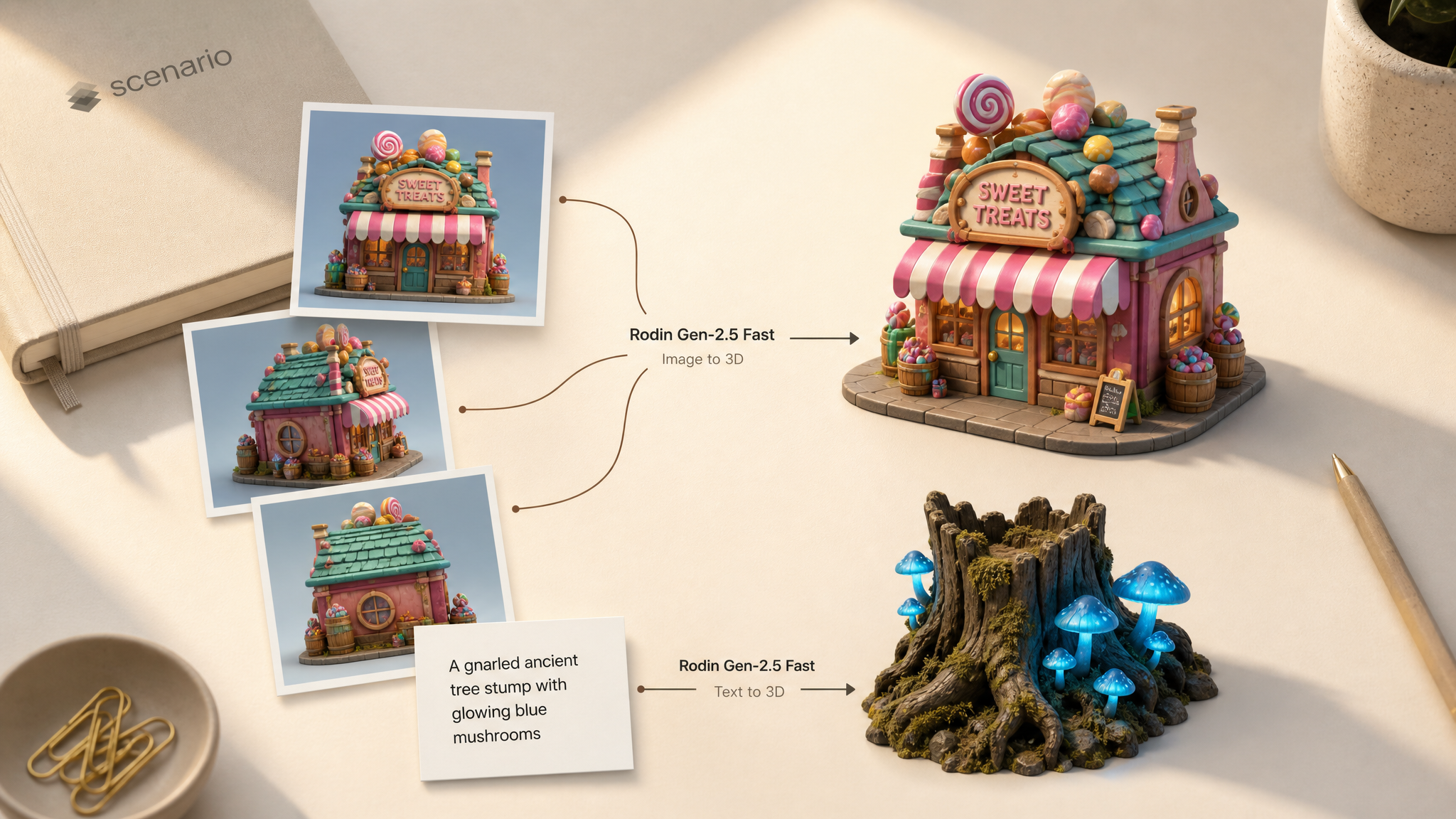
Rodin Gen-2.5 Fast by Hyper3D (Deemos) generates a clean, game-ready 3D model from a text prompt or from one to five images, in minutes. It runs Rodin's fast mode: the lower generation tiers at a fixed price, capped at a 20K-face mesh, so it is built for rapid iteration rather than maximum-detail hero assets.
Three-view candy shop on Image to 3D Fast.
Which Model Should I Use?
Model | ID | Input | Best for |
|---|---|---|---|
Rodin Gen-2.5 Fast (Image to 3D)Image |
| 1 to 5 images | Turning a concept image, packshot, or multi-view set into a 3D asset |
| Text prompt | Blocking out props and characters from a description, no reference needed |
Rule of thumb: if you already have reference art or a photo, use Image to 3D Fast. If you are starting from an idea, use Text to 3D Fast. For maximum detail or meshes above 20K faces, use the full Rodin Gen-2.5 (non-Fast) instead.
How to Use the Models
Image to 3D from one to five views
On Rodin Hyper3D Gen-2.5 Fast:
Upload 1 to 5 images of the same subject. Multiple angles are treated as multi-view captures and reconstruct tighter geometry than a single hero shot. An optional prompt guides material and style; if empty, Rodin auto-generates one from the images.
images: [front, side, back]
tier: Gen-2.5-Low
qualityMeshOption: Auto
material: PBR
highPack: false
Three-view candy shop, Low tier, HD Texture and Texture Delight on. asset_s1dqxm1Xdktr8uPsJwBQcu6i
Text to 3D from a description
On Rodin Hyper3D Gen-2.5 Text to 3D Fast:
Describe the object and its material, not the file or the render. Keep it to a single clear subject.
prompt: A gnarled ancient tree stump with glowing blue mushrooms,
        stylized environment asset, mossy bark
tier: Gen-2.5-Low
qualityMeshOption: Auto
material: PBR
Stylized environment prop from text only. asset_JAPGceyX7WSE8SFn2HVeDTpD
Fast mode trade-offs
Fast mode runs the lower Rodin tiers (Minimum, Extreme Low, Low) at a fixed generation price and caps the mesh at 20K faces. The geometry is clean and game-ready, with real PBR or shaded materials and your choice of triangle (game-ready) or quad (sculpt and rig friendly) topology. Both models export GLB or FBX on Scenario.
Material "All" returns two meshes. When material is set to All, Rodin returns the model twice as two separate GLB files: a Basic PBR mesh and a Basic Shaded mesh. Both are saved as assets, so the same object can appear twice in a gallery. For a single mesh per generation, set material to PBR (recommended for most game and product work) or Shaded.
Parameters
Rodin Gen-2.5 Fast (Image to 3D)
images
Required. 1 to 5 images. Multiple images are treated as multi-view captures of the same subject.
prompt
Optional. Up to 1024 characters. Guides generation; if empty, Rodin auto-generates one from the images.
tier
Optional. Default Gen-2.5-Extreme-Low. Options: Minimum, Extreme Low, Low. Low gives the most structure of the three fast tiers.
qualityMeshOption
Optional. Default Auto. Mesh type and polycount. Auto selects a 20K Triangle mesh.
material
Optional. Default All. PBR returns one Basic PBR mesh. Shaded returns one Basic Shaded mesh. All returns both as two separate GLB files. None returns geometry with no material.
highPack
Optional. Default false. 4K textures and higher-poly geometry instead of the 2K default.
TAPose
Optional. Default false. For human-like models, forces a T or A pose for easier rigging.
useOriginalAlpha
Optional. Default false. Preserves the transparency channel from the input image.
hdTexture, textureDelight, textureMode
Optional texture post-processing, lighting removal, and texture-quality overrides.
enableCreativeMode
Optional. Default false. More generative robustness while keeping output consistent.
previewRender, seed
Optional. Generate a preview render; set a seed for reproducibility.
Rodin Gen-2.5 Text to 3D Fast
Same Settings and Advanced parameters as Image to 3D, with two differences: prompt is required, and there is no images, useOriginalAlpha, or previewRender.
Use Cases
Game prototyping: block out props, weapons, and set pieces from a prompt or concept art and drop the GLB straight into Unity or Unreal.
Characters for animation: generate a character with TAPose on, then rig and animate it (for example with Tripo Rigging and Uthana Text to Motion 3.0).
E-commerce: turn a product packshot into a 3D model for a configurator or AR viewer, with HighPack for 4K textures.
Previs and set dressing: spin up many small assets fast to populate a layout before committing to final art.
Education: generate clear 3D objects (plants, tools, artifacts) for interactive lessons and AR.
Tips for Better Results
Start on the Low tier with Auto mesh. Across testing this gave the best balance of speed and structure among the three fast tiers.
One clear subject per generation. A single, well-framed object (or character) reconstructs far more cleanly than a busy scene.
Use multi-view for hero assets. Feed up to five angles of the same subject to Image to 3D for tighter geometry and fewer guessed-at back faces.
Turn on HighPack only for finals. It gives 4K textures at extra cost; keep it off while iterating.
Set TAPose for anything you will rig. Humanoid characters come out in a clean T or A pose, ready for skeletons.
Describe material in text prompts. Words like "brushed gunmetal", "worn oak", "matte terracotta" steer the PBR textures.
Pick topology on purpose. Triangle for game engines, Quad for sculpting and rigging.
Known Limitations
Fast mode caps at 20K faces and the lower tiers. There is no Extreme-High tier or 150K to 500K mesh here. For maximum detail, use the full Rodin Gen-2.5.
Material "All" outputs two meshes. It returns a Basic PBR GLB and a Basic Shaded GLB per generation, so each object is saved twice. Set
materialto PBR or Shaded for one mesh per generation.Text to 3D has no image input. If you need to match existing art, use the Image to 3D model.
Open the models: Rodin Gen-2.5 Fast · Rodin Gen-2.5 Text to 3D Fast