Content Policy & Copyright - What Each Model Allows
Last updated: October 6, 2026
Different image and video generation models on Scenario are provided by different third-party companies: Google, ByteDance, OpenAI, Black Forest Labs, and others. Each provider enforces its own content policy independently. Scenario does not control these restrictions and has no visibility into why a specific prompt was rejected.
This article explains what to expect from each model family and how to work effectively within these constraints.
1. Why Prompts Get Blocked
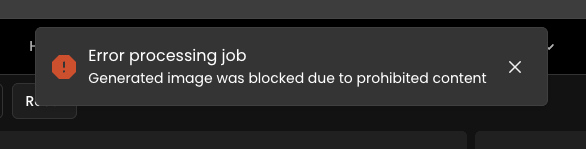
When a generation is rejected, the job fails and shows an error in Recent Tasks. The wording varies from job to job: it is a short explanation written from the provider's answer, and sometimes "An internal error occurred" with an Error ID. A failed generation is refunded automatically, except on Grok models (see below).
Blocks can be triggered by the prompt text, the reference image, or a combination of both. The most common triggers are:
Named copyrighted characters (Marvel, DC, Nintendo, Disney IPs)
Real people's names and likenesses
Trademarked brand names and logos
Graphic violence or adult content
Certain political figures or sensitive topics
2. Content Policy by Model Family
Image models
Gemini (Google)
Most restrictive on the platform. Blocks many brand and character references even when used stylistically. Strict on real people and graphic content.Seedream and Dreamina (ByteDance)
Moderate restrictions. More lenient than Google-family models but still blocks many Western IPs. More flexible with anime and game art styles.GPT Image (OpenAI)
Very strict on real people, more flexible on fictional characters. Moderate on violence and graphic content.Flux 2 (Black Forest Labs)
Lighter default filtering on Scenario. Open-source model with the most permissive defaults among major image models on the platform.Ideogram
Moderate across all categories. Strong text rendering capabilities. Content policy is applied at generation time.Recraft
Generally permissive. Best suited for stylistic and vector work. Most lenient model for copyright characters and real people among all models on Scenario.Hunyuan Image (Tencent)
Moderate restrictions. More flexible with anime and game-style art than Western photorealistic styles.
Video models
Kling V3 (Kuaishou)
Strict and inconsistent. Effect words such as "burst" or "explosion" can block a harmless scene, and the same prompt can pass once and fail the next time. If Kling V3 keeps blocking a prompt, try Seedance 2.0, Seedance 2.5 or MiniMax H3.Seedance 2.0 and 2.5 (ByteDance)
More permissive than Kling V3 for playful or stylized scenes, but strict on violence and weapons: words like "blade", "axe", "spike" or "eliminated" can block a clip. The check can run on the finished video, including its soundtrack, so a clip can fail near the end of the progress bar. Photos of real, well-known people are refused as references (see Scenario's own checks).MiniMax H3
A good alternative when Kling V3 blocks a prompt. It still applies its own content filter.Veo (Google)
Same restrictions as Gemini. Video generation adds extra scrutiny on motion involving real-world IPs.Grok video (xAI)
xAI can drop a finished video for moderation. Grok models are not refunded automatically when that happens: contact support to review it.Wan (Alibaba)
Moderate restrictions on video generation.
Seedance 2.0 and 2.5, Kling V3 and MiniMax H3 need a Pro plan or higher. See What models are available on my current plan?.
These assessments are based on observed behavior across Scenario's customer base and are subject to change as providers update their own policies without notice.
Scenario's Own Checks
Most blocks come from the model provider. A few come from Scenario itself, before anything is sent to the provider. When one of them blocks, nothing is charged for the generation; only the IP Detection fee is kept:
Uploads on the Free plan: uploaded images, and the first and last frames of uploaded videos, are checked for sexual content. A rejected upload shows "This image was rejected because it appears to contain sexual content."
Prompts: prompts that reference sexual content involving minors are rejected.
Real people in Seedance 2.0 and 2.5 references: reference images and frames are checked for the faces of well-known people. A match fails the job with "Detected likeness to public figure(s)". Use an AI-generated portrait instead of a real photo.
IP Detection (Enterprise): if your organization turned it on, a request can be blocked before generation because of an intellectual-property risk. The generation is not charged, but the IP Detection fee is. Your organization admins control the filters: see IP Detection - Screen Generations for Intellectual Property Risk.
Because the first two checks are ours, we can review them. If you think an upload or a prompt was rejected by mistake, contact support with the file or the prompt.
Working with Your Own Licensed IP
If you are a game studio or IP holder generating content based on your own characters and brands, you may still encounter false positives, especially with Google-family models, which use automated content classifiers that cannot distinguish between your licensed IP and an infringing use.
Recommended approaches:
Describe visually, do not name. Instead of referencing the IP name directly, describe the character's visual traits: colors, silhouette, costume details, art style. This bypasses most name-based filters.
Use Flux 2 or Recraft for initial concept generation where visual accuracy matters more than photorealism.
Reserve Gemini for environments and backgrounds where IP-specific characters are not in frame.
Use reference images to guide output without relying on named prompts.
Enterprise accounts: If you are consistently hitting false positives on your own licensed content, contact your Scenario account manager.
Blocked Before or After Rendering
A block before rendering comes from the prompt or a reference image. The job fails quickly.
A block after rendering comes from a check on the finished image, video or soundtrack, for example when it looks like copyrighted material or the soundtrack resembles an existing song. The job fails late, sometimes near the end of the progress bar.
Both are failed jobs: no output is returned, and the cost is refunded automatically, except on Grok models.
If You Are Wrongly Blocked
Providers do not say which word or part of an image triggered a block. These steps solve most cases:
Rephrase. Remove violence and weapon words, swap intense effect words (burst, explosion) for softer ones (glow, sparkles, swirl), and describe a character or brand instead of naming it. In one case, "swinging axes" and "spike traps" became "toy hammers" and "cone obstacles", and the video went through.
Check your references. A block can come from the input image or video, not only the prompt. Try without the reference, or with a different one.
Switch model. Each provider filters independently, so a prompt blocked on one model often passes on another.
Try again. Some filters are not consistent, so the same prompt can pass on a second try. Each failed attempt is refunded, except on Grok models.
What support can and cannot do
We can look up the error behind an Error ID and tell you which provider rejected the job, and whether it was the input or the result.
We can test your prompt and suggest a rewording or another model.
We can review a block from Scenario's own checks and adjust our filter if it was a mistake.
We can review a refund on a Grok model, which is not refunded automatically.
We cannot lift a provider block or find out exactly what the provider flagged: providers do not share it.
We cannot change your organization's IP Detection settings: your admins can.
Enterprise customers can raise persistent false positives with their account manager. For detailed specs on each model family, see Third-Party Image Models on Scenario.