HY World: The Essentials
Last updated: September 2, 2026
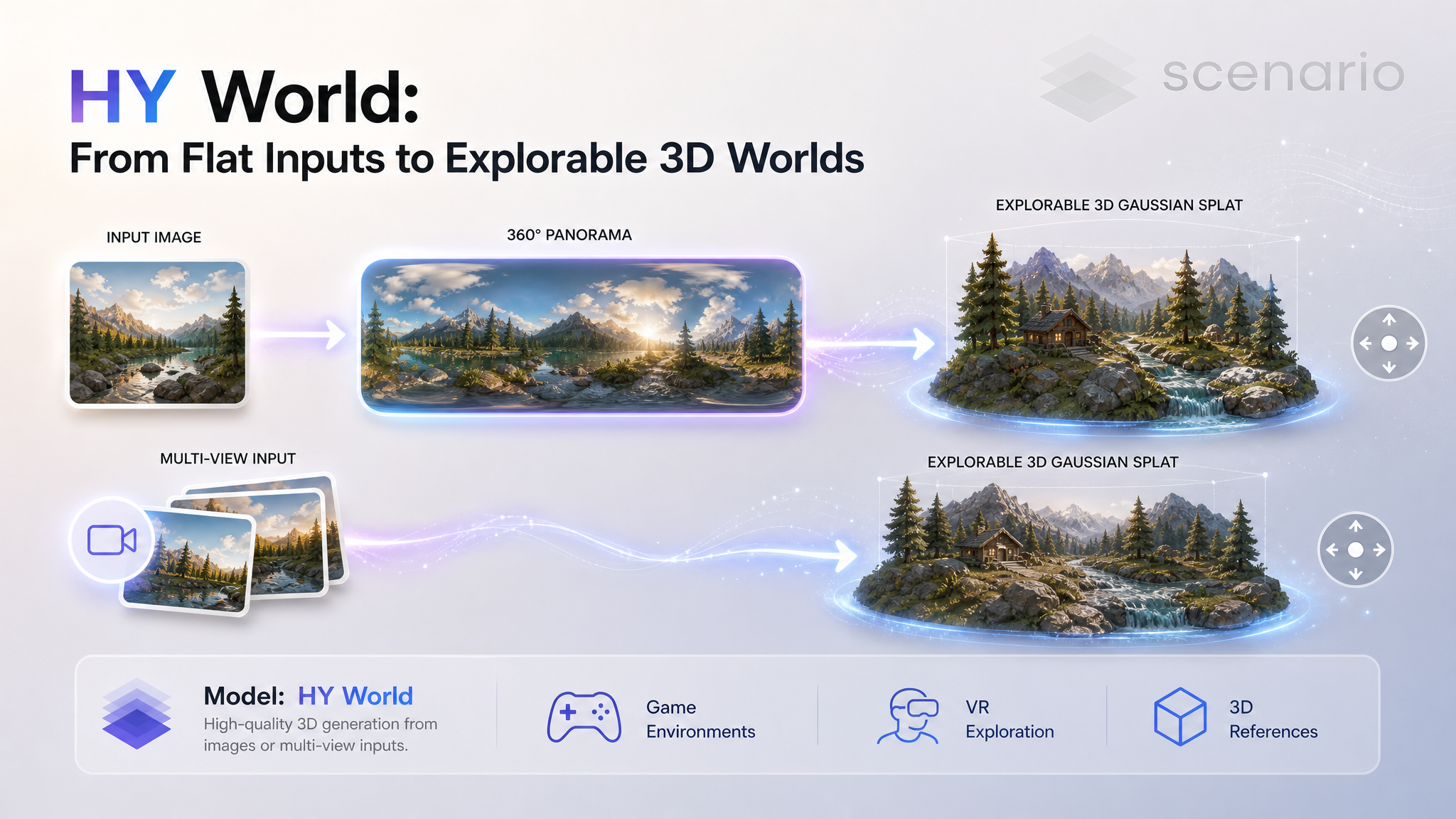
HY World is Scenario's first world-generation family: four models that turn flat inputs into explorable 3D Gaussian splat scenes you can move through, not single-object meshes. Image to Skybox expands one photo of a place into a full 360 degree panorama. Skybox to Splat turns that panorama into a navigable splat scene. Image to Splat collapses those two steps into a single call, going straight from one photo to a splat. Multi-view to Splat rebuilds a scene from overlapping photos or a short video walkthrough. Image to Skybox and Skybox to Splat chain together (image, then skybox, then splat); Image to Splat is a one-call shortcut for that same path; and Multi-view to Splat is a separate route that goes straight from footage to a walkable world.
Which Model Should I Use?
Model | Input | Output | Reach for it when |
|---|---|---|---|
One photo of a place | 360 degree panorama (skybox) | You want a 360 background, or the first step toward a splat scene. | |
One photo of a place | Explorable 3D splat scene | You want a walkable scene straight from one photo, no separate panorama step. | |
A 360 degree panorama | Explorable 3D splat scene | You already have a panorama (or just made one) and want to walk through it. | |
2 to 64 photos, or a video | Explorable 3D splat scene | You have real or generated footage moving through a space and want it in 3D. |
Rule of thumb: starting from a single still and you want to keep or reuse the panorama, go Image to Skybox then Skybox to Splat. Starting from a single still and you just want the splat, use Image to Splat directly. Have footage that walks through the space, go straight to Multi-view to Splat.
How to Use the Model
The pipeline: from one image to a walkable world
The two skybox models are designed to run back to back. Image to Skybox takes a single flat photo and paints the parts of the scene the camera never saw, giving you a seamless 360 degree panorama. Skybox to Splat then lifts that panorama off the sphere and rebuilds it as a 3D Gaussian splat you can move around inside. Image to Splat runs that same two-step chain as a single model call, for when you do not need the intermediate panorama. Multi-view to Splat skips the panorama step entirely: give it several overlapping views of a real space and it reconstructs the scene directly.
Image to Skybox
Point it at a scene, not an object: an interior, a landscape, a street. It expands the single photo into a full equirectangular panorama and fills in the surroundings the photo never captured. An optional prompt guides what goes into the unseen areas. Two backends trade quality for speed: full uses HunyuanImage-3 for maximum fidelity, qwen is faster and lighter.
A photo of overgrown temple ruins, expanded to a full 360 degree panorama (full backend).
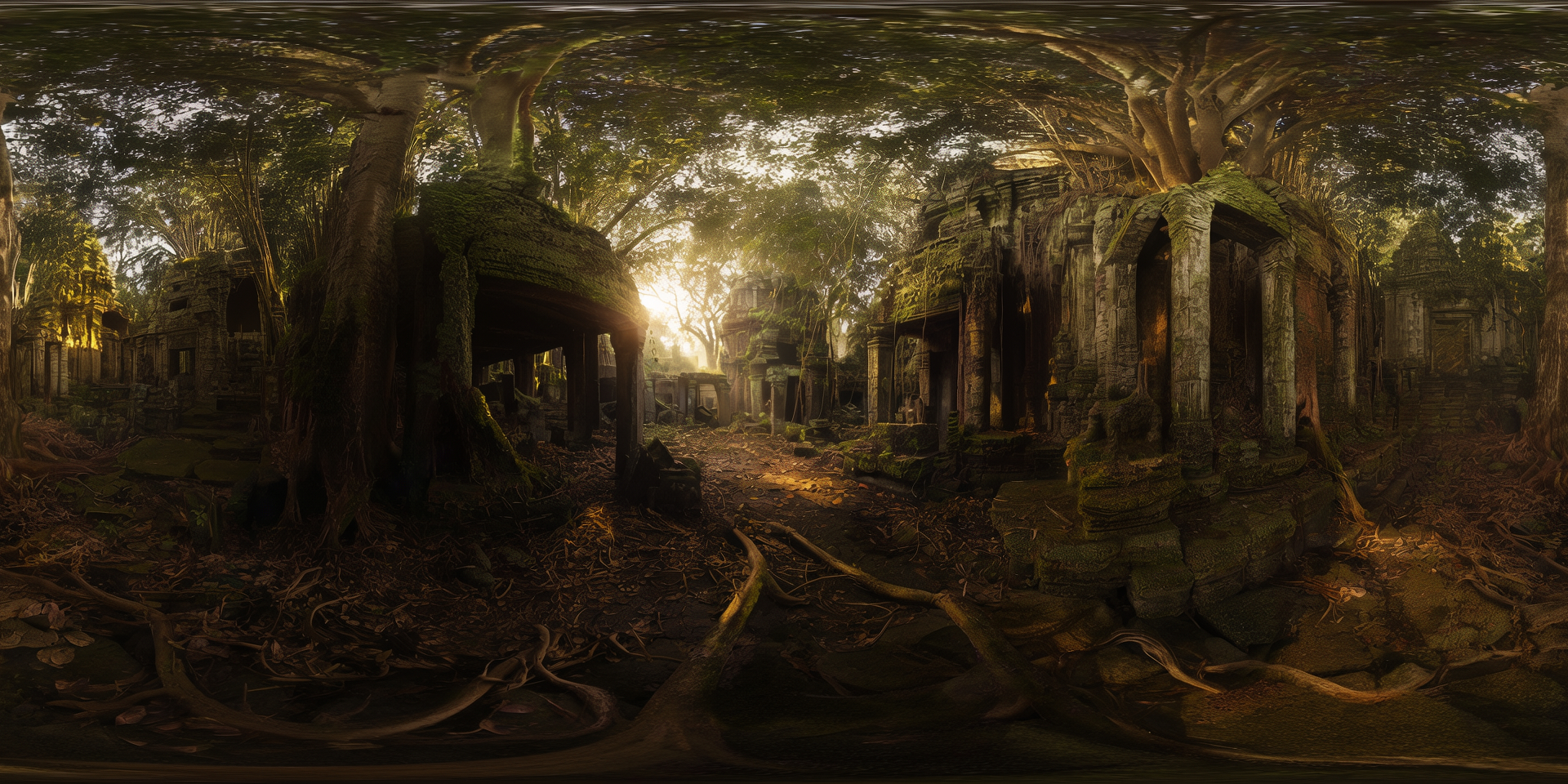
Image to Skybox, full backend · Open on Scenario
A stylized interior turned into a panorama with the faster qwen backend. This panorama becomes the input for the Skybox to Splat example below.
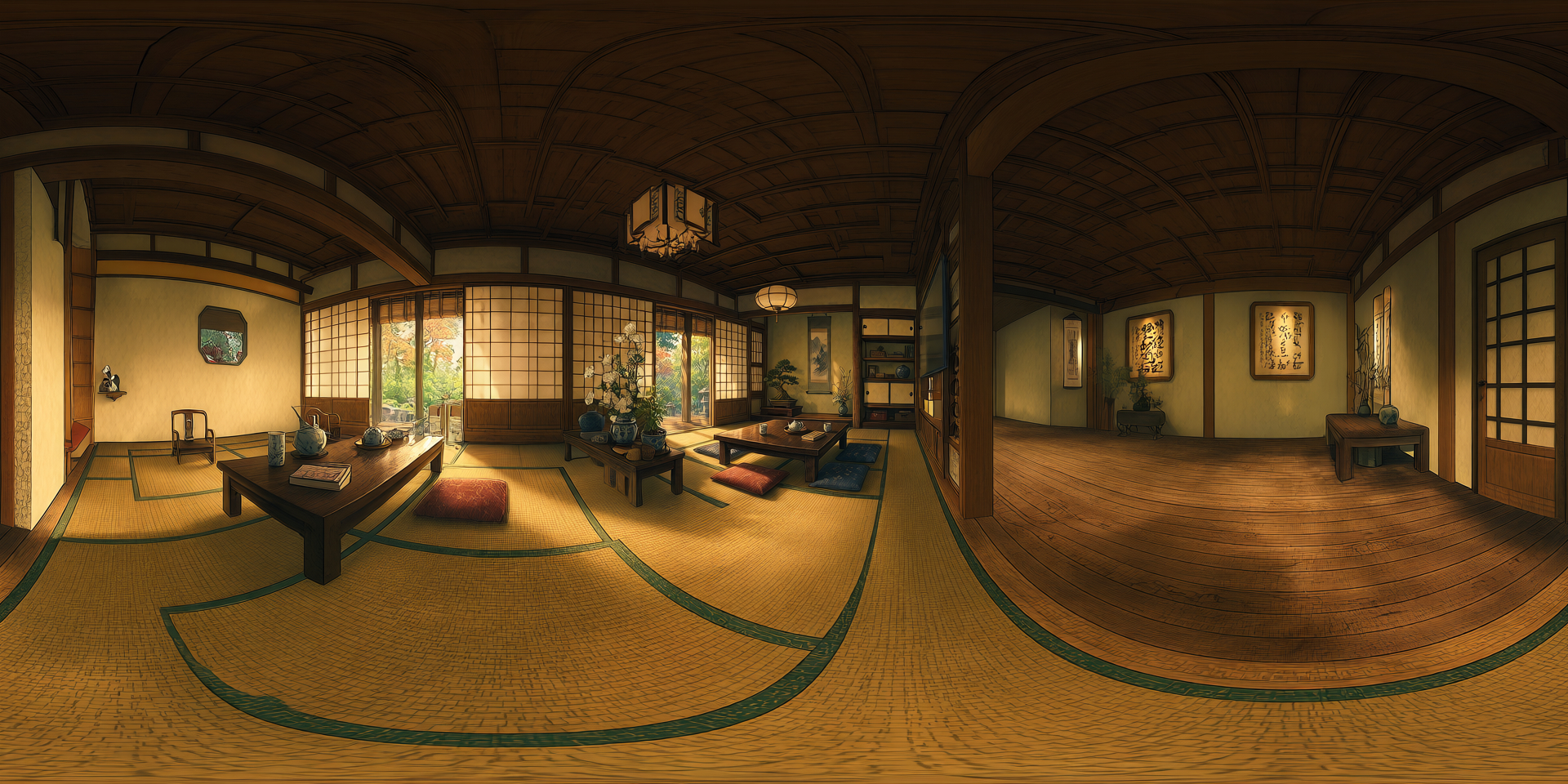
Image to Skybox, qwen backend · Open on Scenario
Skybox to Splat
Feed it a 360 degree equirectangular panorama (a 2:1 image, such as the output of Image to Skybox) and it reconstructs the scene as an explorable Gaussian splat: not a flat backdrop, but a volume you can move through. Optional trajectory planning (navigation, up-route, and reconstruction passes) widens the coverage for richer viewpoints, at the cost of longer processing.
The stylized interior panorama above, reconstructed into an explorable splat scene. Video is a turntable preview of the 3D result.
Skybox to Splat, from the panorama above · Open on Scenario
Image to Splat
The shortcut version of the pipeline above: point Image to Splat at one photo of a place and it goes straight to an explorable Gaussian splat, skipping the separate panorama stop entirely. Same full and qwen backend choice as Image to Skybox, and the same navigation, up-route, and reconstruction trajectory options as Skybox to Splat, but as one model call instead of two.
A cozy living room with a stone fireplace and sunlit windows, reconstructed directly into an explorable splat from a single photo.
Image to Splat, full backend · Open on Scenario
A Mediterranean terrace with lounge chairs beside an infinity pool, overlooking the ocean at sunset.
Image to Splat, full backend · Open on Scenario
A furniture showroom with sofas, a dark table, and wooden shelving, reconstructed with the faster qwen backend.
Image to Splat, qwen backend · Open on Scenario
A futuristic spaceship command center with a holographic table and a view of Earth through the panoramic window.
Image to Splat, full backend · Open on Scenario
Multi-view to Splat
Give it 2 to 64 overlapping photos of the same scene, or a single video walkthrough, and it reconstructs an explorable splat with no camera rig or calibration. It works best when the camera moves through the space (so it captures parallax from many angles) and on static, detail-rich environments. Push the target size up to 1920 for sharper results.
A blacksmith workshop, reconstructed from a short walkthrough video. Turntable preview of the splat.
Multi-view to Splat, from a walkthrough video · Open on Scenario
A wizard study reconstructed the same way. Dense, matte, detail-rich rooms hold up especially well.
Multi-view to Splat, dense interior · Open on Scenario
Parameters
Image to Skybox
Image. Required. A single photo of a place (indoor or outdoor), not an object. This is the view the model expands into a full 360.
Prompt. Optional. Text describing what should fill the unseen surroundings. Leave it blank to let the model infer the scene on its own.
Panorama backend. full uses HunyuanImage-3 for the highest quality (slower). qwen is faster and lighter, with lower fidelity. Compare the temple (full) and interior (qwen) examples above.
Seed. Fix it for reproducible results, or leave it blank for a new variation each run.
Skybox to Splat
Panorama. Required. A 360 degree equirectangular image at 2:1 aspect ratio, such as the output of Image to Skybox.
Max steps. Gaussian-splat training iterations. Higher is marginally sharper and does not materially change time or cost.
Navigation trajectories, Up-route trajectories, Reconstruction iteration. Three optional planning passes that widen coverage for richer, more stable viewpoints. Each one adds processing time. Leaving them on gives the fullest scene; turning them off is much faster.
Max splat points. The upper limit on splats kept after compression. Lower values produce a lighter file.
Image to Splat
Image. Required. A single photo of a place (indoor or outdoor), not an object — the same kind of input as Image to Skybox.
Prompt. Optional. Text describing what should fill the unseen surroundings.
Panorama backend. full uses HunyuanImage-3 for the highest quality (slower, costlier). qwen is faster and cheaper, with lower fidelity.
Max steps. Gaussian-splat training iterations. Higher is marginally sharper and does not materially change time or cost.
Navigation trajectories, Up-route trajectories, Reconstruction iteration. The same three optional planning passes as Skybox to Splat, widening coverage for richer viewpoints at the cost of processing time.
Seed. Fix it for reproducible results, or leave it blank for a new variation each run.
Multi-view to Splat
Images. 2 to 64 overlapping photos of the same scene from different viewpoints. Provide this or a video, not both.
Video. A walkthrough clip; the model samples frames from it. Provide this or images, not both.
Target size. Inference resolution, up to 1920. Higher is sharper but slower, and it is the main lever for quality.
Max splat points. The upper limit on splats kept after compression. In practice the cap is rarely reached; the sharpness gain comes from target size, not from raising this ceiling.
Use Cases
Game environments. Turn concept art or a single reference into an explorable 3D space for greyboxing and level blockout.
Virtual production and previz. Stand up a navigable set from one image or a phone walkthrough, then scout camera angles inside it.
VR and 360 experiences. Generate skyboxes for immersive backgrounds, or full splat scenes to walk through in headset.
Film and animation references. Rebuild a location from footage as a 3D reference for layout, lighting, and set extension.
Archival and real estate. Reconstruct a real room or site from a short video into a splat you can revisit and share.
Marketing and concepting. Take a mood image to a walkable world to pitch a space before building it for real.
Tips for Better Results
Point Image to Skybox at a place, not an object. An interior, a landscape, or a street expands cleanly into a 360. A single product or character does not.
Chain the two skybox models. Make a panorama with Image to Skybox, then feed it straight into Skybox to Splat to go from one photo to a walkable scene.
Use Image to Splat when you do not need the panorama itself. It runs the same two-step pipeline as one call. Reach for the separate Image to Skybox + Skybox to Splat chain only when you want to keep or reuse the intermediate panorama.
For Multi-view to Splat, move the camera through the space. A walkthrough that physically travels forward and looks around gives the parallax the reconstruction needs. A camera that only spins in place has little to triangulate.
Favor static, detail-rich, enclosed scenes for multi-view. Rooms full of texture and geometry reconstruct crisply. Blank walls, moving elements, and open skies give the model little to lock onto.
Raise Target size before anything else. On Multi-view to Splat, pushing target size toward 1920 is the single biggest quality lever. Raising the splat-point ceiling usually does nothing, since that cap is rarely reached.
Use the qwen backend to iterate, full to finish. qwen is quick for trying compositions; switch to full for the panorama you will actually splat.
Choose the trajectory passes deliberately on Skybox to Splat. Leaving navigation, up-route, and reconstruction on gives the most complete scene. Turning them off is dramatically faster when you just need a quick look.
Known Limitations
Full-quality Skybox to Splat is slow. With all three trajectory passes on, a scene can take a long time to finish. Turn the passes off for a fast preview and re-run at full quality once the panorama is right.
Fixed-point rotation reconstructs poorly. A camera that only pans in place gives Multi-view to Splat almost no parallax. It manages feature-rich enclosed rooms, but plain surfaces come out smeared. For a spin-in-place capture, use Skybox to Splat with a panorama instead.
Thin and cluttered elements produce floaters. Hanging objects, wires, and dense small props can reconstruct as stray blobs in mid-air. Framing that keeps them against solid geometry helps.
Reflective and transparent surfaces are unreliable. Glass, water, and mirror-like materials are view-dependent, so they confuse both the panorama fill and the splat reconstruction.
Multi-view wants a real scene, not a single frame. It needs genuine coverage from multiple viewpoints. One image or a few near-identical frames will not reconstruct a full space; use the skybox pipeline for that.
Image to Splat inherits the chained models' limitations. It runs the same panorama-then-splat process internally, so thin or cluttered elements can still produce floaters and reflective or transparent surfaces are still unreliable.
Splats are not meshes. The output is a Gaussian splat for real-time viewing and exploration, not a watertight polygon mesh. Pipelines that require clean topology need a separate meshing step.