Seedream Models: The Essentials
Last updated: September 28, 2026
Which Seedream to pick and how to direct it: in-image text, marker and sketch edits, references, sequences, and every parameter
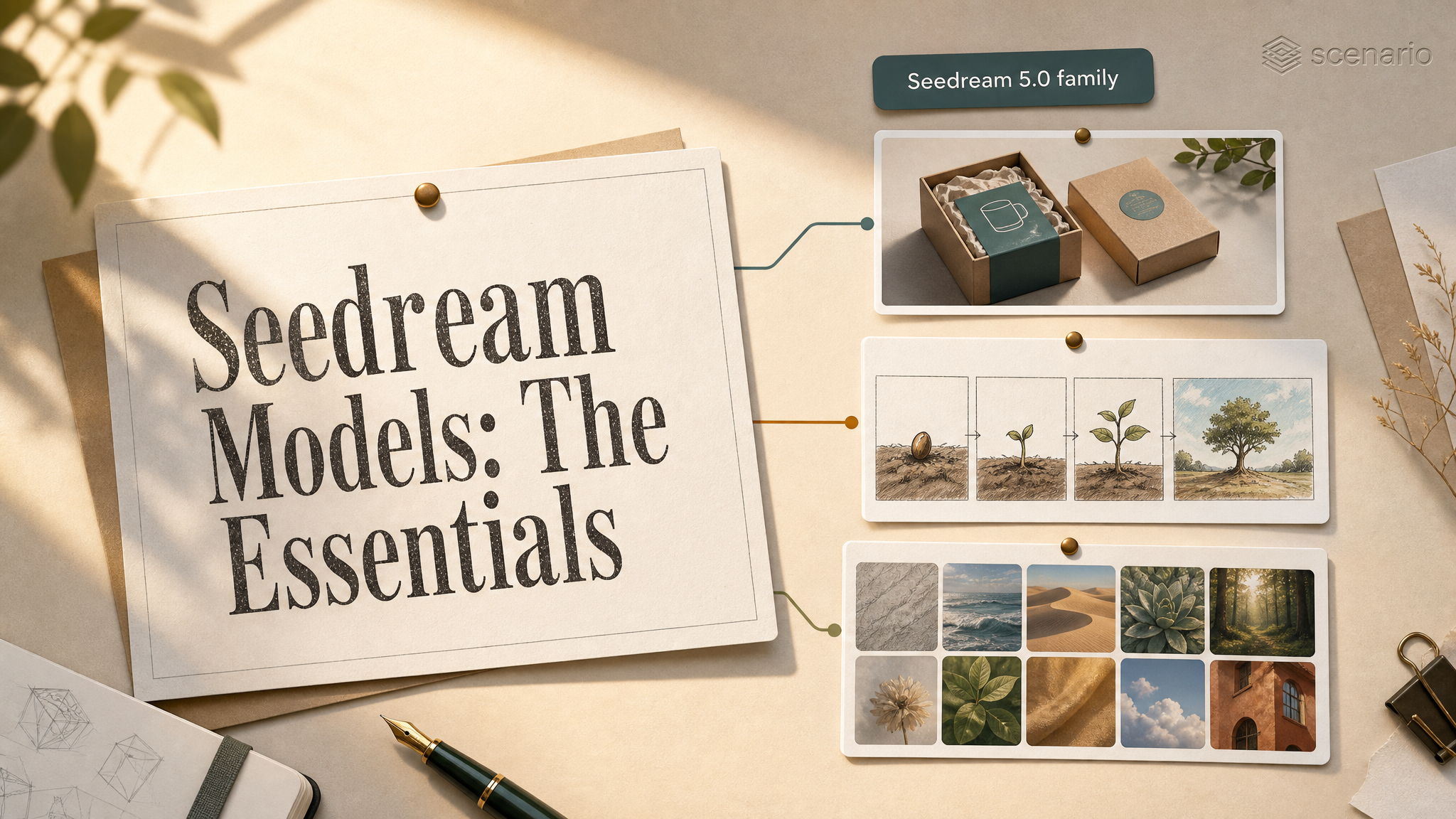
Seedream is ByteDance's family of image models on Scenario. The 5.0 generation is reasoning-first: it thinks through a prompt before it renders, which shows up as reliable in-image text, coherent layouts, and strong subject consistency. Its real step forward is control. Instead of regenerating and hoping, you direct the model: mark the region to change, say what stays locked, and give each reference image a role. Three 5.0 generation models are live. Pro is the quality and editing tier, with the cleanest text, marker and sketch edits, and exact color matching. Lite is the speed tier, with more reference slots, 4K output, and sequence generation, a capability it shares with Seedream 4.5 and 4.0. Flash is the fast, affordable tier: the same prompt style and reference editing up to 2K, at one flat price per image. Two companion tools, Pro Layerize and Flash Layerize, run in the other direction: hand it a finished image and it splits it back into editable layers, a clean base plus transparent PNG cutouts, with the background rebuilt behind whatever it lifts.

Seedream 5.0 Pro, from a single prompt. asset_wtxoFTzb6b9tRpZj1RjUYzXb
Which Model Should I Use?
Model | Strength | Best for |
|---|---|---|
Quality | Cleanest in-image text, marker and sketch edits, exact hex colors, up to 10 references | Posters, packaging, key art, UI mockups, catalog and product editing where polish matters most |
Speed + Sequences | Fast, up to 14 references, to 4K, and sequence generation | Storyboards and image sets, high reference counts, rapid iteration, large batches |
Speed + Cost | Fast 1K to 2K generation and single-instruction edits, up to 10 references, custom sizes from 672 to 3136 px, keeps transparency from a PNG reference | High-volume drafts, ad and thumbnail variants, product shots, sticker and UI assets, rapid iteration |
Layers | Splits one finished image into up to 17 layers: a clean base plus transparent PNG cutouts, with the background rebuilt behind each lifted element | Turning finished art into editable assets for compositing, parallax and motion, and UI |
Layers, fast | The same split as Pro Layerize (a clean base plus up to 16 transparent PNG layers), steered by an optional part list or bbox tags | Quick layer passes on sprite sheets, posters, product shots and key art |
Prior generation, strong editing and subject preservation, sequence sets, 4K | Existing 4.5 workflows and edits | |
Prior generation, up to 14 references and sequence output, 4K | Existing 4.0 workflows |
For new work, start with a 5.0 model. Choose Pro when the design leans on legible text or precise edits: it debuted at #2 on Arena's community multi-image edit leaderboard (July 2026), up from #11 for Seedream 4.5. Choose Lite when you need a consistent set of images, many references, or 4K. Choose Flash when you want 5.0 text rendering and reference editing at the lowest cost and fastest turnaround, for example dozens of ad variants or product shots; it is also the only 5.0 model that preserves a transparent background from a PNG reference. Seedream 4.5 and 4.0 remain available for pipelines already built on them, and they can be the more economical choice for high-volume workloads that do not lean on 5.0's text rendering. Reach for Pro Layerize or Flash Layerize when you already have a finished image and need it broken into editable layers rather than generating something new.
How to Use the Model
How Seedream 5.0 Works
Write a prompt that describes the scene and the style, and quote any text you want rendered exactly as it should appear. Keep style directions (medium, palette, mood) outside the quotes. Set the output size, and for Lite optionally turn on sequence generation to get a related set of images in one run.
A key art poster for an indie deep-sea survival game. A lone diver in a battered brass helmet stands on the spine of a sunken whale, looking up at a distant surface glow. Bioluminescent jellyfish drift around her. Cold teal and amber palette, painterly digital illustration. At the top in a tall weathered serif, the title 'ABYSSAL'. Along the bottom in small clean sans caps, the tagline 'THE PRESSURE REMEMBERS'.
Only the quoted words render as text; the style words steer the look. Seedream 5.0 Pro.
Text Rendering in Images
This is the reason to reach for Seedream 5.0 Pro. It holds spelling and layout across full campaigns, product labels, handwritten annotations, and dense infographics. Name each text block and its role (title, subhead, price, label) and quote the exact words. For infographics, list the facts and name each element (a flavor wheel, comparison bars, labeled photos); Pro assembles the layout. Text renders natively in more than ten languages, including Japanese, Korean, Thai, and Arabic: write the actual characters and the model follows each script's rules, down to right-to-left Arabic and Spanish accents.
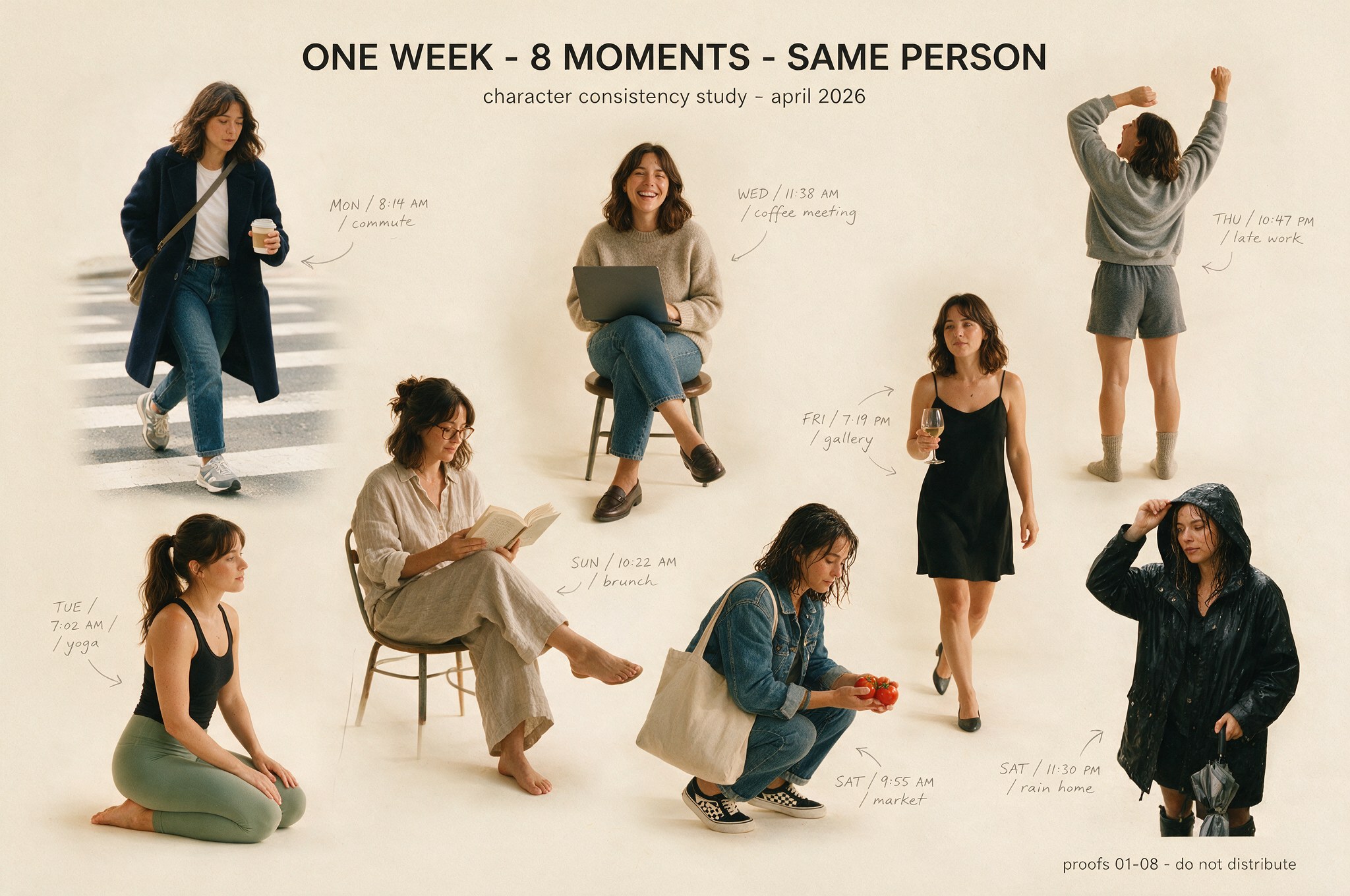
One image, eight moments, one character: the layout and every handwritten annotation held together
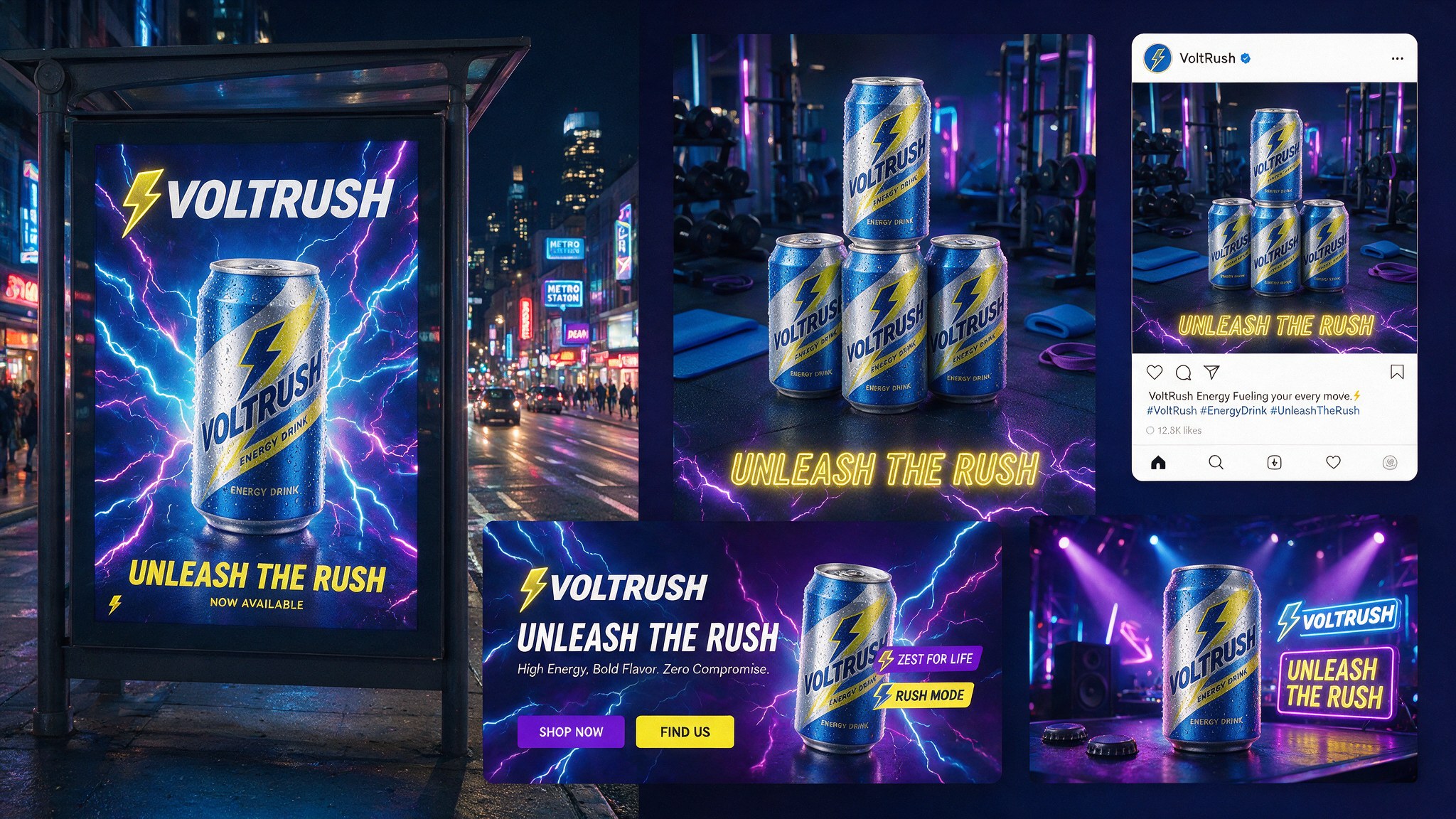
A full campaign in one generation, the copy consistent across billboard, social, web, and stage
Editing and Reference Images
Attach reference images (up to 10 on Pro and Flash, up to 14 on Lite) and the model can keep a subject consistent, drop a product into a new scene, or restyle a photo. Say plainly what to preserve, and give each reference a role by number: "Using the material from Image 1 and the color swatch from Image 2, modify the sofa in Image 3." One instruction can fuse several references into one composed shot: a bundle image from separate product photos, or a model dressed from different garment references, each element at the right perspective and lighting. These examples started from a character sheet, a product still, and a photo.
Character kept consistent in a new scene
Product placed into a lifestyle scene
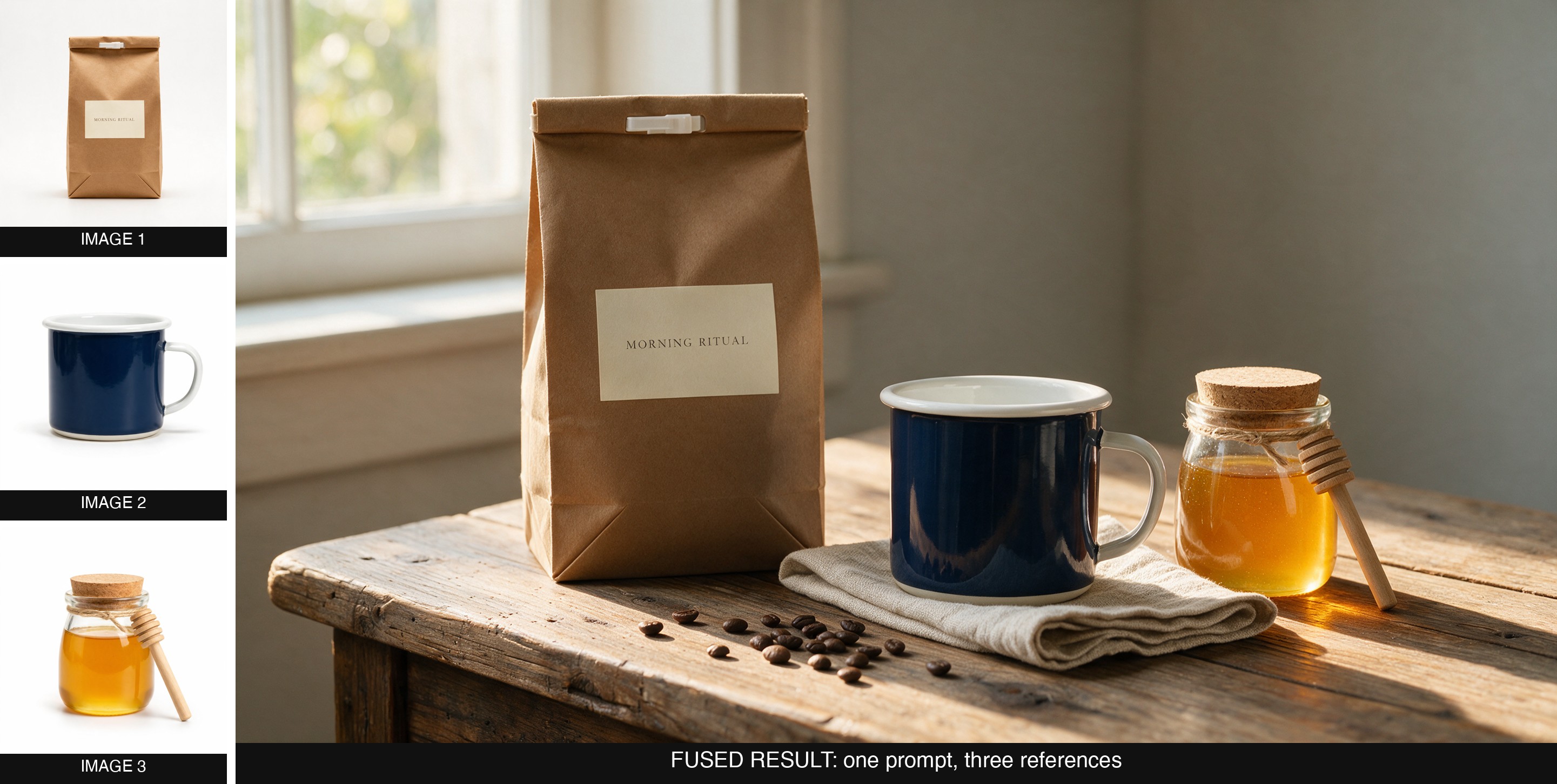
Three separate product photos, fused into one scene with correct scale and lighting
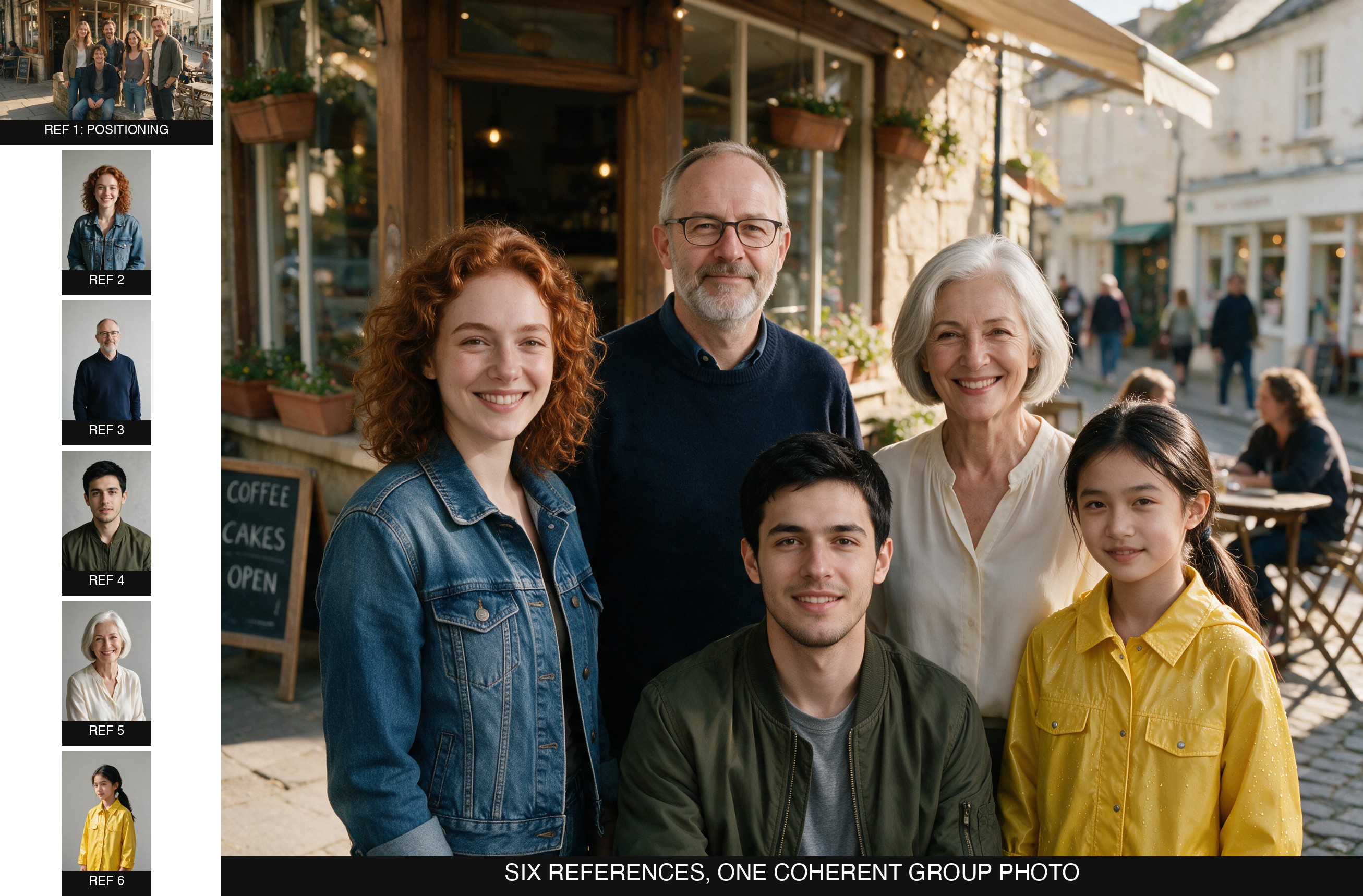
Five separate portraits, fused into one group photo from a single positioning reference
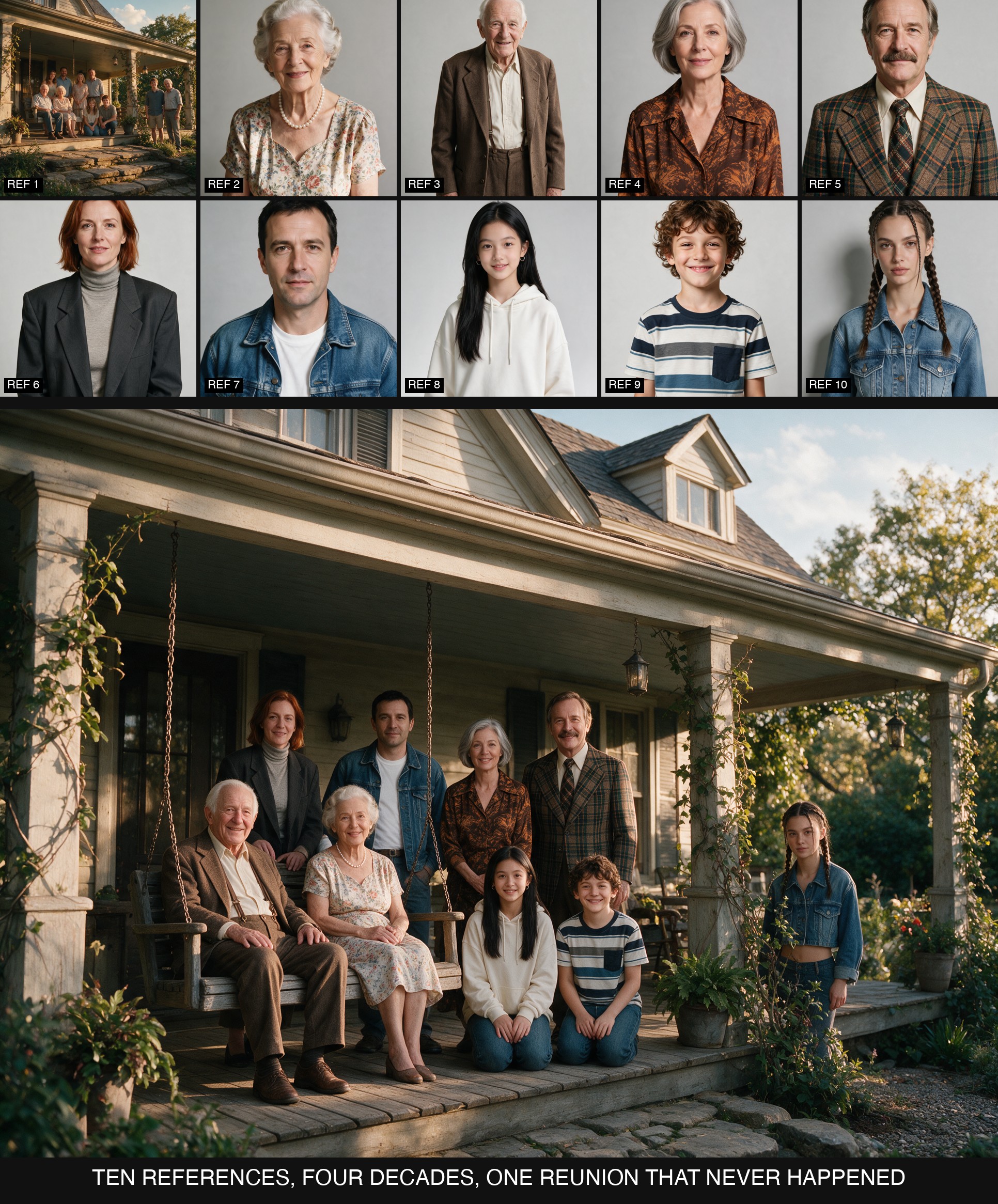
Nine portraits and one positioning photo, Pro's full 10-image reference limit, fused into one reunion spanning four decades of style
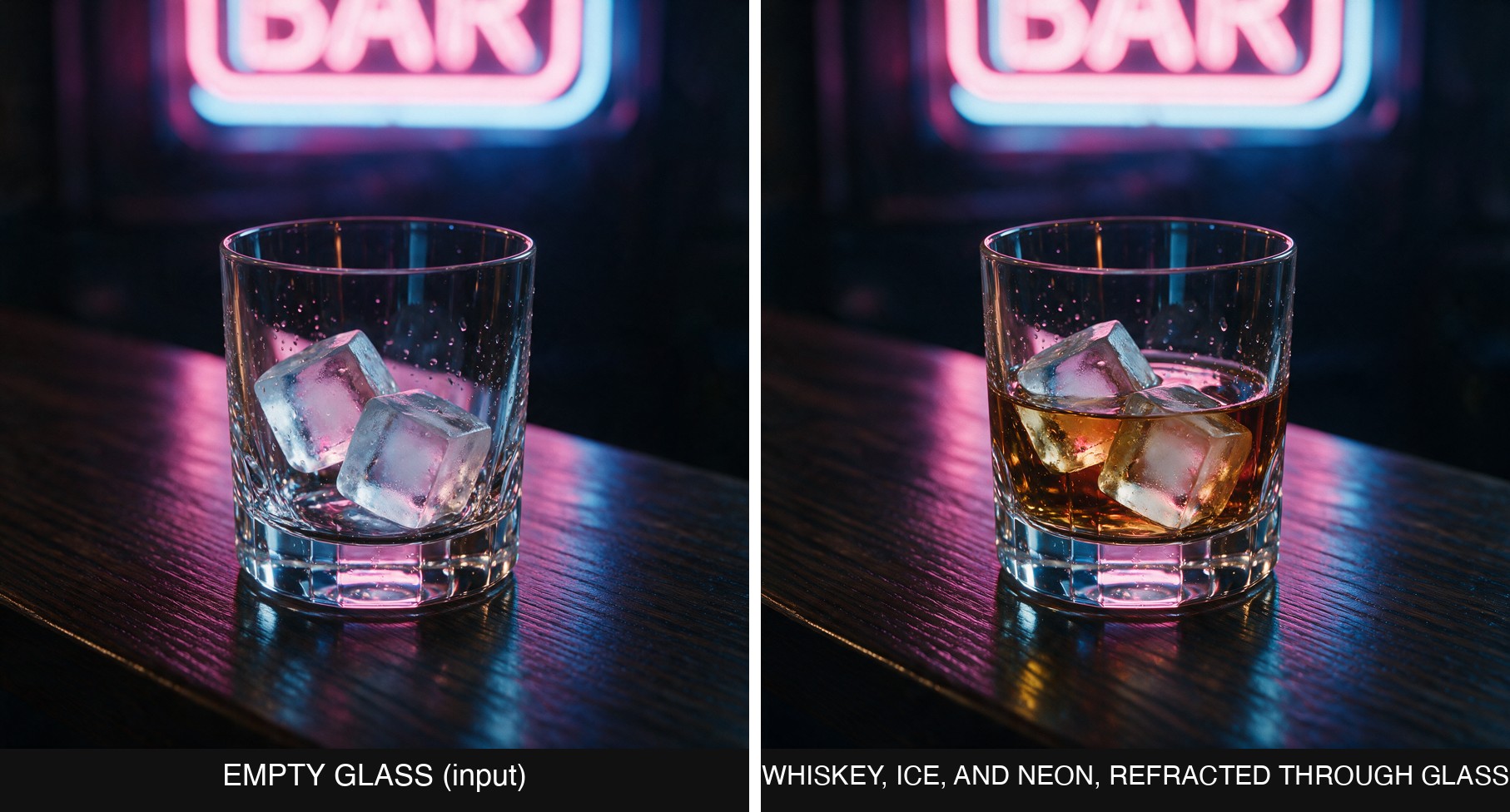
The neon sign's color visibly bends through the ice and liquid, not just glowing behind the glass
Fast Generation and Editing (Flash)
Seedream 5.0 Flash takes the same prompts as Pro: describe the scene and style, quote the exact text to render, and pick a size. It generates from text or edits from up to 10 reference images, at 1K to 2K, and every resolution costs the same flat amount per image, so it is the natural choice when you need many images quickly. Flash does not reason as long as Pro, so give it one clear instruction per edit and keep the rendered text short and named.
Cover key art for a cozy fantasy farming game. A young gnome farmer in patched green overalls and an oversized straw hat stands on a hill of terraced pumpkin fields at golden hour, holding a lantern-shaped watering can that pours a stream of glowing seeds. Beside her, a round mossy rock golem carries a woven basket of giant turnips. A crooked windmill with patchwork sails stands in the distance under a peach and lavender sky. At the top, the title 'HOLLOWBROOK HARVEST' in chunky hand-carved wooden letters with small leaves tucked into them. Along the bottom, small clean sans-serif caps reading 'COMING SPRING 2027'. Painterly stylized 3D look, soft rim light, rich saturated autumn palette.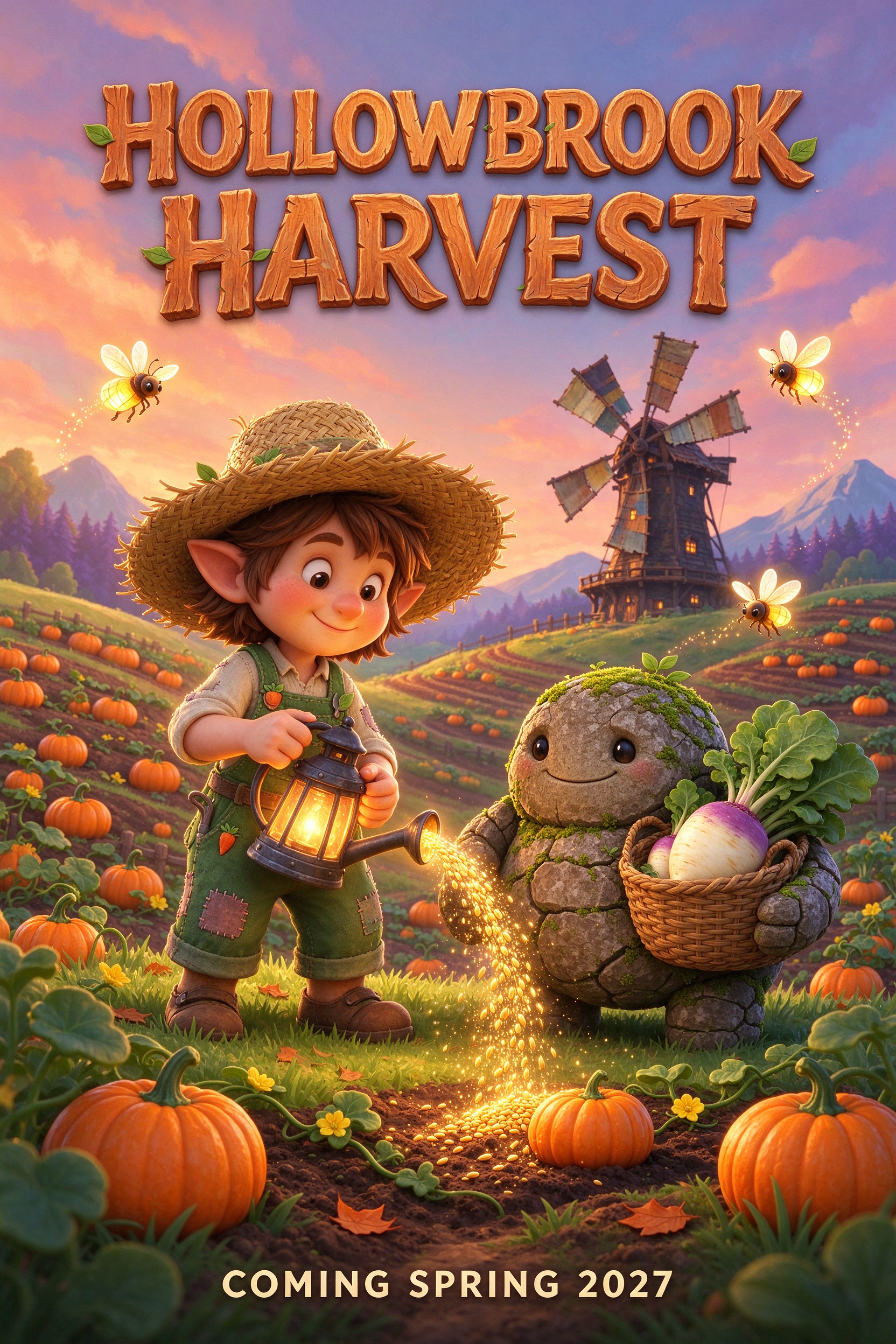
Title and tagline rendered cleanly, straight from the prompt. Seedream 5.0 Flash. Open on Scenario
Numbered references work the same way as on Pro. Three separate studio shots in, one composed lifestyle scene out, with every product kept to its reference:
Combine the products from the three reference images into one outdoor lifestyle photo. Image 1 is the charcoal insulated water bottle with the bamboo cap, Image 2 is the mustard-yellow waxed canvas backpack with brown leather straps, Image 3 is the pair of olive-green trail shoes with orange laces. Place them together on a flat granite boulder at a mountain trailhead at golden hour. Keep each product's exact shape, color, materials, and details from its reference, with correct scale relative to each other, matching warm low-sun lighting and long soft shadows. No logos or text.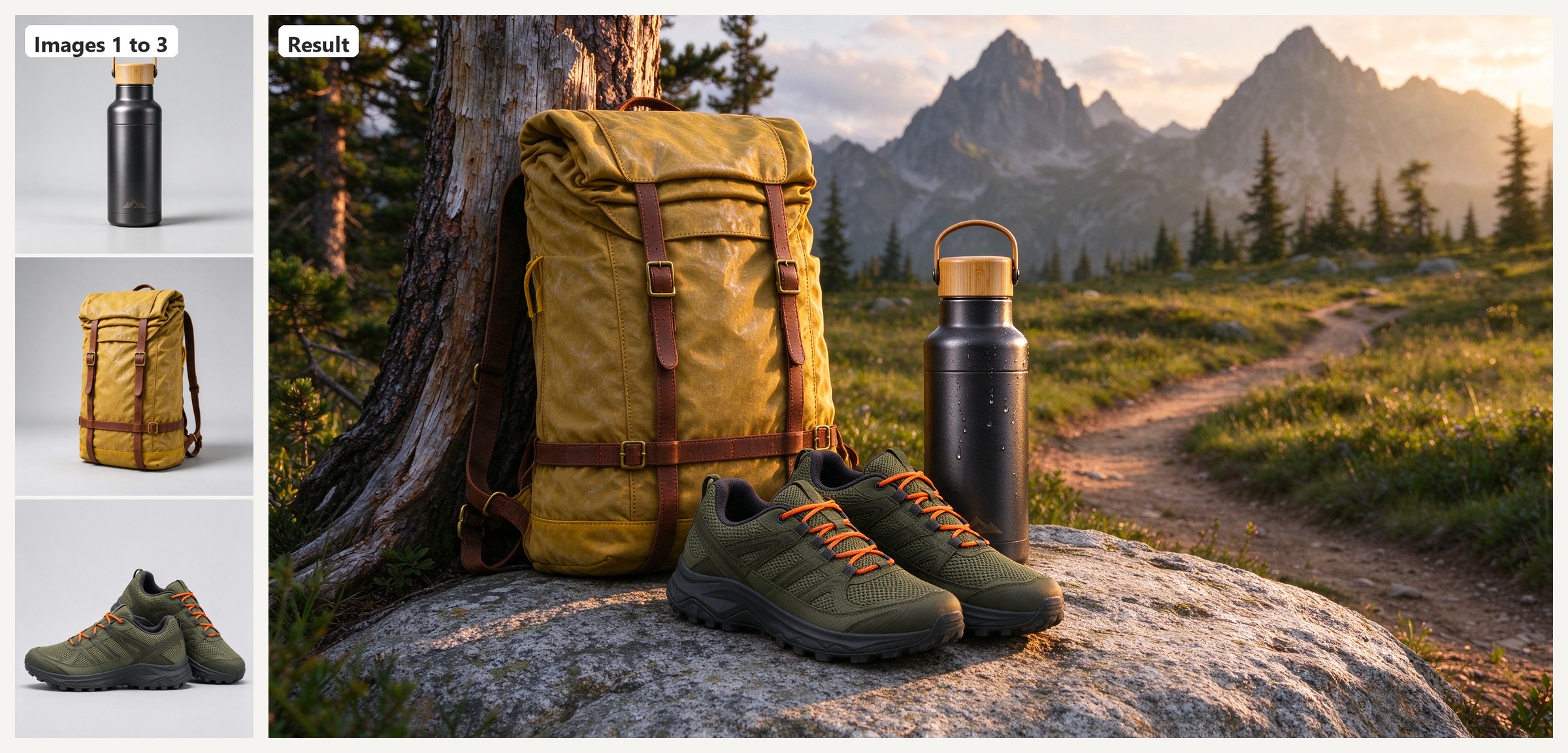
Three references, one scene: shape, color and materials held, scale and light matched. Open on Scenario
Give one reference the subject and another the style, and Flash repaints the subject in that style while keeping the face, clothing and props:
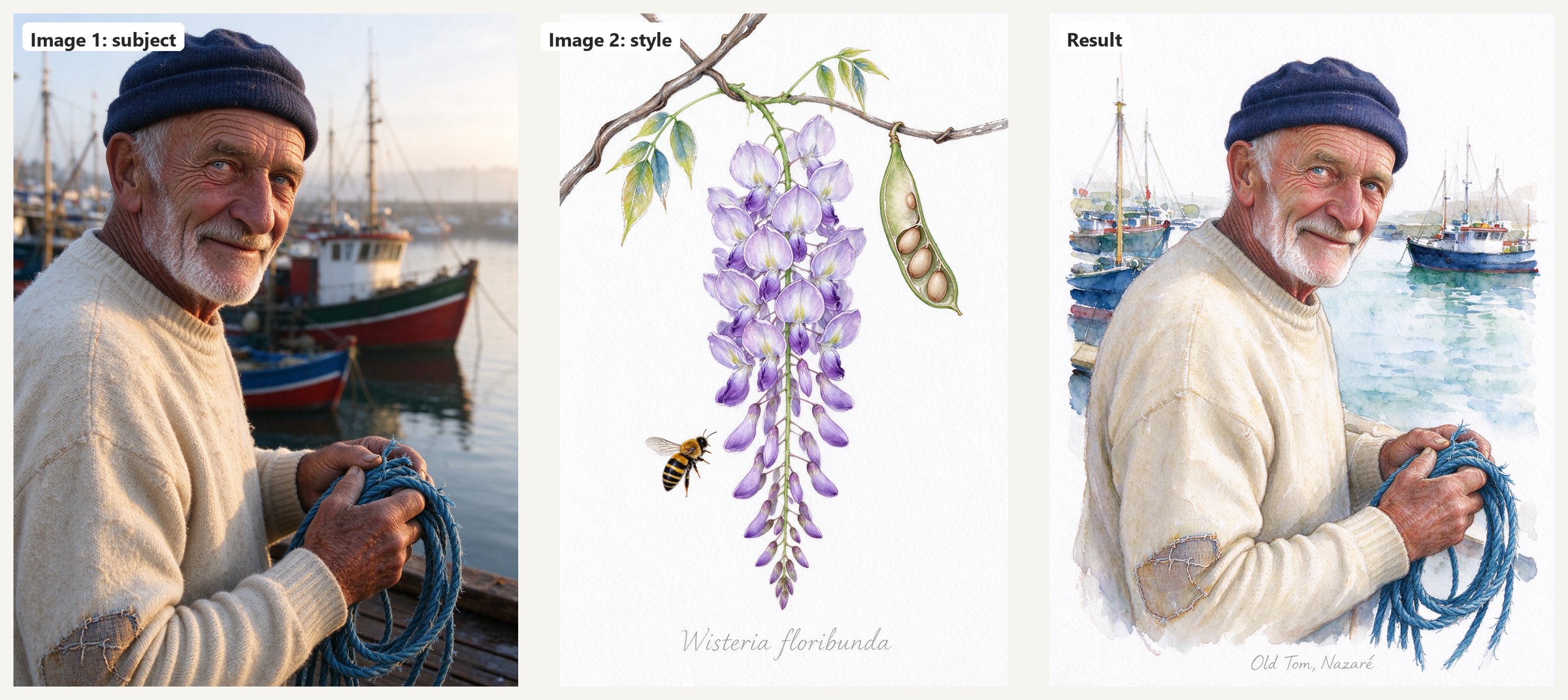
Image 1 supplies the fisherman, Image 2 the watercolor technique. Open on Scenario
Flash is also the only 5.0 model with a transparent background option. Pass exactly one PNG that already has an alpha channel, set background to transparent, and the edited result keeps its transparency, ready to drop into a game UI or sticker sheet.
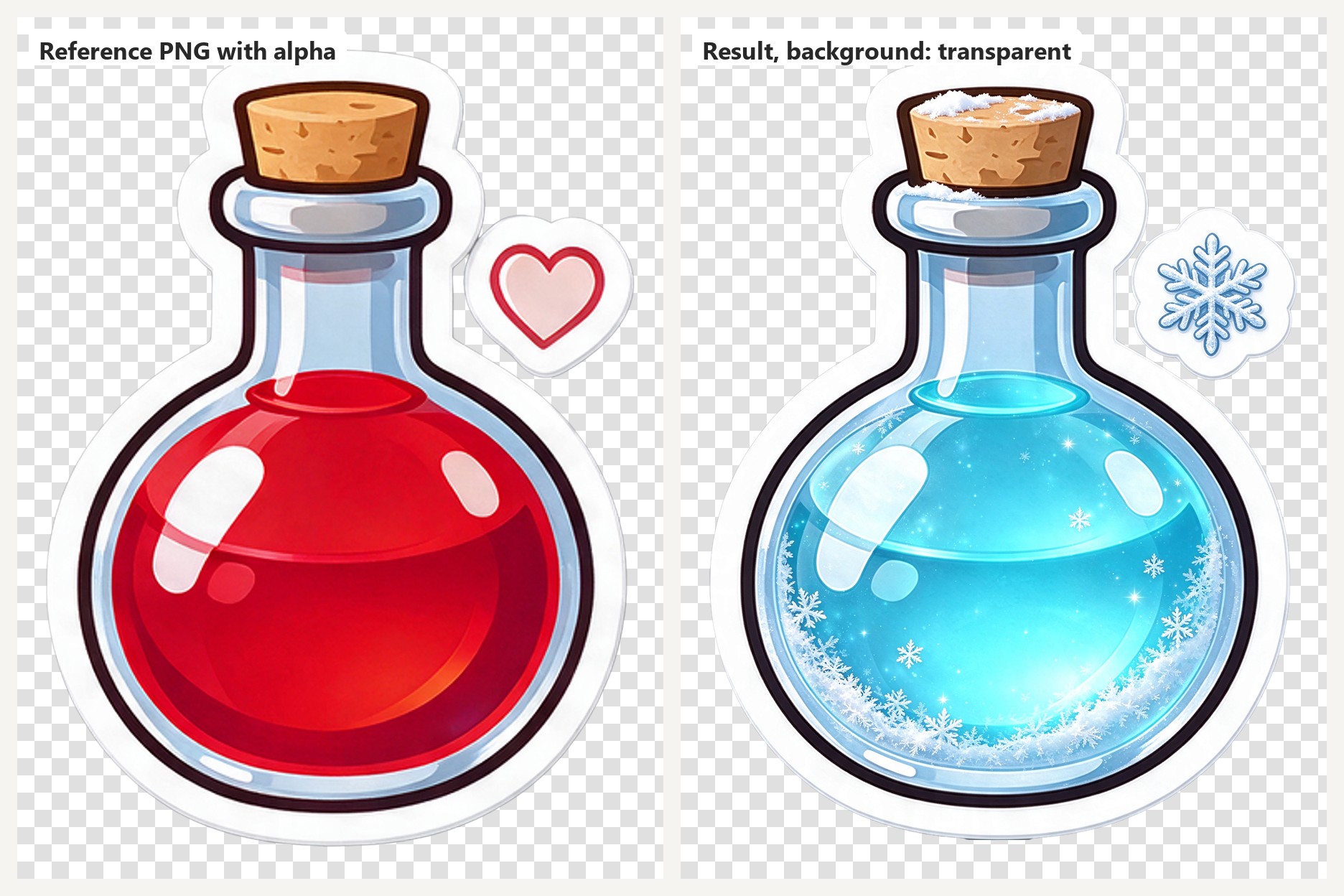
A health potion turned frost potion, alpha channel preserved. Open on Scenario
Custom sizes go well beyond the presets. Flash composes for the frame you give it, from a 3136 by 672 banner to a 672 by 3136 hanging scroll, and holds multi-panel layouts such as a full manga page with consistent characters and lettering.
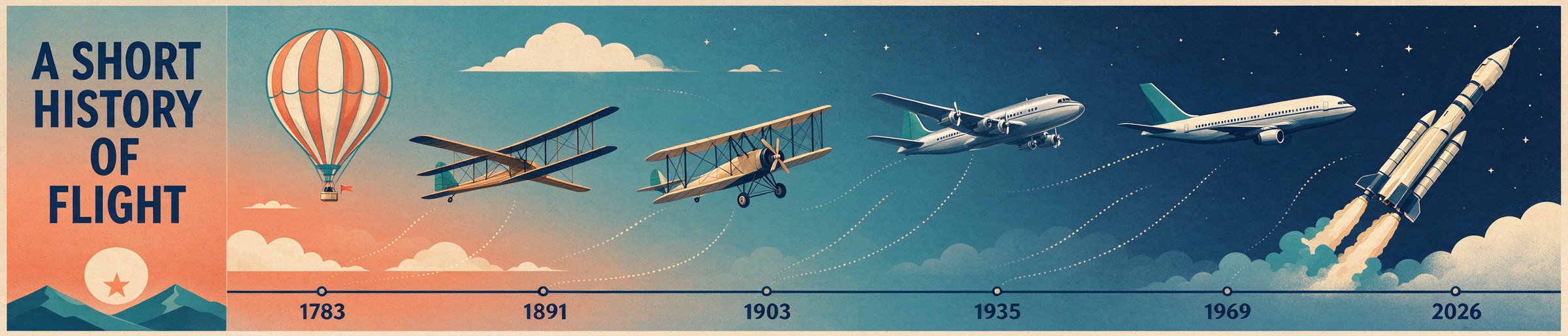
3136 by 672: six machines, six correct year labels. Open on Scenario
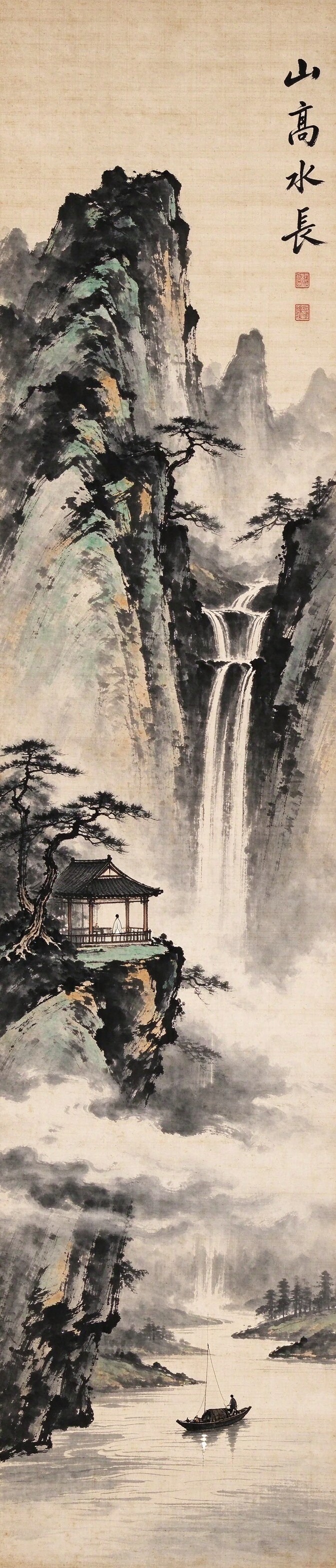
672 by 3136: a shan shui scroll composed top to bottom. Open on Scenario
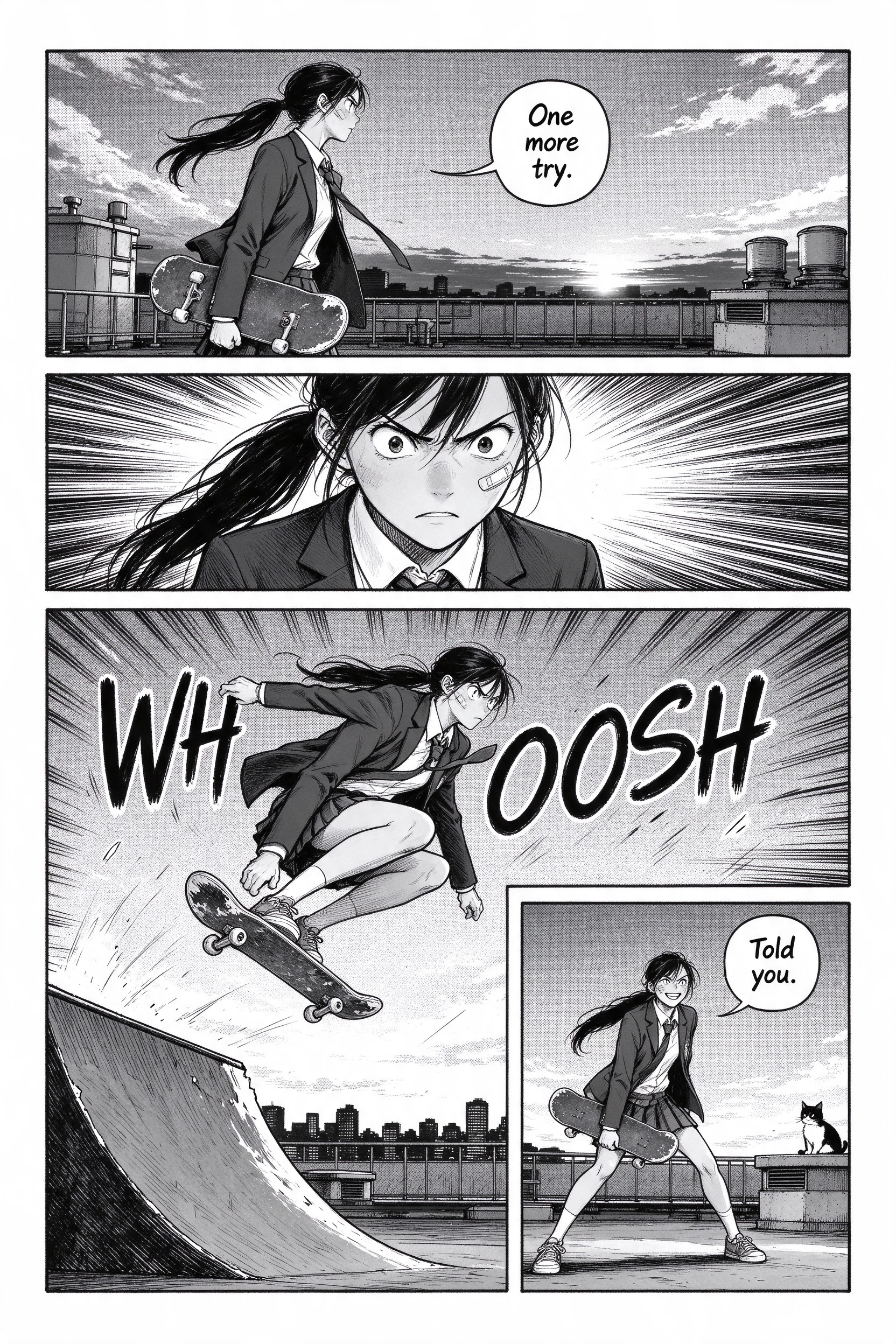
One image, four panels, one character, English lettering in every bubble. Open on Scenario
Marker-Based Editing (Pro)
Seedream 5.0 Pro understands markings drawn on a reference image. Circle an object, add an arrow, sketch a shape, or drop a coordinate mark, then tell the model what to do in the marked area. It edits exactly there and blends the result into the scene. Ask for the markings to be removed in the same prompt. This is a Pro-only capability, and the most precise way to direct a local edit without masks.
In the area marked with the red circle, replace the vending machine with a retro arcade cabinet. Its glowing marquee reads 'STARFALL' and its screen shows a colorful space shooter in attract mode. Keep everything else in the scene exactly the same. Remove the red circle and arrow markings from the final image. Match the station's cool fluorescent lighting.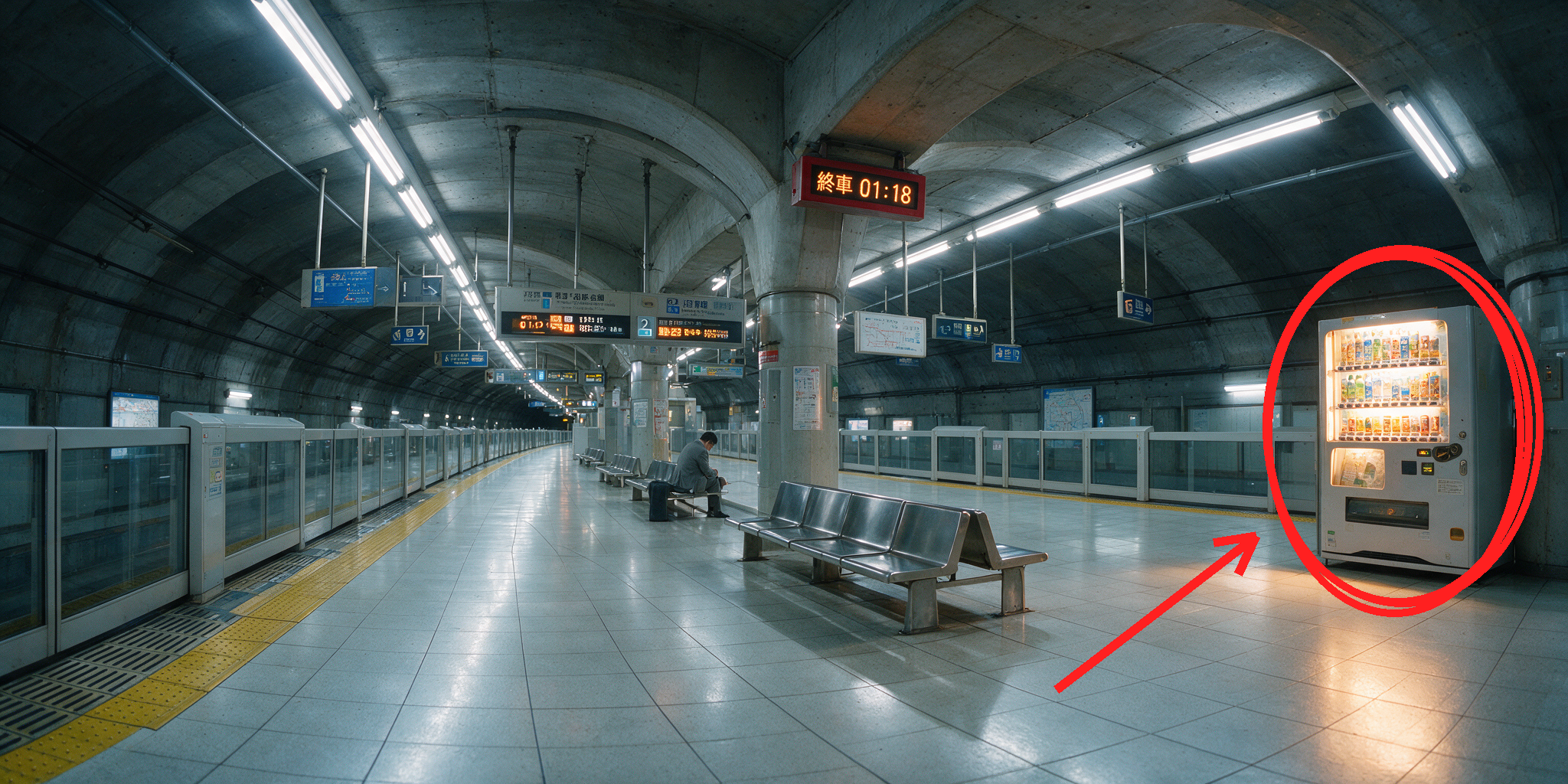
The marked reference: a red circle and arrow drawn directly on the image
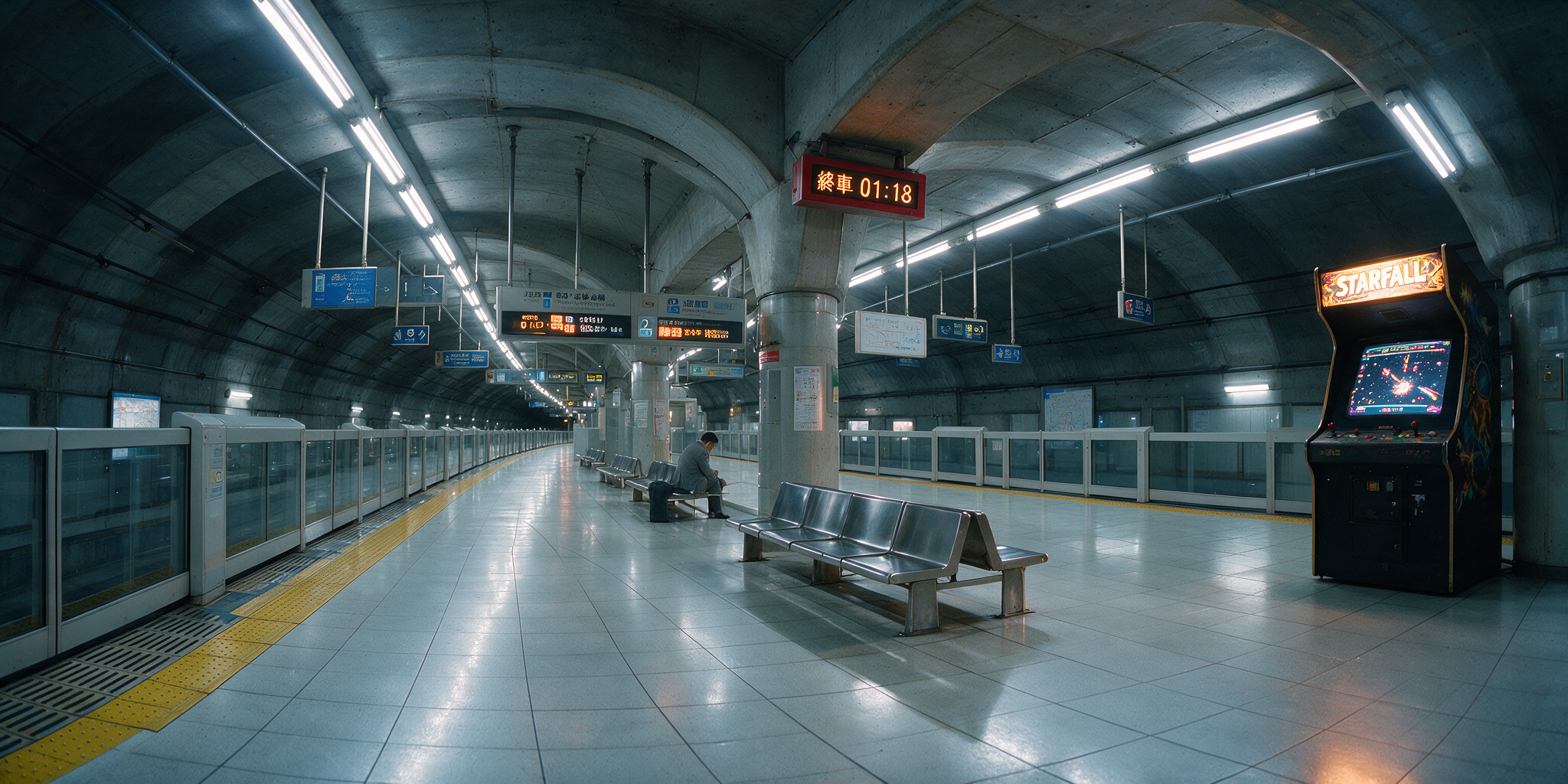
The result: only the circled area changed, markings gone, lighting matched. asset_TUEmguSzNZVcXguqfyS2asX5
Markers stack. Draw several boxes or arrows in different colors, give each one its own instruction, and Pro applies every edit in one pass:
Red box: change the side logo to a gradient of coral pink fading into orange. Green box: replace the white laces with navy blue flat laces. Yellow box: add a small 'NEW ARRIVAL' tag in bold yellow with a subtle drop shadow. Remove all box markings from the final image.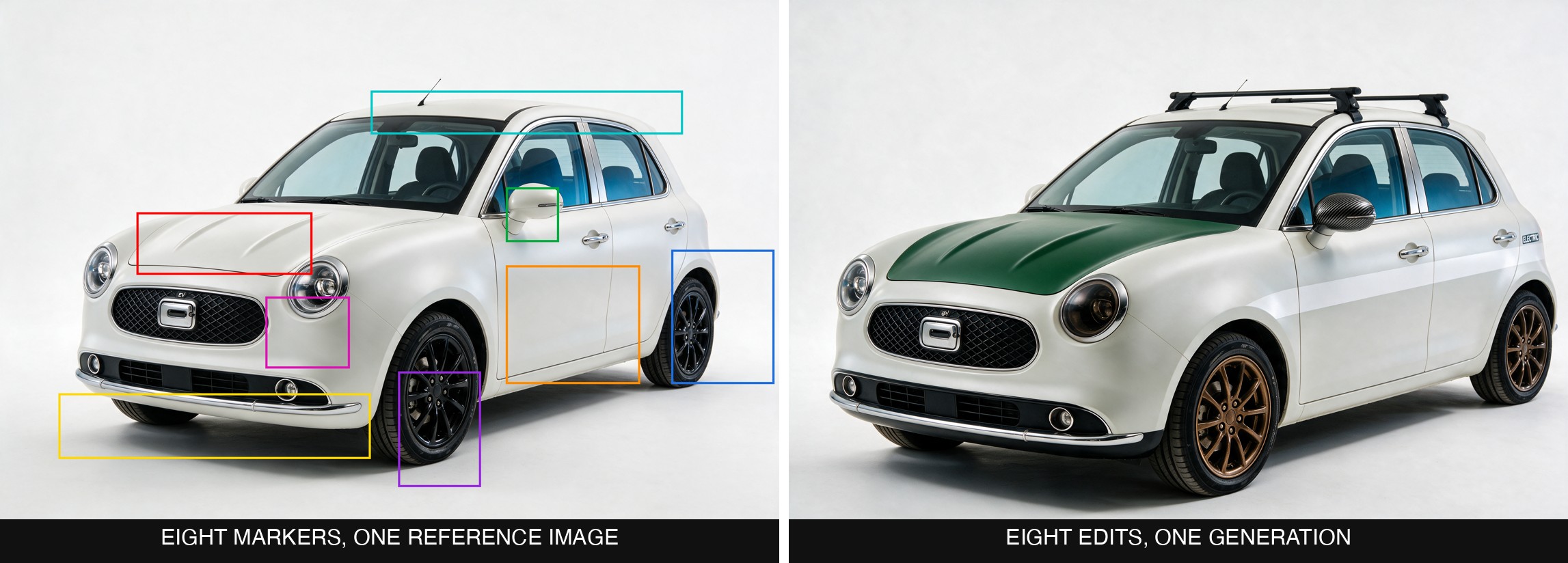
Eight colored markers, eight instructions, six landing cleanly in a single pass
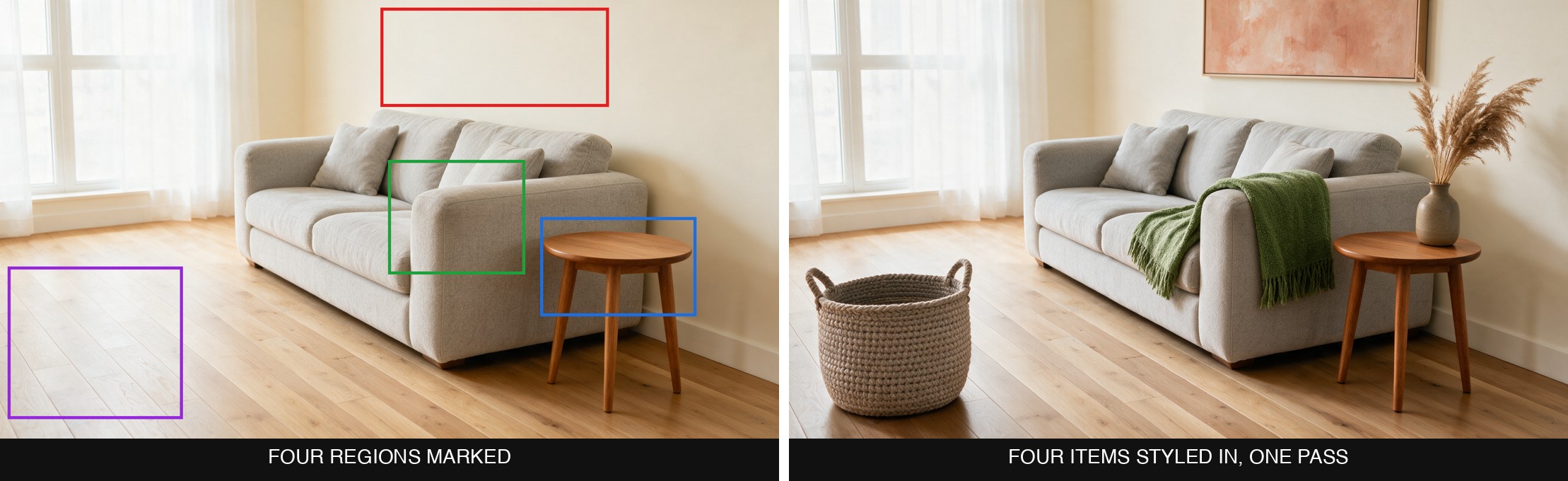
Four marked regions, four different items, styled in one pass
Sketches and exact values work the same way. Draw a stick figure to redirect a pose, or doodle a shape and describe it, and Pro renders it photoreal. Name a hex code ("dark green #3E4A2E, brushed metal finish") and the marked region matches it while structure, stitching, and reflections stay put.
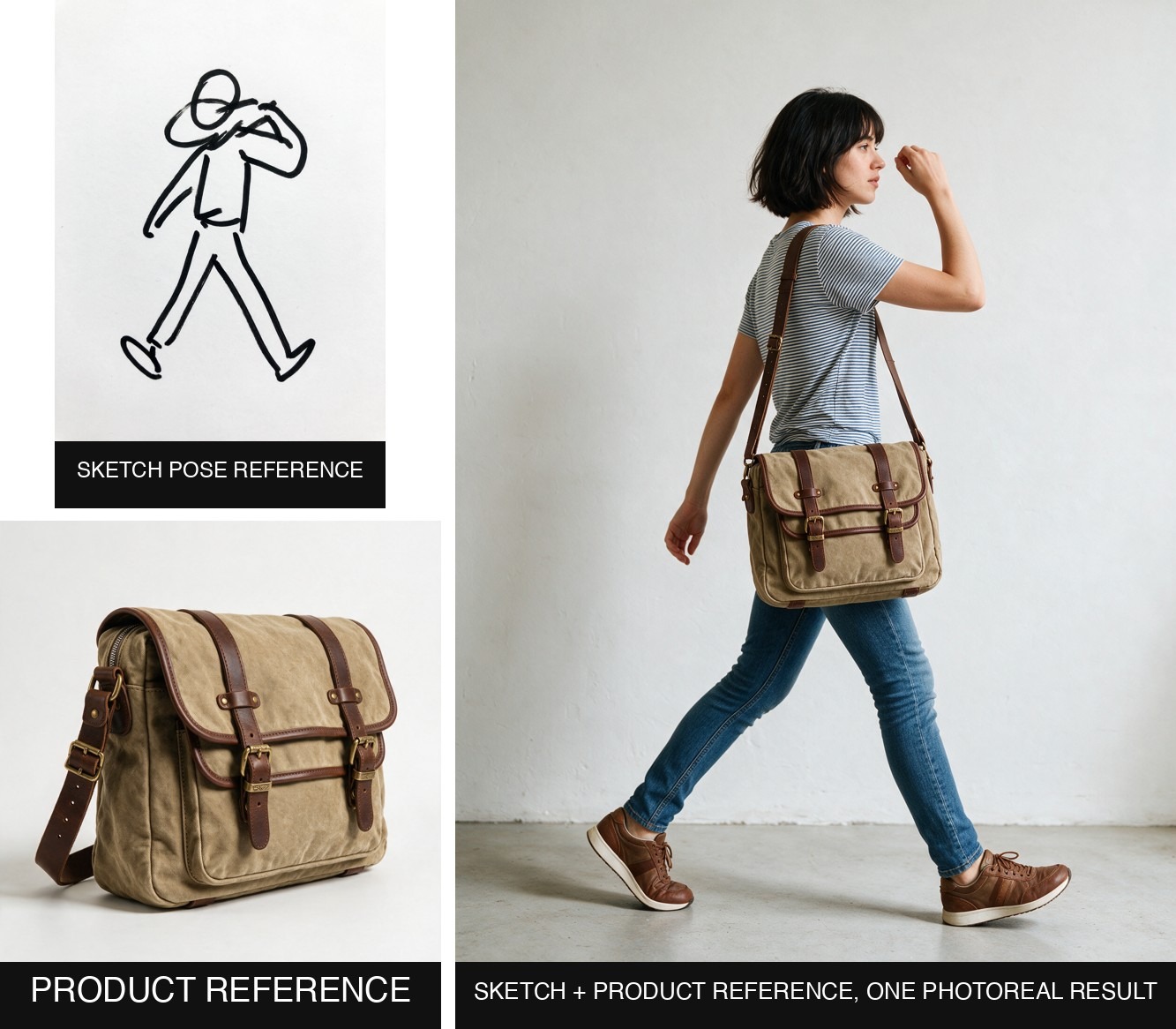
A rough pose sketch and a separate product reference, fused into one photoreal result
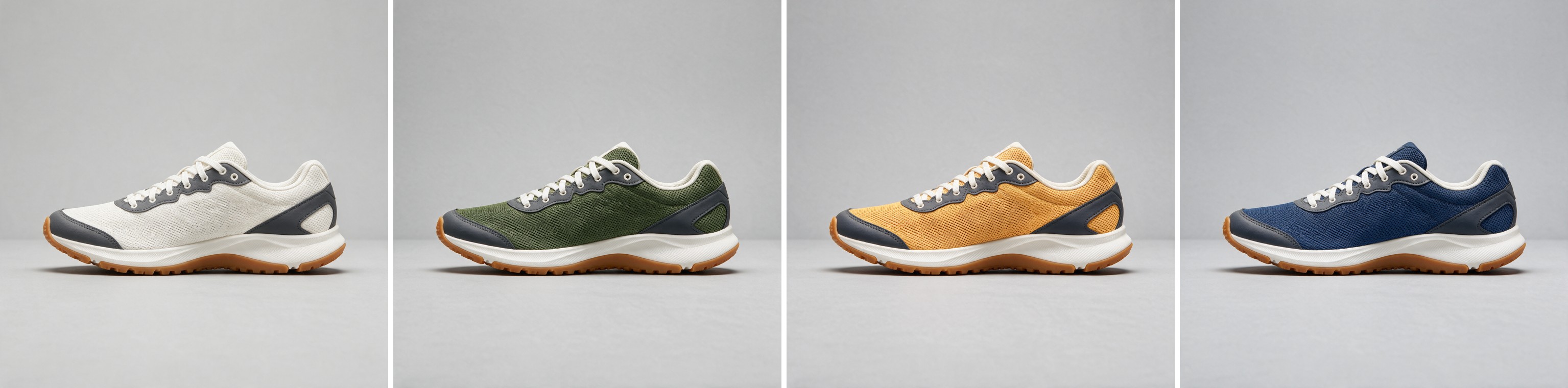
One sneaker, matched to three exact hex codes: #3E4A2E, #DB973E, #1F3A5F
Sequence Generation (Lite, 4.5, and 4.0)
Seedream 5.0 Lite, 4.5, and 4.0 can all return a set of related images in one run. Turn on sequentialImageGeneration and set maxImages, and the model produces story steps, variations, or turnarounds that share a character, palette, and style. Pro and Flash are the Seedream models without sequence generation; each returns one image per run.
Generate a sequence of 4 cinematic storyboard frames of a boss encounter. Frame 1: wide establishing shot, a lone knight in weathered teal-and-brass armor wades into a flooded gothic cathedral, shafts of light through broken stained glass. Frame 2: low tracking shot behind the knight as a colossal serpent made of living stained glass rises from the black water, glowing from within. Frame 3: close on the knight's face beside her raised glowing blade, the serpent's kaleidoscope light washing over her. Frame 4: the serpent strikes and light floods the nave as the knight lunges forward, glass shards suspended mid-air. Keep the same knight, the same serpent design, the same teal, amber and stained-glass palette, and the same painterly cinematic concept-art style across all four frames.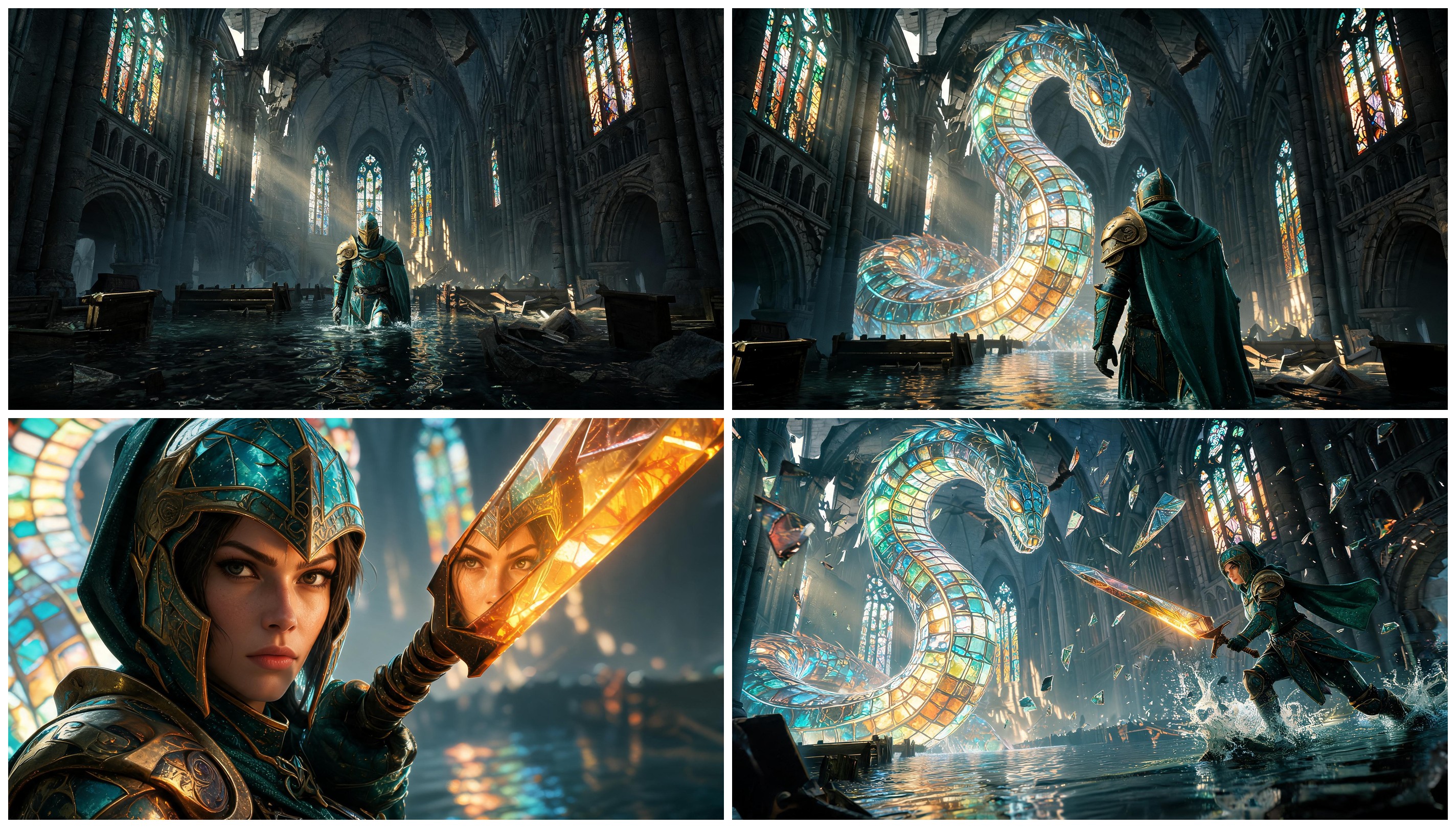
Four frames from one Seedream 5.0 Lite run: same knight, same serpent, same palette, four camera angles.
Layer Extraction (Pro Layerize and Flash Layerize)
Seedream 5.0 Pro Layerize works in the opposite direction from the generation models: give it one finished image and it separates that image into editable layers. You get a clean base plus a set of transparent PNG cutouts, one per major element, and the model rebuilds the background behind everything it lifts so each piece stands on its own. It returns up to 17 layers, scaled to how many distinct elements the scene holds. An optional prompt lets you steer what to isolate; leave it empty and the model decides. This is a tool built on Pro, so it does no prompt-driven generation of its own: the only required input is the image, plus a size tier for the output resolution.
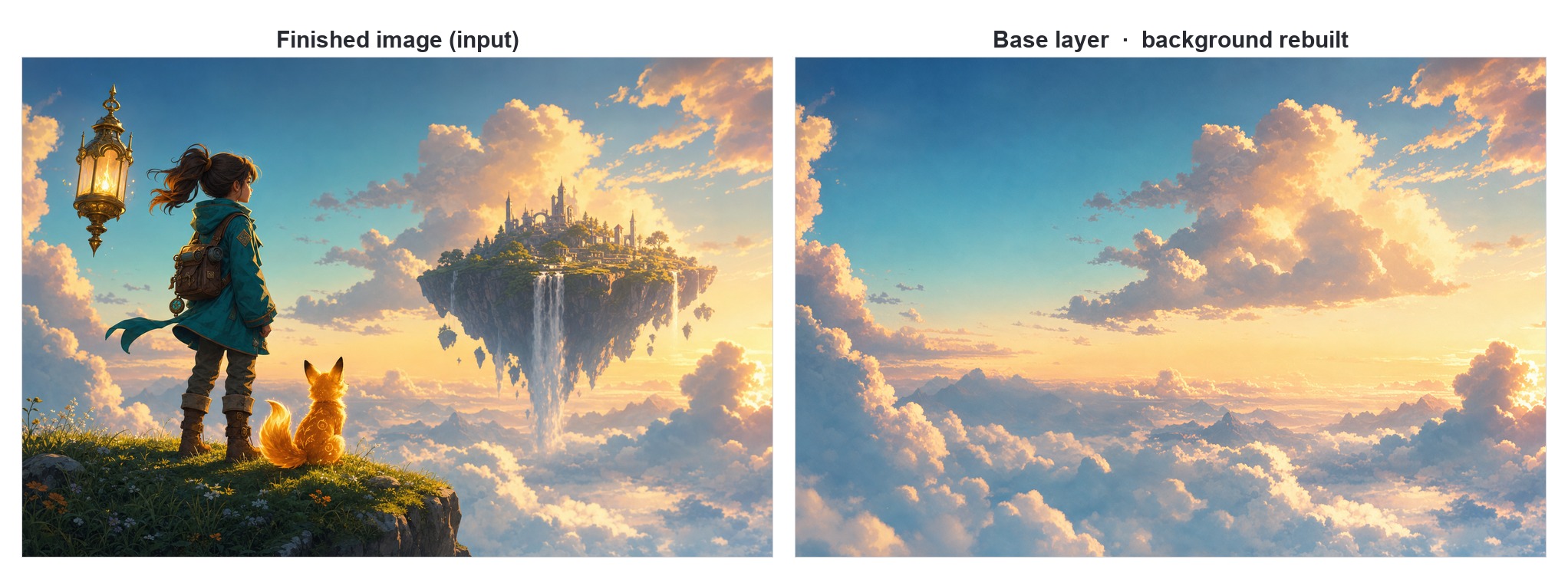
One finished image in, and a clean base back with the sky rebuilt behind everything that was lifted. Open on Scenario
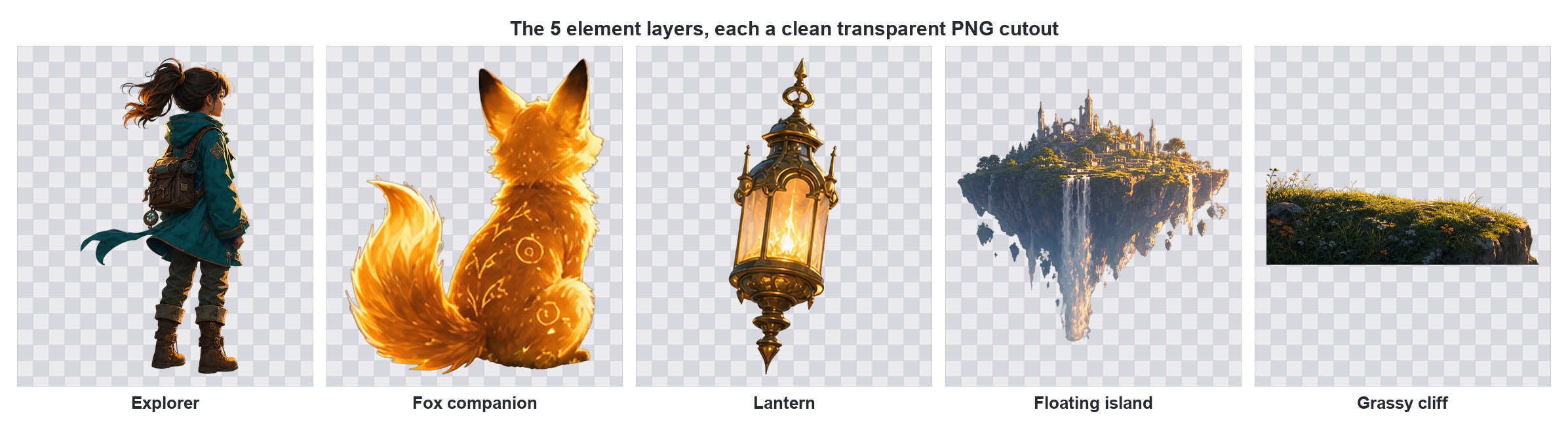
The same image split into five transparent cutouts, each ready to recompose, animate, or drop onto a new background.
Flash Layerize
Seedream 5.0 Flash Layerize performs the same split: one finished image in, a base layer plus up to 16 transparent PNG elements out, each cropped to its own bounds. You steer it in three ways. Leave the prompt empty for a full automatic split. Name the parts you want in plain language, and it returns exactly those, even a dozen of them, while everything else stays in the base. Or target a region with <bbox>x1 y1 x2 y2</bbox> on a 0 to 1000 grid to lift one element and leave the rest untouched.
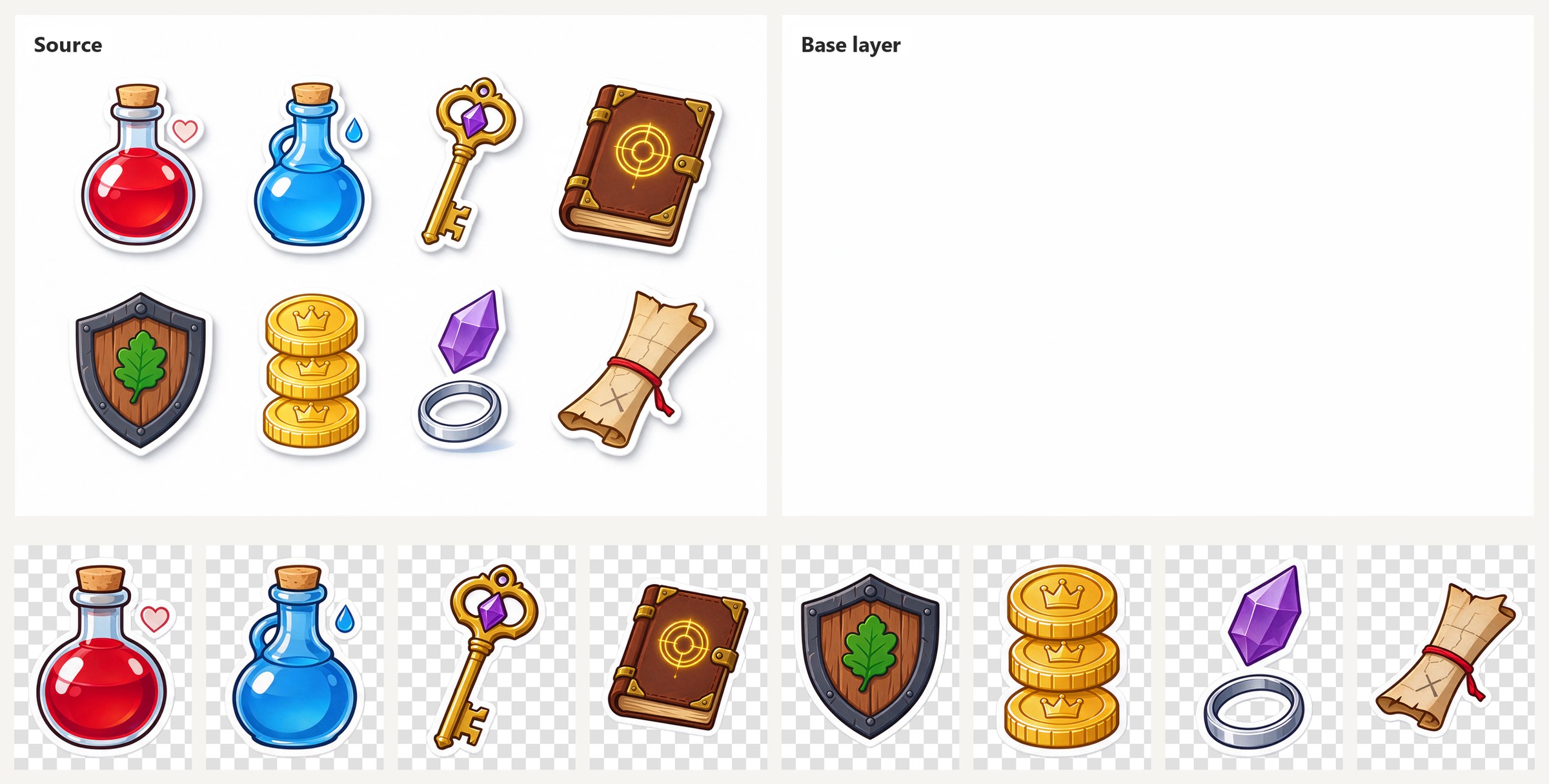
Automatic split of a sticker sheet: a clean base and all eight items as separate PNGs. Seedream 5.0 Flash Layerize. Open on Scenario
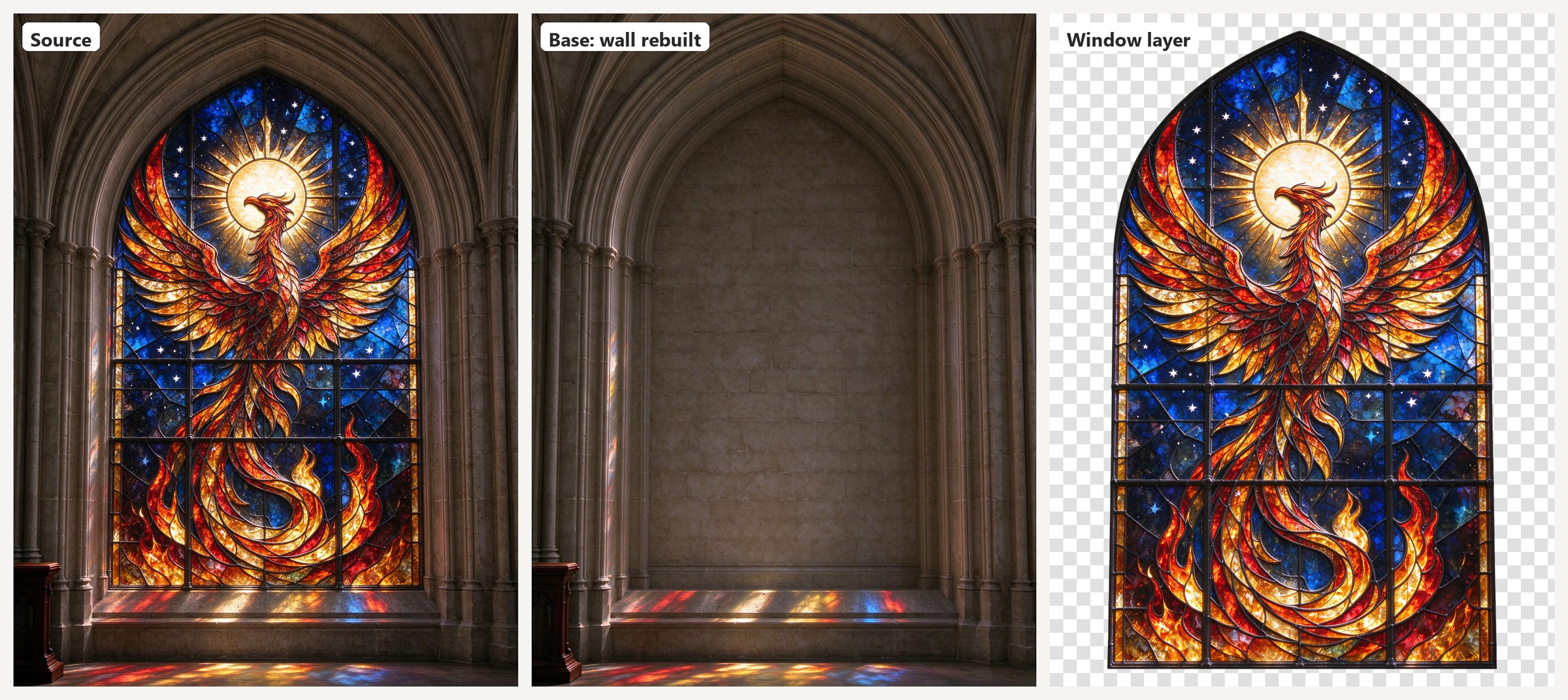
Asked for the whole window as one layer, it rebuilt the stone arch behind it and kept the colored light on the ledge in the base. Open on Scenario
Part lists can be as fine as you like. This poster was split into eleven layers: each letter of the headline on its own, the red circle, each text block, and each rule.
Separate each typographic element into its own layer: each of the four letters f, o, r, m individually, the red circle, the line 'DESIGN WEEK ZURICH', the date '12–18 OCT 2026', the grey paragraph, and the three thin black rules. Keep only the blank off-white paper in the base.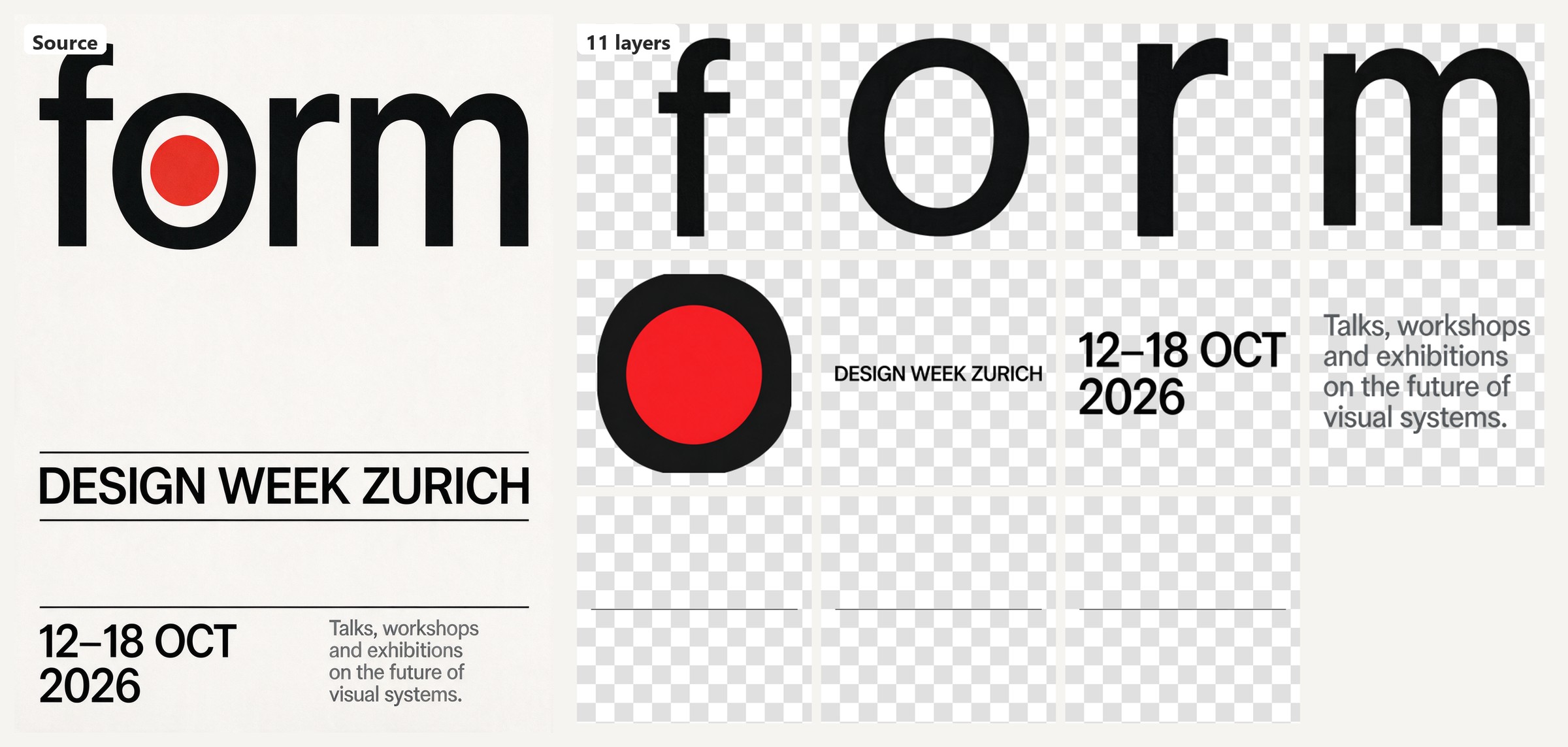
Eleven named parts, eleven layers, ready to animate letter by letter. Open on Scenario
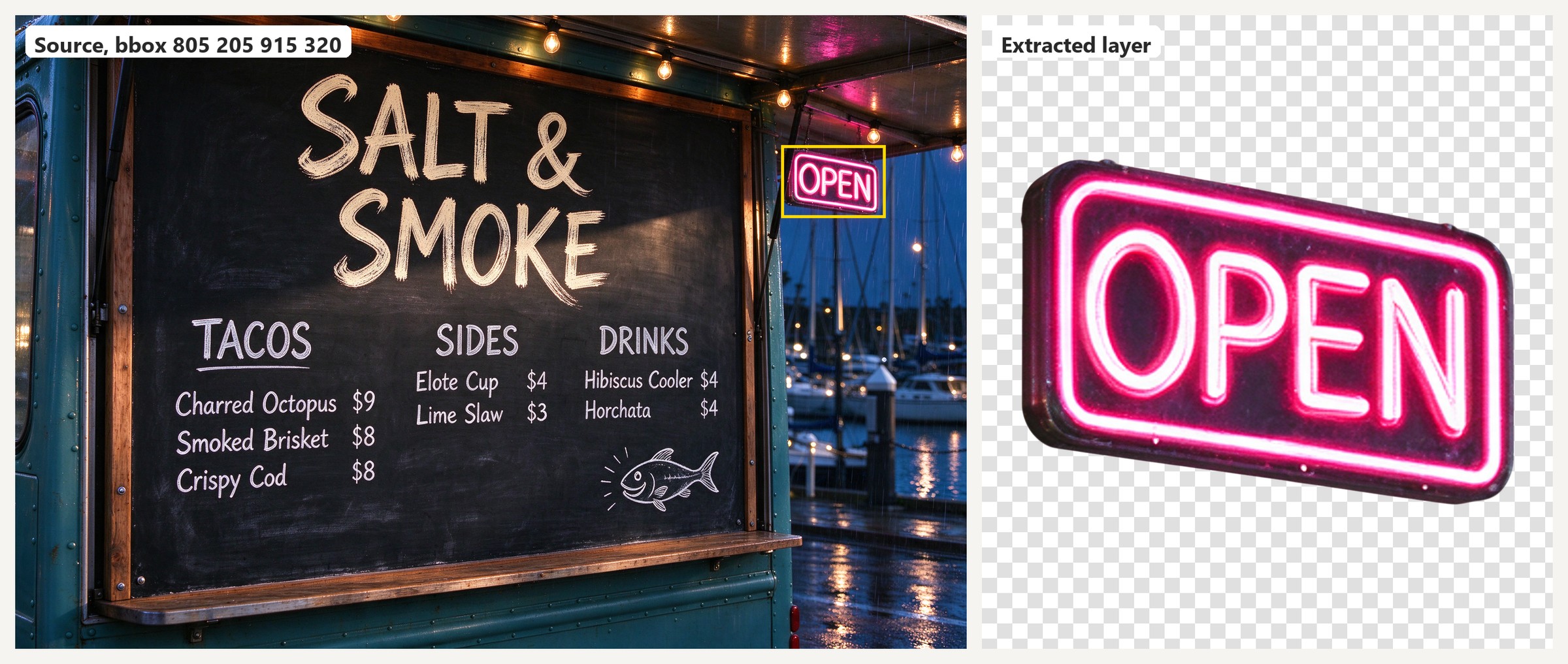
A bbox around the neon sign lifts only that element, glow included. Open on Scenario
Parameters
The 5.0 models share a small, focused set of controls. A few dials are not available on Pro.
prompt
Required. Up to 3500 characters on Pro and Flash, 2048 on Lite. ByteDance recommends staying under roughly 600 words: very long prompts scatter the model's attention and details start to drop. Describe the scene and the style, and quote any text you want rendered exactly. For dense layouts, name each text block and its role.
referenceImages
Optional. Up to 10 on Pro and Flash, up to 14 on Lite. Use them to keep a character or product consistent, place a product in a new context, or restyle an image. State plainly what to preserve.
width and height
Output dimensions in pixels. Pro and Flash run 672 to 3136 per side; Lite runs higher, up to 4K. Both offer a ladder of ready-made presets across common ratios (21:9, 16:9, 3:2, 4:3, 1:1, 3:4, 2:3, 9:16). Picking a preset is the reliable path.
On Pro, the maximum is a total pixel budget, not just a per-side limit. A 2K square (about 2048 by 2048) is the practical ceiling. A custom size whose area exceeds that fails with a pixel-count error even when each side is under 3136, so 1728 by 2432 is rejected. When in doubt, pick a preset. Lite reaches full 4K.
Flash offers 1K and 2K presets across the same ratios, and its custom range is generous: both 672 by 3136 and 3136 by 672 rendered cleanly, as the scroll and the timeline above show.
background (Flash only)
Opaque by default. Set it to transparent to keep the alpha channel of a single PNG reference in the edited result. It needs exactly one reference image that already has transparency; it is not a background remover, so for cutting a subject out of a finished image use a Layerize tool instead.
sequentialImageGeneration and maxImages (not available on Pro or Flash)
Set sequentialImageGeneration to auto and the model may return a set of related images (story steps, variations, turnarounds) up to maxImages. Total images (input plus generated) cannot exceed 15. Leave it off for a single image. Available on Lite, 4.5, and 4.0; Pro and Flash always return a single image.
Pro Layerize and Flash Layerize: image, prompt, and size
Layer extraction takes a smaller, different set of inputs. image is the one required field: the finished image to split. An optional prompt (up to 3500 characters) can steer what to isolate, and is safe to leave empty. It accepts a plain-language list of parts or <bbox>x1 y1 x2 y2</bbox> region tags on a 0 to 1000 grid. size sets the output resolution tier: auto keeps the input aspect ratio and adapts from the source, or pick 1K, 1.5K, or 2K. Setting an explicit tier gives more predictable output than auto.
Use Cases
Games: key art and cover posters (Pro), plus character turnarounds and storyboard sets (sequence mode).
Marketing and advertising: hero ads, packaging, and posters with real copy baked in; one key visual recomposed per format and localized per market.
Publishing and editorial: book covers, album art, and magazine covers with mastheads and cover lines.
Education: infographics and labeled diagrams where every callout must be spelled correctly.
E-commerce: colorway and material variants from one master photo matched to exact hex codes, background swaps from marketplace white to lifestyle scenes, and bundle shots fused from separate product photos.
Storyboards and comics: consistent multi-panel sequences from a single sequence run on Lite, 4.5, or 4.0.
Video pipelines: Seedream stills make strong start frames for Seedance video models.
Layered asset prep: split finished key art or a marketing composite into a clean base and transparent cutouts with Pro Layerize, then recompose, animate, or build parallax and UI from the pieces. Flash Layerize handles quick passes on sprite sheets, posters and product shots.
High-volume creative: ad and thumbnail variants, product shots, and drafts at scale on Flash, with one flat price per image at every resolution.
Tips for Better Results
Quote the exact text you want. Words in quotes render as written, as in the coffee bag and the "ABYSSAL" poster.
Keep style words outside the quotes. Terms like "painterly" steer the look and do not appear as text.
Name each text block and its role. Calling out "title", "banner", or "footer" gives the model a layout to follow, as in the tournament poster.
Write non-Latin text directly. Quoting the actual characters produces legible Japanese or Chinese signage.
Lock identity with a reference image. To reuse a character or product, pass it in
referenceImagesand state what to keep constant.Give each reference a role. Number them in the prompt: "the material from Image 1, the color from Image 2."
Mark the edit instead of describing the location. On Pro, circling the object directly on the reference image is more reliable than describing where it sits, as in the arcade cabinet example.
Use sequence mode for sets. When you need matching frames or variations on Lite, 4.5, or 4.0, turn on sequence generation rather than prompting one image at a time.
Pick a preset size. Presets keep you inside the pixel budget and give predictable framing; use custom width and height only for an exact ratio.
Put each label inside the area it names. When many labels must match many regions, as in a cutaway building, write the label into the region itself ("the neon on its wall reads 'RADIO'") rather than in a list beside it.
Keep rendered text short on Flash. Headlines, labels and short paragraphs are reliable; long body copy in narrow columns can break words or turn into pseudo-text.
Name the parts you want from Layerize. An explicit list returns exactly those layers; an automatic split on a busy scene can spend its 16 layers on small props.
Known Limitations
Pro uses a total pixel budget. Custom sizes beyond a 2K preset fail even when each side is under 3136 (details under Parameters). Lite reaches 4K.
Pro and Flash do not offer sequence generation. They return a single image per run; Lite, 4.5, and 4.0 all support sequence sets.
Text is strong, not flawless. Only the text you name and quote is reliable, small background signage can come out as pseudo-text, and even headline copy carries an occasional typo. Proofread anything customer-facing.
Reference image constraints. Inputs accept common formats up to 30 MB each, with aspect ratios between 1:16 and 16:1.
No seed or batch-count control. There is no seed parameter, so exact reproduction is not guaranteed; save an output you like and reuse it as a reference.
Occasional queue delays. A job can sit before it starts under load. If one stalls, resubmit it.
Layerize decomposes, it does not generate. Pro Layerize splits an existing image into a base plus up to 17 transparent cutouts (our five-element scene returned six layers). Very busy or overlapping scenes can merge nearby elements or hit the layer cap, and the tool needs a finished image to work from rather than a text prompt.
Flash text has limits. Short English and Japanese text rendered cleanly in our tests, but short Arabic lines came back misspelled, and long body copy degrades. Check any non-Latin or dense copy before using it.
Layerize cannot see through glass. Transparent or refractive elements are lifted as a layer, but what appears through them is re-imagined: a water droplet reflecting a city came back with a blurred generic interior.
Layerize tops out at 16 layers. A very busy image can hit the cap on an automatic split; name the parts you care about instead.
Some splits are blocked by moderation. A Flash Layerize run that isolated a small portrait photo inside an app screen was refused; keeping the photo in the base let the same split go through.
Showcase
A few more single-prompt generations from Seedream 5.0 Pro.
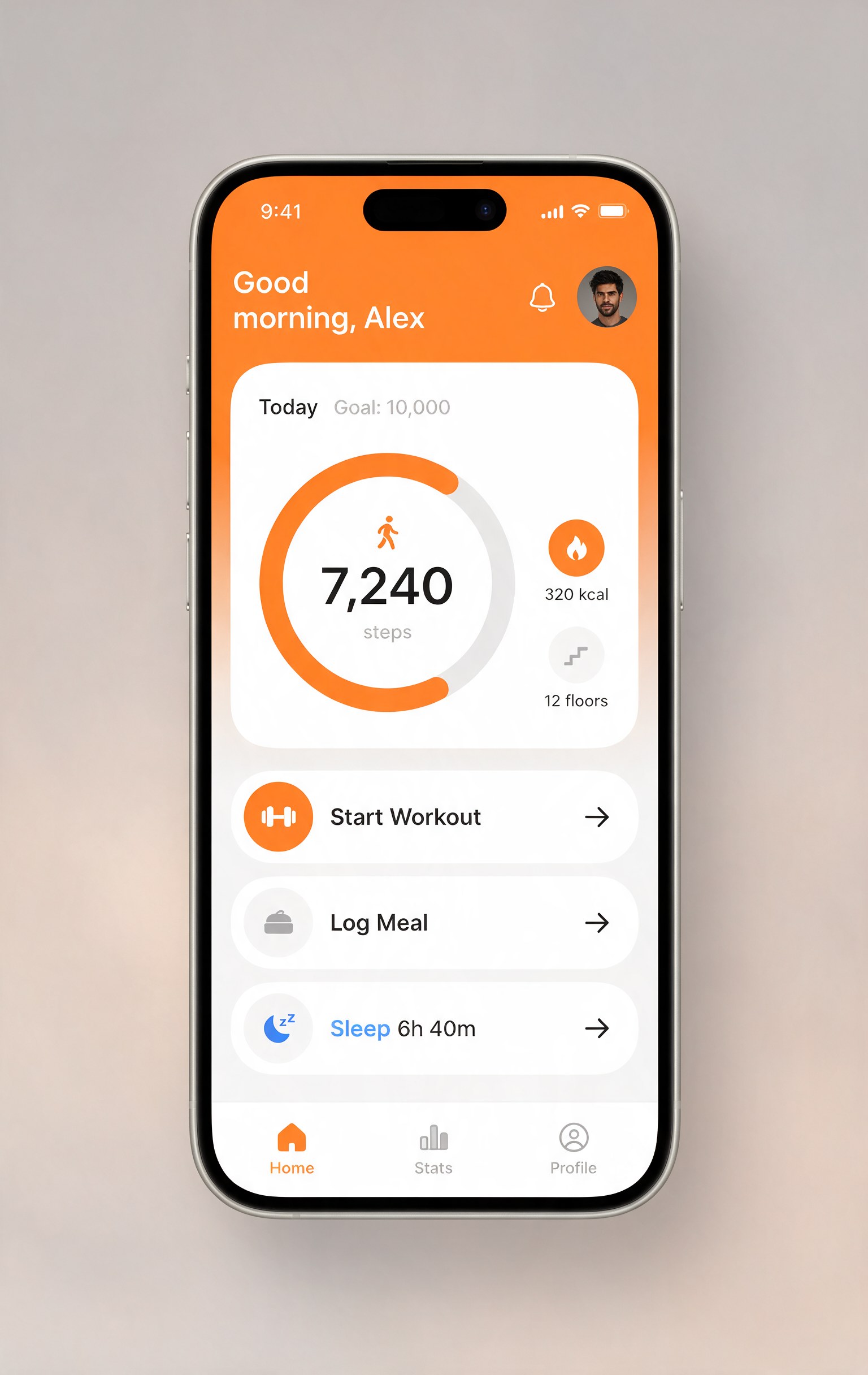
A full mobile app screen: labels, numbers, and layout all correct
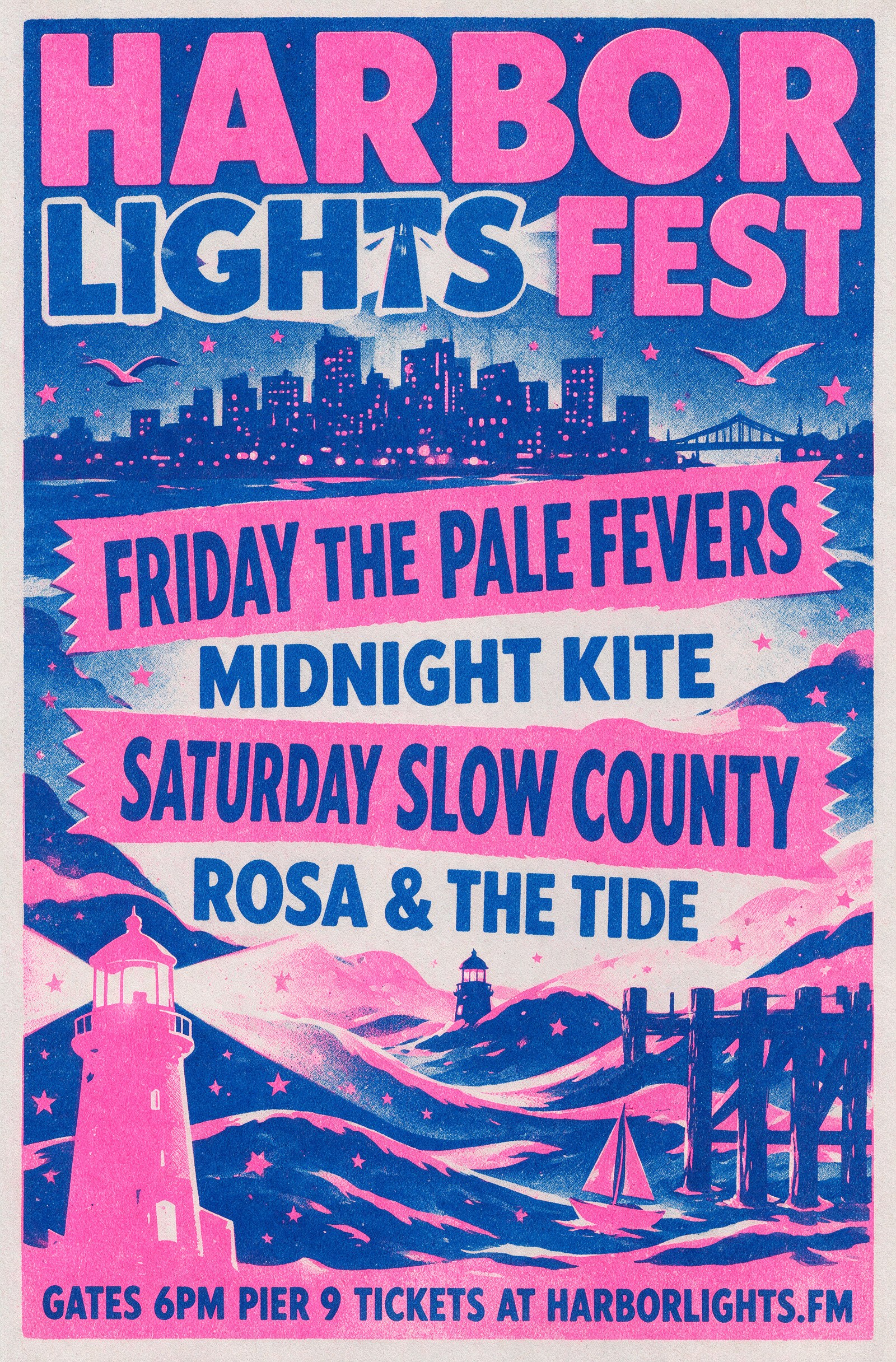
A dense festival poster: band names, days, and ticket line all clean
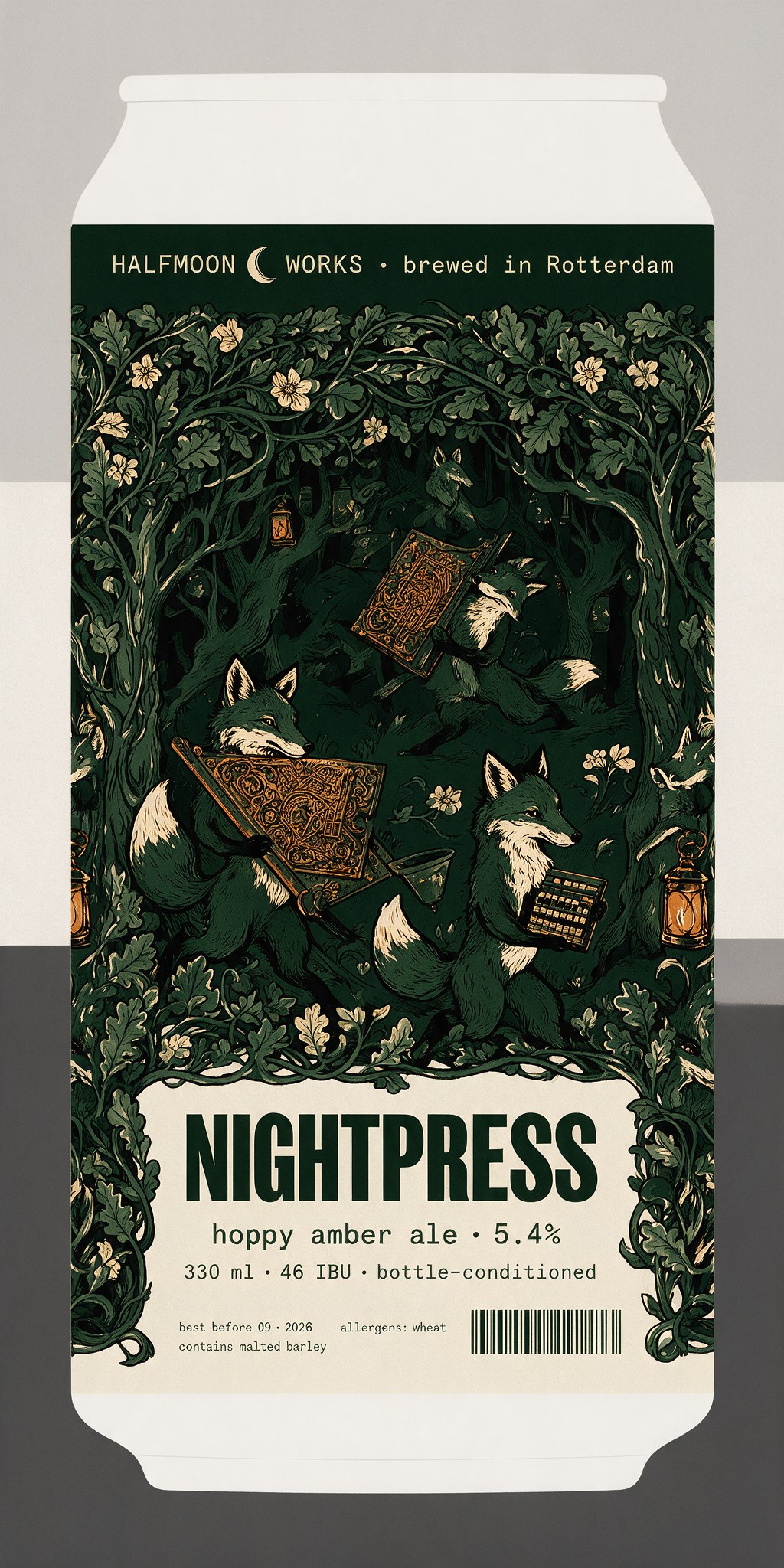
Packaging with full label copy: name, style, ABV, volume, IBU, allergens, all clean
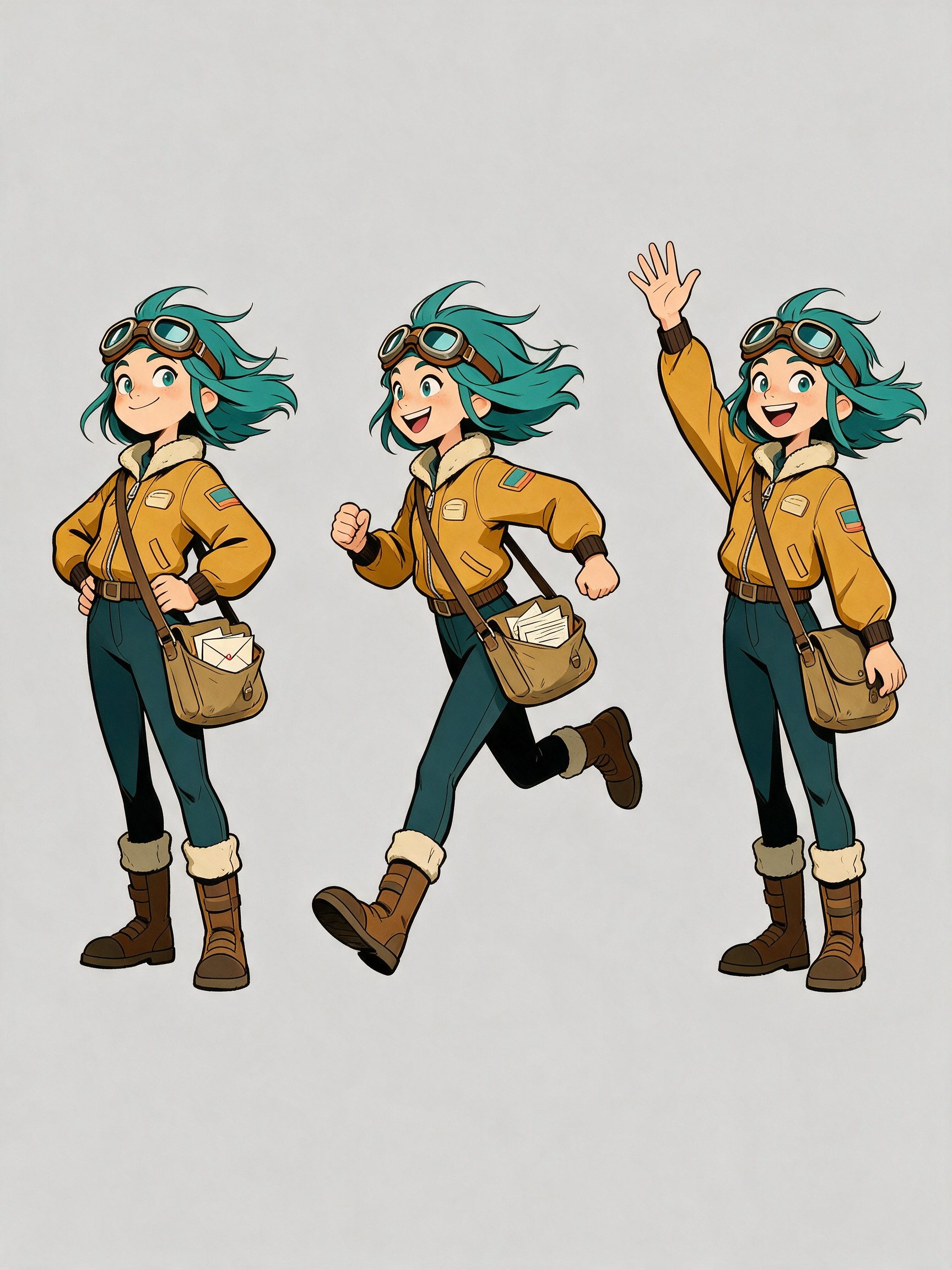
Character sheet: three poses, one consistent character, from a single prompt
Related
Seedream 5.0 Lite: Precision Power in a High-Speed Package: the speed tier in depth.
Seedance Models - The Essentials: turn Seedream stills into video.
Introducing Seedream 5.0 Pro: ByteDance's launch post.
Seedream 5.0 Pro for product and ad creative: ByteDance's playbook of worked marker, color-code, and fusion edits.