Kandinsky 6.0: The Essentials
Last updated: October 9, 2026
Kandinsky 6.0 is a video family from Kandinsky Lab that generates a 5-second clip and its soundtrack in a single pass: spoken dialogue with lip-sync, ambience, foley and music, all in sync with the picture. It ships in two tiers, a fast 3B Lite and a 29B Pro, each with Text to Video and Image to Video, plus two super-resolution upscalers, VSR and VSR Lite, that take the 480p output to 1080p and beyond. Lines you write in the prompt come back spoken as written in the large majority of takes, which makes the family a strong fit for talking characters, ads and short story beats.
Kandinsky 6.0 Pro Text to Video: one prompt, one pass, picture plus the scripted line, rain, wind and lamp hum · Open on Scenario
Which Model Should I Use?
Model | ID | Input | Best for |
|---|---|---|---|
| Text prompt | Fast drafts, social clips, stylized looks, testing prompts before Pro | |
| Text prompt, optional negative prompt | Final shots, dialogue scenes, ads, cinematic story beats | |
| Image (first frame) + prompt | Quick animations of stills, products, crafts and game art | |
| Image (first frame) + prompt, optional negative prompt | Talking characters, UGC-style ads, explainer hosts, anime scenes | |
| Video up to 121 frames | Final upscale of a Kandinsky clip to 1080p and above | |
| Video up to 121 frames | Lighter variant of VSR, same factors and input limits |
Start with Lite to find the shot: it returns in a few minutes, while Pro usually takes 15 to 40 minutes per clip on Scenario today, longer when many jobs run at once. Move to Pro for the keeper, when you want tighter control through guidanceScale and negativePrompt. Every generator outputs 480p, so finish with VSR at 2.25x when you need 1080p.
How to Use the Model
Write prompts the way Kandinsky reads them
Kandinsky 6.0 was trained on long, structured captions: a detailed description of the picture, then the soundtrack in its own block. On Scenario you write both in the single prompt field:
Describe the scene, the subject, the action in order (first this, then that) and the camera, in plain prose.
Put every spoken line inside
<S>...<E>exactly where it is said.Describe voices, ambience, foley and music inside
<AUDCAP>...<ENDAUDCAP>at the end.
The tags pass through to the model untouched: in our tests none of them was ever spoken or shown on screen. This is the exact prompt behind the lighthouse clip above:
A medium close-up inside the lamp room of a stone lighthouse at dusk. An elderly keeper with a white beard, deep-set grey eyes and a navy wool sweater under a yellow oilskin coat stands beside the giant brass-ringed Fresnel lens, which glows amber behind him. Rain streaks the curved storm windows and, far below, dark waves break against black rocks. He wipes the glass with a folded cloth, lowers the cloth to his side, then turns to face the camera and says calmly, his lips moving naturally with the words, <S>The storm will pass by morning, it always does.<E> He finishes with a faint, tired smile. Warm amber light from the lens rakes across his face against the cold blue dusk outside. Slow push-in from medium shot to close-up, continuous shot, 35mm film look. <AUDCAP>A deep, gravelly older male voice, calm and reassuring. Heavy rain drums against the glass, wind howls around the tower, waves crash faintly far below, and a low mechanical hum comes from the rotating lens. No music.<ENDAUDCAP>Five seconds is short. Plan one or two actions plus one line of dialogue per clip, and give every action a visible end state.
Keep the frame full
Without guidance, some Lite clips came back letterboxed, pillarboxed or inside a thin border: 4 of 15 in one batch. Lite has no negative prompt, so the fix goes in the prompt itself. Open with full-frame wording such as "Full-frame widescreen shot filling the entire frame edge to edge, no borders, no text". Every Lite clip we generated with this opening filled the frame. On Pro, add "picture frame, border, images" to negativePrompt as well.
Full-frame widescreen documentary shot filling the entire frame edge to edge, no borders, no text. In a dim glassblowing studio, a glassblower in her forties with a leather apron, safety glasses and rolled sleeves turns a long steel blowpipe with a glowing orange blob of molten glass on its end. First she blows gently into the pipe and the glass swells into a round bubble, then she rolls it along a steel table, shaping it into a smooth vase while bright orange light from the furnace behind her flickers across her face. Sparks of heat shimmer in the air. Medium shot, slow push-in, warm orange and deep shadow palette. <AUDCAP>The deep roar of a glass furnace, a soft breath into the pipe, the gentle rolling scrape of glass on steel, and quiet workshop ambience. No music. No speech.<ENDAUDCAP>Lite Text to Video, 16:9, full-frame wording at the start of the prompt · Open on Scenario
Dialogue and lip-sync
Speech is where Kandinsky 6.0 stands out. In the large majority of our dialogue clips, on both tiers, the line written inside <S>...<E> was spoken word for word, including a Russian line on Pro. A few takes slurred a word, added a stray word or skipped the line, so plan a regeneration for your hero shot. Describe the voice (age, tone, pace) in the audio block so it matches the character.
Grainy 1970s television broadcast look with soft VHS color bleed and slight scan lines. A local TV weatherman in his forties with a thick mustache, feathered brown hair, a wide-lapel brown corduroy suit and a mustard tie stands in front of a hand-drawn weather map board covered in sticky sun and cloud symbols. He first points confidently at a big cartoon sun on the map, then turns back to the camera and says cheerfully, his lips moving naturally with the words, <S>Folks, pack your umbrellas anyway.<E> He finishes with a wink and a little shrug. Studio lighting is flat and bright, the camera holds a static medium shot like an old studio pedestal camera. Warm faded oranges and browns. <AUDCAP>A warm, cheesy baritone male TV announcer voice with a slight echo of a small studio. A faint electrical hum of studio lights and a soft tape hiss. No music. No other speech.<ENDAUDCAP>Lite Text to Video, 4:3, 1970s TV look with a spoken line · Open on Scenario
A snowy winter street market in an old Russian town at dusk, strings of warm bulbs glowing above wooden stalls. A cheerful elderly woman in a thick red wool headscarf with a floral pattern, a quilted dark coat and fingerless mittens stands behind a steaming wheeled cart piled with golden fried pirozhki on a tray. First she lifts the lid of the cart, releasing a big cloud of steam, then she looks straight at the camera and calls out warmly, her lips moving naturally with the words, <S>Горячие пирожки! Берите, пока тёплые!<E> She finishes by holding out one pastry wrapped in paper toward the camera with a big smile. Snowflakes drift through the light, passersby in fur hats blur in the background. Medium close-up, gentle handheld camera, warm amber light against blue winter dusk, 35mm film look. <AUDCAP>A loud, hearty elderly female voice speaking Russian with warmth. Crunching snow underfoot, the hiss of hot oil, a muffled crowd murmur, and faint accordion folk music from a nearby stall. No other speech.<ENDAUDCAP>Pro Text to Video, 16:9, a market seller calling out in Russian · Open on Scenario
Sound design without dialogue
Leave out the <S> tags and the audio block becomes a sound designer: wing hums, splashes, bells and score timed to the action. Write "No music" or "No speech" when you want a clean bed.
Extreme macro nature documentary shot. A tiny ruby-throated hummingbird with iridescent emerald back feathers hovers in front of a cluster of bright red trumpet-shaped flowers on a green vine, its wings a soft blur. First it slips its long thin beak deep into one flower to feed, then it pulls back, hovers for a moment with its throat feathers flashing ruby in the sunlight, and darts away out of frame to the right, leaving the flowers swaying gently. Background is a creamy out-of-focus garden in soft greens and yellows with round bokeh highlights. Vertical framing, locked-off macro lens with very shallow depth of field, crisp detail on the feathers. Bright natural morning light. <AUDCAP>The rapid, high-pitched buzzing hum of hummingbird wings close to the microphone, rising as it darts away, with soft birdsong, rustling leaves and a gentle breeze in the background. No music.<ENDAUDCAP>Lite Text to Video, 3:4 macro: wing hum rises as the bird darts away · Open on Scenario
Premium sneaker commercial shot in a dark studio. A single unbranded running sneaker with a translucent ice-blue sole, a white knit upper and neon coral laces floats in mid-air against a deep black background, slowly rotating. First a burst of water erupts upward from below and splashes around the sole in a glittering crown of droplets frozen in slow motion, then the droplets fall away and the sneaker completes its turn to a clean three-quarter hero angle, glistening wet under a sharp rim light. Fine mist hangs in the air and catches cyan and coral accent lights. Vertical framing, macro detail on the knit texture, the camera slowly pushes in. High contrast, glossy commercial look, no text, no logos, no brand marks. <AUDCAP>A deep bass whoosh as the sneaker rotates, a sharp crisp water splash with droplets pattering, and a punchy minimal electronic beat that hits on the splash.<ENDAUDCAP>Pro Text to Video, 9:16 product ad: the beat hits on the splash · Open on Scenario
Full-frame square macro nature shot filling the entire frame edge to edge. A bright green veiled chameleon with a tall casque grips a thin branch with its curled tail against a soft blurred jungle background. First it rolls one turret-like eye toward a cricket on a nearby leaf, then it shoots out its long sticky tongue in a lightning-fast strike and snaps the cricket back into its mouth, its skin rippling with bands of turquoise and yellow as it settles. Extreme macro, shallow depth of field, crisp detail on the scaly skin. Natural humid jungle light. <AUDCAP>Soft jungle ambience with distant birds and insects, a tiny wet snap of the tongue, a faint leaf rustle. No music. No speech.<ENDAUDCAP>Pro Text to Video, 1:1 macro: the tongue strike lands with a tiny wet snap · Open on Scenario
Stylized looks
Both tiers handle stylized styles: 2D cel animation, voxel games, stop-motion crafts, 3D animated features and anime. Name the style in the first sentence of the prompt.
Hand-drawn 2D cel animation with bold clean ink outlines, flat cel shading and a painted watercolor background. At night in a crowded rain-soaked street market strung with red paper lanterns, a cheerful young street cook with spiky orange hair, a white headband and a blue apron stands behind a steaming iron griddle lined with plump dumplings. He flips three dumplings into the air with a wooden spatula, catches them neatly on a paper plate, then slides the plate across the counter toward the camera with a proud grin. Steam billows up through the lantern light, and blurred shoppers with umbrellas pass behind him. Vertical framing, low angle, the camera holds steady with a slight upward tilt as the dumplings rise. Saturated warm reds and oranges against deep blue night shadows. <AUDCAP>Loud sizzling oil on the hot griddle, a crisp metallic clang of the spatula, soft rain pattering on canvas awnings, and the murmur of a busy crowd. A light upbeat plucked-string melody plays in the background.<ENDAUDCAP>Lite Text to Video, 9:16, hand-drawn 2D cel animation · Open on Scenario
Stylized voxel video game trailer shot, chunky cube-built world with bright saturated colors. Inside a dark underground cave, a small blocky miner character with an orange hard hat, a headlamp and blue overalls swings a pickaxe into a wall of glowing purple crystal blocks. First the pickaxe strikes and cracks the wall, then a large crystal block breaks loose and drops to the ground, and the miner lifts it over his head in triumph as purple light floods his face. Small cube particles and sparks scatter around, torches flicker on wooden support beams, and a mine cart track runs off into the darkness. Square framing, slow orbit camera around the miner at waist height. Vivid game-engine lighting with strong purple and warm orange contrast. <AUDCAP>Sharp crunchy pickaxe impacts, a glassy crystal crack and a heavy thud as the block lands, a bright magical chime as it glows, dripping water echoing in the cave, and an upbeat chiptune adventure melody.<ENDAUDCAP>Lite Text to Video, 1:1, voxel game trailer with chiptune score · Open on Scenario
Stylized prompts on Pro: Pro's built-in negative prompt contains "2D cartoon, cartoon, 2d animation, paintings, images". For a stylized look, write your own negativePrompt without the style words, but keep "images, frame, border" in it: in one test where we dropped "images", a stylized clip came back inside a decorative picture frame.
Re-run with frame, border and images in the negative prompt and "full-frame, edge to edge" wording added at the start of the prompt, it rendered without the frame:
Pro Text to Video, 1:1, 3D animated style with a custom negative prompt · Open on Scenario
Image to Video
The image becomes the first frame. Do not re-describe the picture: describe what moves, what is said and what is heard, and reference the elements that are actually in the image. Identity, outfit and art style carry through from the still.
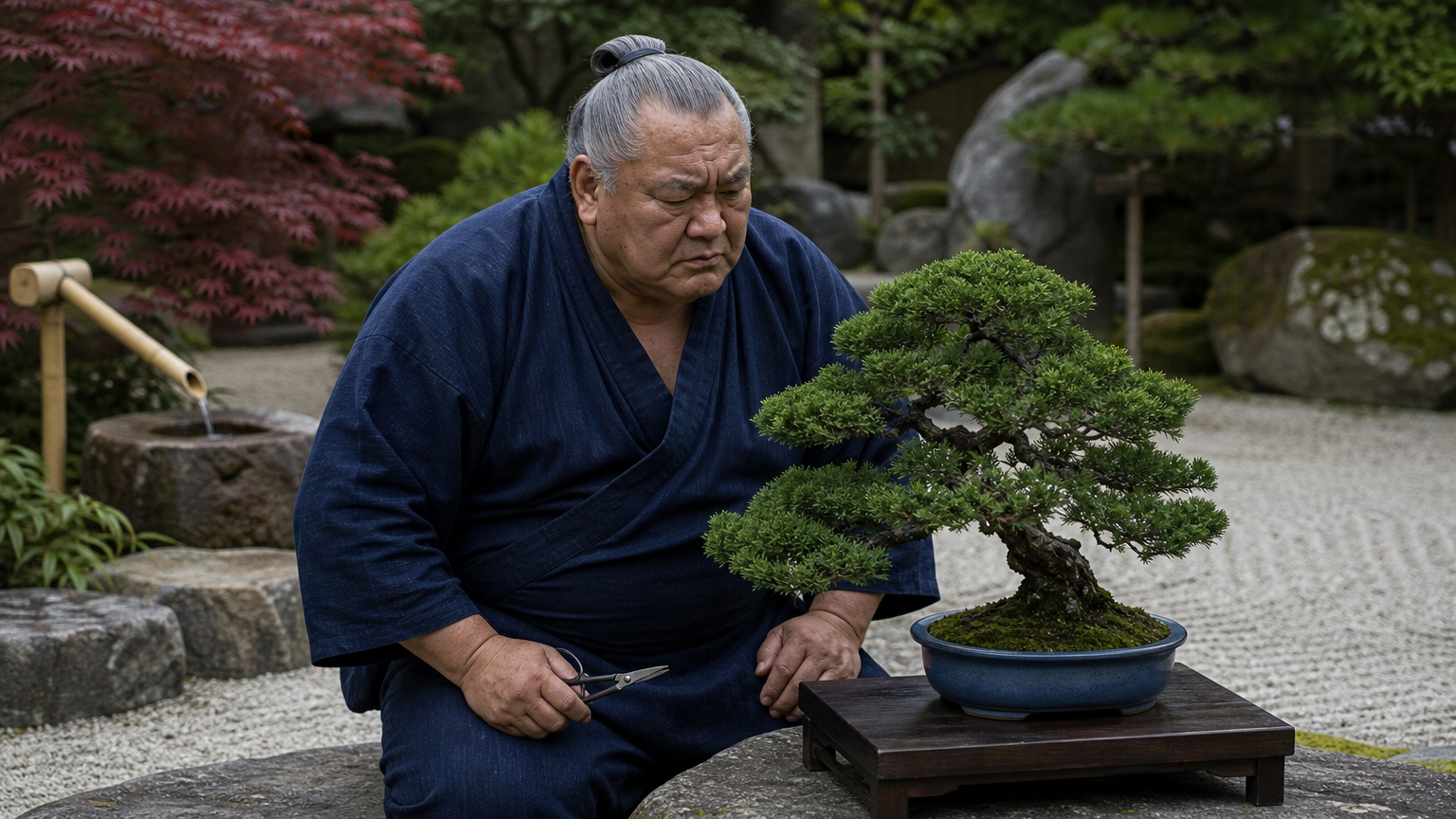
Source still (GPT Image 2) · Open on Scenario
The retired sumo wrestler in the indigo yukata kneels beside the small juniper bonsai in its blue pot on the low wooden stand. First he lifts the tiny scissors in his right hand and makes one precise snip at a single twig on the top of the tree, the clipping falling onto the stand. Then he leans back, studies the tree with furrowed brows, and says gravely to the bonsai, his lips moving naturally with the words, <S>Just a little off the top, my friend.<E> He finishes with a satisfied nod and a tiny smile. The bamboo water spout keeps trickling into the stone basin, the red maple leaves sway gently. Steady medium shot at eye level with a slow push-in. <AUDCAP>A deep, slow, gravelly older male voice, solemn but warm. A crisp tiny snip of scissors, water trickling from bamboo, soft wind in leaves and distant birdsong. No music. No other speech.<ENDAUDCAP>Pro Image to Video: one snip, then the line, said to the tree · Open on Scenario
Vertical smartphone selfie video, natural UGC style. The freckled woman with the auburn bun and grey sweatshirt holds the small amber dropper bottle up beside her cheek in the bright white bathroom. First she says to the camera with a friendly, genuine smile, her lips moving naturally with the words, <S>Okay, this serum actually changed my mornings.<E> Then she tilts the bottle slightly so the light glints through the amber liquid and finishes with an enthusiastic nod. Slight natural handheld wobble like a phone held at arm's length, soft window daylight from the left, the eucalyptus sprig and mirror behind her. The bottle stays plain with no label. <AUDCAP>A bright, casual, friendly young female voice, close to the phone microphone. Soft bathroom room tone with a faint echo off tiles. No music. No other speech.<ENDAUDCAP>Pro Image to Video, 9:16 UGC-style product testimonial · Open on Scenario
Stop-motion animation with slightly stepped, handcrafted movement. The little green knitted dragon sitting on the floury wooden table wrinkles its yarn snout, tilts its head back, and lets out a big sneeze that blows a puff of white flour into the air in front of it. The flour cloud drifts and settles across the table and onto the rolling pin, and the dragon blinks its button eyes, shakes its head, and gives a small proud wiggle of its felt-spiked back. The teacup and rolling pin stay in place. Warm morning window light, cozy cottage kitchen softly blurred behind. Locked-off vertical macro camera. <AUDCAP>A tiny high-pitched creature sniff building into a cute squeaky sneeze, a soft puff of flour, a little contented chirp, and quiet kitchen ambience with a ticking clock and birdsong outside. Light playful pizzicato strings.<ENDAUDCAP>Lite Image to Video: a knitted dragon sneezes flour, stop-motion feel kept · Open on Scenario
Japanese 2D anime animation with clean line art and cel shading. On the city rooftop at sunset, the teal-haired courier girl in the yellow windbreaker holds up her hand where the black crow with the tiny red scarf is perched. First she whispers to the crow with a grin, <S>Fly fast, it's urgent.<E> Then she lifts her arm and the crow spreads its wings and takes off, flying away over the dense city skyline toward the orange and violet clouds until it becomes a small silhouette. She lowers her hand and watches it go, her hair and bag strap blowing in the wind. Low angle, the camera slowly tilts up to follow the crow into the sky. <AUDCAP>A soft, energetic teenage girl voice. Heavy wing flaps and a single crow caw, wind across the rooftop, distant city hum. A soaring, hopeful anime string and piano melody swells as the crow flies off. No other speech.<ENDAUDCAP>Pro Image to Video with a custom negative prompt: anime style held from the source illustration · Open on Scenario
Period looks carry through too. Name the look in the first sentence so the motion matches the still, here grain, flicker and a hand-cranked jitter on a sepia photo:
Vintage sepia 1920s film look with grain, flicker and soft vignette. The young newsboy in the flat cap and wool vest stands on the busy street corner holding up the folded newspaper. First he waves the paper above his head, then he cups one hand to his mouth and shouts to the passersby, his lips moving naturally with the words, <S>Extra! Extra! Read all about it!<E> A man in a fedora stops and hands him a coin as old automobiles roll past behind them. Medium shot, slight hand-cranked camera jitter. <AUDCAP>A loud, eager young boy voice shouting. Old car horns, clopping horse hooves, crowd chatter and a scratchy ragtime piano like an old record. No other speech.<ENDAUDCAP>Pro Image to Video, 4:3, 1920s film look kept from the source still · Open on Scenario
For a stylized character on Pro, swap the style words out of the negative prompt and keep the frame terms. This is the negative prompt used for the cactus below: picture frame, border, frame, decorative edge, images, photorealistic, worst quality, low quality, ugly, deformed, static, blurry, extra limbs
Stylized 3D animated feature film. The grumpy little cactus with the pink flower sits in its terracotta pot on the sunny windowsill, arms crossed. First the watering can beside it tips and pours a few drops onto the cactus, then the cactus scrunches its bushy white eyebrows, shakes the water off and grumbles, its mouth moving with the words, <S>I said no water on Tuesdays!<E> It finishes with an indignant huff as the pink flower on its head droops. Warm afternoon light. Static camera at windowsill height. <AUDCAP>A small, scratchy, grumpy cartoon voice. Water droplets plinking, a tiny shake sound, a huff, and a bouncy comedic pizzicato tune. No other speech.<ENDAUDCAP>Pro Image to Video, 1:1, stylized 3D mascot with a scripted grumble · Open on Scenario
Upscale with VSR and VSR Lite
Every Kandinsky 6.0 generator outputs 480p (864x480 for 16:9). The VSR models multiply the input resolution by upscaleFactor: 2.25x turns 864x480 into about 1080p, 2x and 4x are also available. They sharpen edges and fine textures such as feathers, fabric, sugar grains and line art, and keep the audio track. Here is the dumpling clip above after VSR at 2.25x (480x864 to 1088x1952):
Kandinsky 6.0 VSR, 2.25x on the Lite cel-animation clip · Open on Scenario

Detail crop at the same moment: original 480p (left), VSR 2.25x (right)
Photoreal footage works the same way. This Lite nature shot went from 736x544 to 1664x1216 at 2.25x:
Kandinsky 6.0 VSR, 2.25x on a photoreal Lite Text to Video clip · Open on Scenario
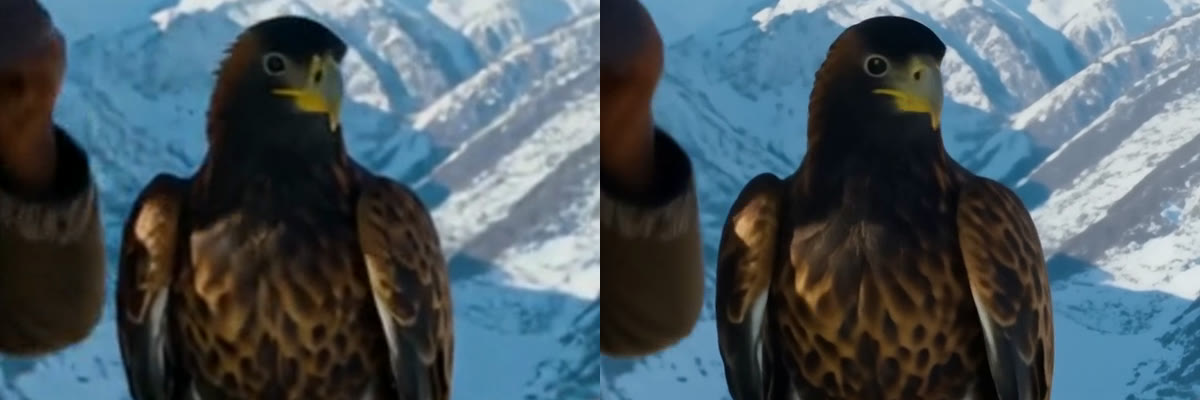
Detail crop at the same moment: original resized with standard bicubic scaling (left), VSR 2.25x (right)
The upscalers also work on clips from other models, as long as the input fits the limits below. A 720p Seedance 2.5 clip trimmed to 5 seconds, upscaled 2x to 2560x1440:
Kandinsky 6.0 VSR, 2x on a 3D animated clip · Open on Scenario
Prepare the input: the upscalers reject videos longer than 121 frames (about 5 seconds at 24 fps) and failed in our tests on inputs whose width or height is not a multiple of 16 (for example 854x480 or 1470x630). Trim and resize first, e.g. 848x480 instead of 854x480.
Parameters
The generators share most controls. Pro adds guidanceScale and negativePrompt; Image to Video adds image and an auto aspect ratio. The upscalers take only a video and a factor.
prompt
Required on all four generators. Long, ordered prose for the picture, spoken lines inside <S>...<E>, and the soundtrack inside <AUDCAP>...<ENDAUDCAP>. See the lighthouse prompt at the top of this article.
image
Image to Video only, required. Used as the first frame; the output keeps its subject, style and lighting (see the sumo and courier examples).
aspectRatio
16:9, 4:3, 1:1, 3:4 or 9:16 (default 16:9). Output sizes are 864x480, 736x544, 640x640, 544x736 and 480x864. Image to Video adds auto (default), which picks the closest ratio to your image and center-crops it.
generateAudio
true / false, default true. Turn it off for a silent clip, for example a fashion film you will score later. The output then has no audio track at all.
Lite Text to Video, 9:16, generateAudio off · Open on Scenario
enablePromptExpansion
true / false, default false. Rewrites your prompt into a long video and audio description before generating. It works best on short prompts. With a detailed prompt it can drift: in our test it replaced a detailed tram scene with an unrelated one. Leave it off when you write the full prompt yourself.
Where it shines is a one-line idea. This short prompt, with expansion on, became a complete scene with sound:
A lighthearted shot of a red panda barista in a tiny forest cafe pouring latte art, with cozy cafe sounds.Lite Text to Video, enablePromptExpansion on, short prompt · Open on Scenario
negativePrompt (Pro)
Optional. When empty, Pro uses its built-in negative prompt ("Static, 2D cartoon, cartoon, 2d animation, paintings, images, worst quality, low quality, ugly, deformed, walking backwards"). Anything you write replaces it entirely, so copy over the parts you still want.
guidanceScale (Pro)
1 to 10, default 5. How closely Pro follows the prompt. We got good results between 4 and 6 (the whale clip at 4, the sneaker ad and the paleontologist at 6); stay near the default unless the model ignores part of the prompt.
seed
Optional number for reproducible results. Leave empty for a random seed.
video (VSR, VSR Lite)
Required. Up to 121 frames, resampled to 24 fps, with width and height divisible by 16. The output is 113 frames long, so the last fraction of a second of a full 5-second input is dropped.
upscaleFactor (VSR, VSR Lite)
2, 2.25 (default) or 4, applied to the input size. 2.25x is the 480p to 1080p step for Kandinsky clips; 4x on a 16:9 Kandinsky clip (864x480) gives 3456x1920.
Use Cases
Talking characters and mascots: Give a character a scripted line in a 5-second clip with matching lip-sync, from text or from your own character art.
UGC-style and product ads: Animate a product shot or a presenter still into a short testimonial, or a hero product shot with sound design timed to the action.
Game trailers and cinematics: Voxel, stylized 3D or anime beats with sound effects and score, ready to cut into a trailer.
Education and explainers: A presenter in front of a subject (a museum skeleton, a weather map) delivering one clear line.
Localized short content: Spoken lines in English or Russian without a separate voice-over pass.
Upscaling short clips: Take 480p drafts, or any short clip trimmed to 5 seconds, to 1080p and above with VSR.
Tips for Better Results
Use the tags. Spoken lines inside <S>...<E> and sound inside <AUDCAP>...<ENDAUDCAP> gave accurate speech and well-timed sound in most of our tests.
Open with full-frame wording. "Full-frame shot filling the entire frame edge to edge, no borders, no text" at the start of the prompt kept Lite clips free of black bars.
One line, one or two actions. Five seconds fits a single sentence of dialogue and one or two actions; extra beats get dropped (a dumpling flip and a coffee spill we asked for never happened).
Write how each action ends. "...and lands beside him", "...and stands on the summit". Open-ended actions tend to stop halfway or end with objects breaking or duplicating.
Spell out the order. Write "First..., then...". Without it, Pro I2V sometimes swapped the order of a glance and a line.
Describe the voice. Age, tone and pace in the audio block keep the voice consistent with the character on screen.
Start on Lite, finish on Pro. Lite returns in a few minutes, so use it to lock the prompt before committing to a Pro render.
Ground Image to Video prompts in the image. Name what is visible ("the open laptop on the right") and describe only the change.
Prepare inputs for VSR. Trim to 5 seconds at 24 fps and resize to dimensions divisible by 16 before upscaling.
Known Limitations
Fixed 5 seconds at 480p. There is no duration or resolution setting on the generators. Chain clips for longer scenes and use VSR for higher resolution.
Occasional speech slips. A small share of dialogue clips voiced a stray extra word after the line, slurred a word, clipped the end of the line or skipped it, even with "No other speech" in the prompt. Regenerate or trim the tail.
Borders and letterboxing. Some clips, mostly on Lite, come back with black bars, a thin border or a vignette frame. Full-frame wording at the start of the prompt (and frame terms in the Pro negative prompt) greatly reduces it, but a stylized Pro clip still came back inside an oval vignette once.
Some actions never happen. A spill, a flip or the last step of a climb can be skipped, and handled objects sometimes break apart or duplicate. Keep the action simple and give it a clear end state.
Sung lyrics are unreliable. A sung <S> line on Lite Image to Video came back as band music with no words. Spoken lines worked every time.
Prompt expansion can override detailed prompts. Keep enablePromptExpansion off when you write a full prompt.
Pro is slow. Pro jobs usually take 15 to 40 minutes each on Scenario at the moment, longer under heavy load; Lite and VSR take a few minutes.
Custom negative prompts replace the built-in one. Copy over the default terms you still want, especially "images", to avoid framed or picture-like outputs.
VSR input limits. Inputs over 121 frames are rejected even though the field says they are capped, inputs with dimensions not divisible by 16 failed, and outputs are 113 frames.
Speech languages. Kandinsky Lab trained speech on English and Russian. Other languages were not tested.
Multi-person scenes, hands and on-screen text. Kandinsky Lab lists multi-speaker lip-sync, hand detail and text rendering as weak spots. In our tests, a game title card and on-screen lettering in a noir scene came out as gibberish. Keep one speaker per clip, avoid readable signage and add "no text" to the prompt.