Veo Models: The Essentials
Last updated: October 5, 2026
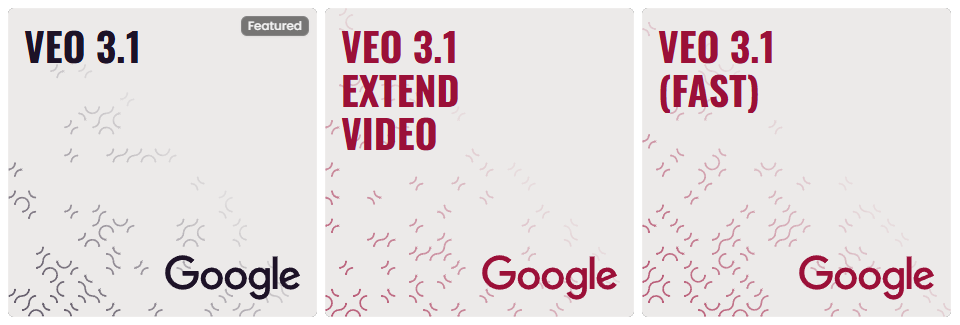
Google’s Veo 3.1 represents the latest advancement in high-fidelity video generation on Scenario. This generation is designed to provide cinematic visuals and fluid motion with professional-grade technical controls. The suite focuses on the Veo 3.1 architecture, replacing older versions with enhanced stability and visual fidelity.
The Veo 3.1 Suite
The current ecosystem is built around three primary models designed for different production needs:
Veo 3.1: The flagship "featured" model for high-fidelity cinematic video generation.
Veo 3.1 (Fast): A high-speed iteration of the engine, utilizing the same configuration settings as the standard model for rapid prototyping.
Veo 3.1 Extend Video: A specialized utility designed to add duration to existing video clips with high-fidelity continuation.
Technical Configuration & Interface
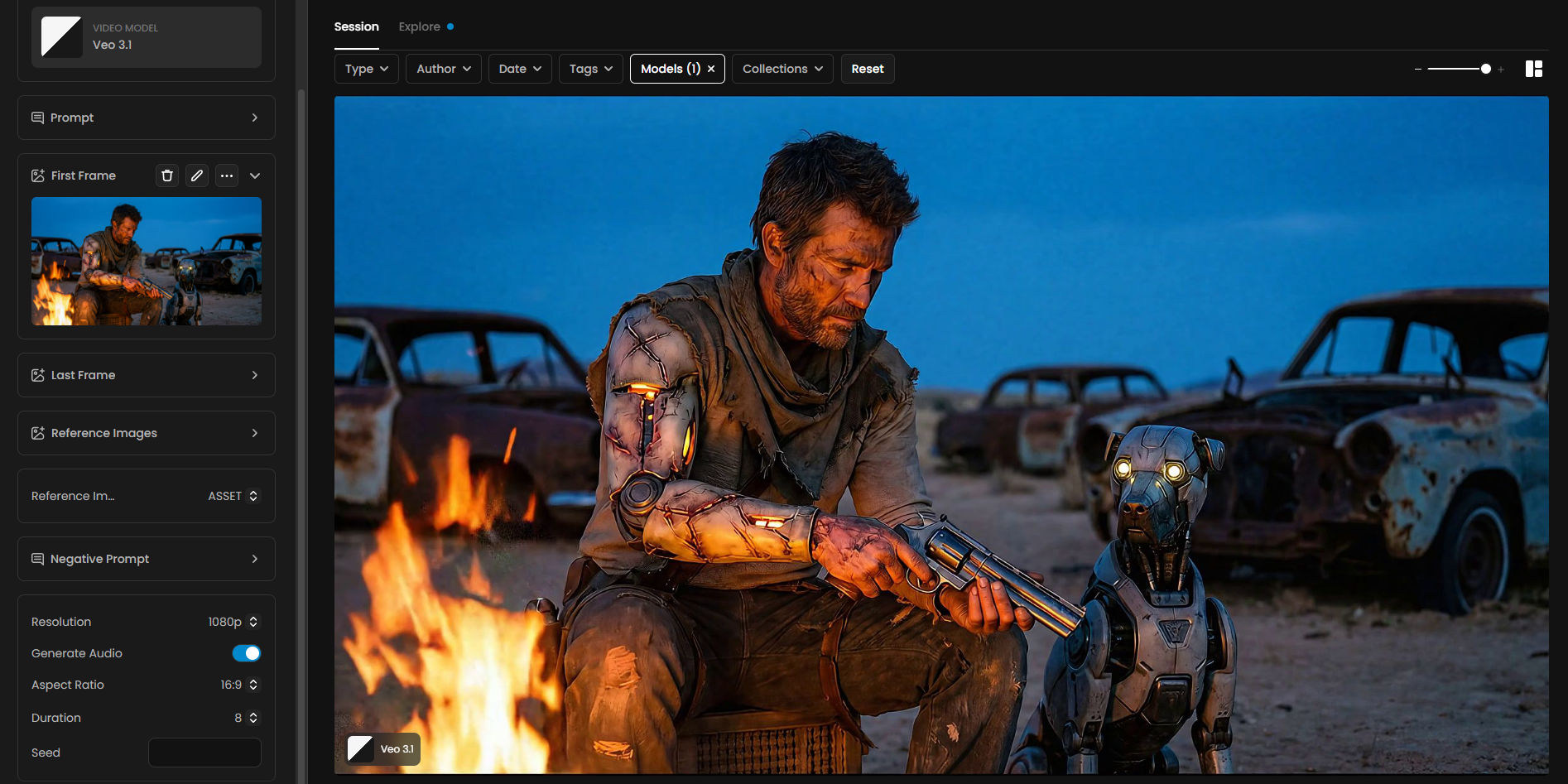
The Veo 3.1 and Veo 3.1 (Fast) models utilize a unified interface providing granular control over both visual and auditory output:
Input & Reference Controls
Multimodal Input: Supports Prompt, Negative Prompt, First Frame, and Last Frame to direct complex action sequences.
Reference Image Logic: Creators can upload Reference Images and define their influence type:
ASSET: Provides physical elements to the scene, such as objects, characters, or specific settings.
STYLE: Influences aesthetics, including color palettes, lighting, and textures (e.g., photography, anime, or origami).
Production Settings
Resolution: High-definition output options including 720p and 1080p.
Aspect Ratio: Flexible framing for different platforms, including 16:9 (landscape) and 9:16 (vertical).
Duration: Selectable clip lengths of 4, 6, or 8 seconds.
Native Audio: Includes a Generate Audio toggle to create synchronized soundscapes natively within the video generation process.
Reproducibility: Supports a Seed field to allow for reproducible results across different sessions.
Veo 3.1 Extend Video
The Extend Video model is designed for seamless narrative expansion. By dragging and dropping or uploading an existing video into the Video input, creators can describe how the scene should continue via a text Prompt. Like the generation models, it supports Seed inputs and optional Generate Audio toggles to maintain consistency in the extended frames.
Key Strengths
Superior Realism and Fidelity
The Veo 3.1 models are designed for exceptional realism and fidelity, featuring professional-grade 4K output for high-end productions. This generation demonstrates a state-of-the-art understanding of real-world physics, leading to more believable and natural movements that correctly simulate weight, momentum, and lighting interplay within every scene.
Enhanced Prompt Adherence
One of Veo's significant strengths is its improved prompt adherence, meaning the models are highly responsive and accurate in translating user instructions into video content. This allows for more precise control over the generated output, ensuring that the video closely matches the textual description.
Native Audio Generation
Veo 3.1 stands out by generating all audio natively, including dialogue, voice-overs, sound effects, and ambient noise. This integrated audio capability eliminates the need for separate audio generation and synchronization, streamlining the video creation process while significantly enhancing the overall quality and immersion of the generated content.
With superior audio richness and precision synchronization, Veo 3.1 adds natural speech, realistic sound effects, and environmental noise that perfectly match the physics and atmosphere of each scene.
Resolution and Duration
Veo 3.1 models support various resolutions, including the capability for 4K output. These models can generate 8-second clips, with the possibility to create longer sequences through concatenation on Scenario by reusing a "Last Frame" as the new "First Frame".
To maintain seamless continuity, simply click the three-dot menu on a generated video and select "Last Frame". This action automatically copies the final frame into the First Frame input field on the generation panel, ensuring smooth visual transitions between consecutive clips.
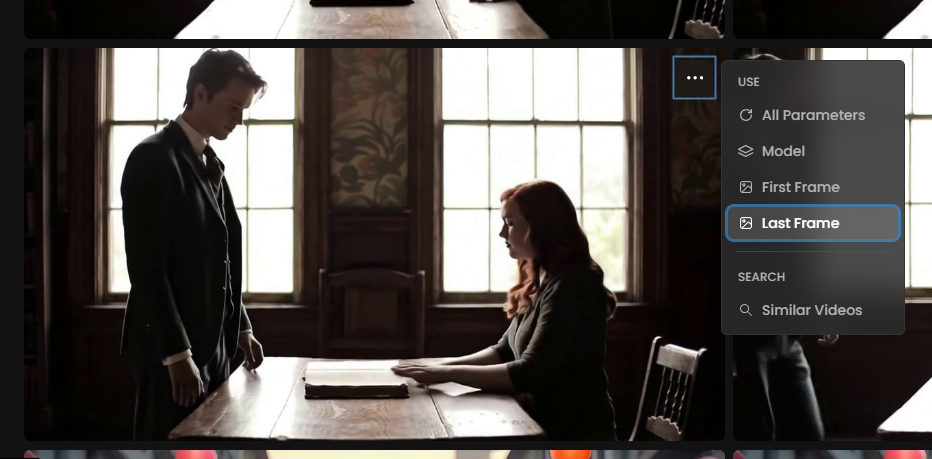
This video was edited by putting together 3 scenes generated using this method.
Examples and Output Analysis
Prompting for Visual Elements
To achieve the best results with Veo, a well-crafted prompt is essential. Prompts should include detailed descriptions of visual elements such as the subject, context, action, style, camera motion, composition, and ambiance. The more specific the prompt, the better Veo can understand and generate the desired video.
For example, instead of a simple prompt like "A man and his robot dog are sitting by a campfire in a junkyard." a detailed prompt would be:
“A clumsy young wizard accidentally invokes a massive fire phoenix from a tiny candle. He falls backward, eyes wide with terror and awe. He stammers: "I... I think I overdid it this time!"
Style: Stylized 3D animation, vibrant colors, expressive facial rigging.
Camera: Low-angle wide shot looking up at the towering phoenix.
Lighting: Warm orange and gold glow filling the dark library.
Environment: Ancient library with floating books and dust motes.
Elements: Wizard apprentice, glowing phoenix, wooden shelves, ancient scrolls.
Motion: Fluid fire movement, flying books caught in the heat wave.
Ending: The wizard covers his head as a feather of fire falls.
Music: Orchestral crescendo. SFX: Roar of flames, fluttering paper.“
You can write this prompt manually or you can use the Rewrite your prompt tool. The video below was generated using this prompt with the Veo 3.1 model:
We highly recommend Scenario users to take advantage of the “Prompt Spark” tool located just below the prompt box. It provides three main options: generate a prompt, rewrite your prompt, and translate the prompt.
You only need to provide a clear and straightforward description of your scene. Then, by clicking "Rewrite your prompt", the tool will enrich your input with technical terms, improve the visual detail, and, when applicable, add audio prompt suggestions to match the scene. Prompt Spark also takes the First Frame into account.
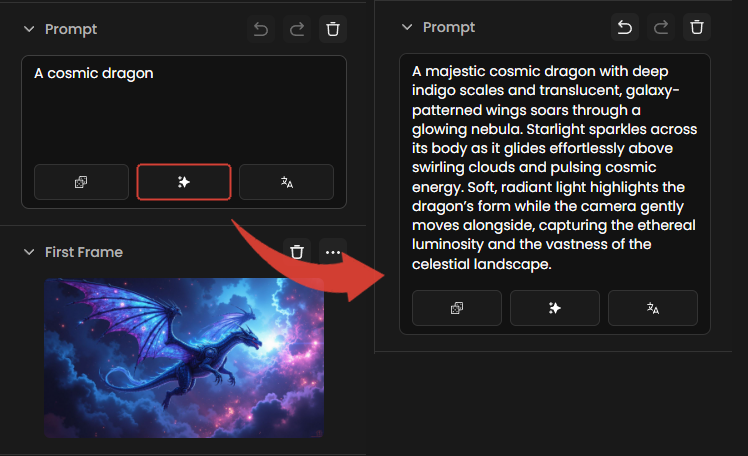
With these built-in tools, you don't need to be a prompt expert to achieve great results. Prompt Spark is designed to transform simple ideas into optimized and highly effective prompts, helping you get the most out of any video generation model, especially Veo 3.1.
Character Consistency
Veo 3.1 shows significant advancements in maintaining character consistency across different generations. By keeping a character's detailed prompt description consistent, users can generate multiple scenes with the same-looking person, which is crucial for narrative continuity. This feature is particularly strong, allowing for the creation of character reference sheets with exact wording to ensure visual continuity.
Prompting for Audio
Since Veo 3.1 generates audio natively, prompts should also include audio elements such as dialogue, ambient noise, sound effects, and music. Dialogue can be prompted explicitly (e.g., "A guy says: My name is Ben") or implicitly (e.g., "A guy tells us his name"). For explicit dialogue, it's recommended to keep it short, ideally something that can be said in about 8 seconds, to avoid unnatural pacing.
Dynamic Camera Movements and Environmental Effects
Veo models are capable of handling complex camera movements like pans, zooms, and tracking shots, as well as intricate environmental interactions such as weather, particle effects, and lighting changes, all with impressive realism.
Transport elements through the latent space
You can follow use a subject that will be carried through different spaces and it will maintain its characteristics within different contexts.
b
Visual notes on start frame
You can doodle and draw your notes on the first frame, like you would for a human artist, and Veo 3.1 will follow your instructions.
You can also attach notes and ask the model to delete them on first frame as a prompt. Veo 3.1 will read them and understand them, and action on your video will follow those written prompts.
Conclusion
Veo 3.1 is the definitive professional choice for AI video on Scenario. By providing tools for direct generation, rapid speed, and seamless extension, this suite ensures that every step of your video production pipeline remains high-fidelity and technically precise.