Riverflow 2.5: The Essentials
Last updated: July 9, 2026
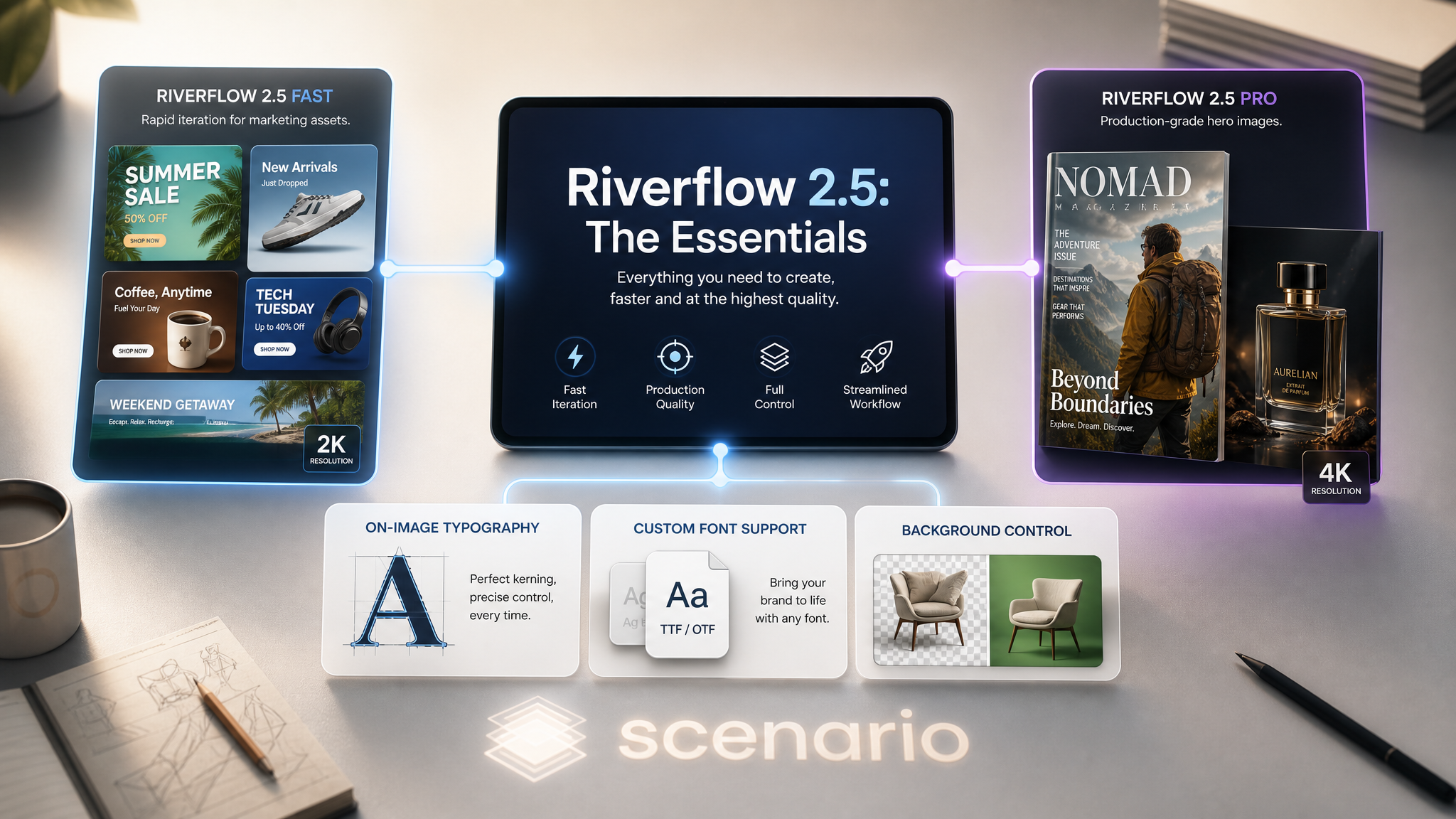
Covers Riverflow 2.5 Fast and Riverflow 2.5 Pro.
The Riverflow 2.5 family from Sourceful is built for marketing and design work that ships. Both models are agentic: they generate multiple candidates per request and can be asked to judge their own work against a scoring rubric before returning the winner. Both render on-image typography cleanly, accept custom font files (TTF, OTF, WOFF, WOFF2), and handle transparent or solid backgrounds natively. The split is simple: Fast for iteration speed and high-volume marketing pipelines (up to 2K, 4 reference images), Pro for production-grade hero work (up to 4K, 10 reference images, an extra xhigh thinking tier).

Which Model Should I Use?
Model | ID | Best for |
|---|---|---|
| Speed-first marketing and design work: ad banners, social posts, packaging mockups, real-estate flyers, brand variants. Up to 2K, 4 reference images, thinking levels low/medium/high. | |
| Production-grade hero work: campaign key art, magazine covers, premium packshots, large-format ad creative. Up to 4K, 10 reference images, extra |
Default to Fast for iteration. Move to Pro when the deliverable is a final asset that has to clear a brand-team review. Both share the same parameter surface (with Pro adding 4K and the xhigh thinking tier), so prompts written for Fast carry directly to Pro without changes.
How to Use the Models
How Riverflow Works
Riverflow is an agentic image model: each request generates multiple candidates internally, the model reasons about which one best fits your instruction (and optionally your scoring rubric), and returns the winner. The thinkingLevel dial controls how much compute the agent budgets for that reasoning step.
The minimum call needs nothing but a prompt:
prompt: "Premium skincare packshot of a porcelain ceramic cream tub..."
// everything else has sane defaults
Layer in optional inputs as the project demands: reference images for image-to-image, a scoring prompt or rubric to bias candidate selection, custom fonts for brand typography, transparent or solid backgrounds, and an aspect ratio that matches the deliverable.
Riverflow 2.5 Fast: Iteration Speed
Fast renders at up to 2K with three thinking levels (low, medium, high). It accepts up to 4 reference images for img2img work. Right for ad banners, social posts, packaging mockups, brand variants, and anything where you need to iterate 5 to 10 versions before locking the direction. The 20 examples below all came from Fast at 2K + high in roughly 40 seconds each.
 "OAKWOOD ESTATES" real estate flyer, 3:4 2K |  "CHATEAU MONTBLANC" wine, 2:3 2K |
 "FALL/WINTER 26" lookbook, 3:4 2K |  "TRATTORIA ROMA" menu, 2:3 2K |
 "PULSE 24" gym social, 1:1 2K |  "COCOA REVOLT 72%" chocolate, 4:5 2K |
Riverflow 2.5 Pro: Production Quality
Pro renders at up to 4K and adds an xhigh thinking tier on top of low, medium, high. It accepts up to 10 reference images (Fast caps at 4), supports the same scoring and font features, and is the recommended tier when the deliverable has to clear a brand-team review. The 18 examples below cover packaging, automotive, sneakers, tech keynote, magazine covers, hospitality, sports, food and beverage, game key art, luxury watches, perfume, streaming series, bourbon, airline campaigns, and beauty editorial.
 "NORTH" magazine cover, 3:4 4K |  "DROP 07" sneaker, 4:5 2K |
 "MERIDIAN AUTOMATIC" watch, 1:1 4K xhigh |  "EAU DE ZINNIA" perfume, 3:4 4K |
 "BLOOM ISSUE 09" magazine, 3:4 4K xhigh |  "NOX RUNNERS DROP 12" sneaker, 2:3 4K xhigh |
The Scoring System
The agentic differentiator. Pass a scoringPrompt (free-form instruction) or a structured scoringRubric (a JSON list of dimensions with weights), and the model judges its candidates against those criteria before picking the winner. The OSARA skincare hero at the top of this article used this scoring prompt:
scoringPrompt: "Score this image as a luxury beauty hero shot for a high-end
direct-to-consumer brand website. Reject any candidate with warped or
unreadable brand text, soft focus on the labels, or amateur lighting."
The rubric form goes further. It is a JSON list of 1 to 8 dimensions:
scoringRubric: [
  {
    "key": "clarity",
    "label": "Clarity",
    "description": "How easy is the text to read? Letters are sharp and high-contrast against their background, with no blurring, warping, or overlapping characters.",
    "weight": 0.5,
    "passing_score": 7
  },
  {
    "key": "thumbnail",
    "label": "Thumbnail readability",
    "description": "How well does it hold up at small size? The main subject and any text stay recognizable at roughly 200x200 pixels.",
    "weight": 0.5
  }
]
Rubrics shine when the brand standard is well-defined and you want the model to enforce it across a batch. Skip the rubric for casual iteration: it adds reasoning overhead and is wasted compute when you have not locked the criteria yet.
Custom Typography
Both models accept up to 2 custom font files via the fontUrls input (TTF, OTF, WOFF, or WOFF2). Pair each URL with a string in the fontTexts input (same order, up to 300 characters each) and the model renders those words in your uploaded typeface. Use this when:
Brand typography matters. Stock fonts make brand work look generic. A real brand font ships the design.
Headlines must match a campaign's set type. Magazine cover lines, packaging headlines, and ad copy that already exists as type in InDesign or Figma should match exactly in the image.
Multilingual or non-Latin scripts. Upload the font that covers the script (Cyrillic, Arabic, Hangul, etc.) and Riverflow renders it.
Leave the font inputs empty and the model picks a fitting typeface from its built-in set. The examples in this article all used built-in type and quoted strings inside the prompt.
Background Control
The background input keeps the rendered background as-is (original, default), removes it for an alpha-channel PNG (transparent), or fills it with a solid hex color (solid + backgroundColor). Use:
Original: for staged photography, scenes, and editorial work where the background is part of the design.
Transparent: for cutout products, mockup elements, and any asset destined for layered compositing.
Solid: for brand-color flood-fills, e-commerce packshots that need consistent backdrops, and corporate templates.
Parameters
Shared Across Fast and Pro
prompt
Required, 2 to 2048 characters. Describes what to create or how to edit your reference images.
referenceImages
Optional. Image assets to edit or build from. Fast accepts up to 4; Pro accepts up to 10.
aspectRatio
One of auto (default) or 10 named ratios: 21:9, 16:9, 3:2, 4:3, 5:4, 1:1, 4:5, 3:4, 2:3, 9:16. Auto picks a fitting ratio based on the prompt.
thinkingLevel
Reasoning budget. Fast: low, medium (default), high. Pro: same plus xhigh for batch production runs.
background
original (default), transparent (alpha channel), or solid (use backgroundColor hex).
backgroundColor
Hex code, default #ffffff. Only applies when background: solid.
fontUrls
Up to 2 URLs to your own TTF, OTF, WOFF, or WOFF2 font files. Each font adds to the run.
fontTexts
Up to 2 strings (300 chars each), matched to fontUrls by order. The first text uses the first font, and so on.
scoringPrompt
Free-form instruction telling the model how to judge candidates and pick the best result. Use when the deliverable has a clear stakeholder standard.
scoringRubric
Structured criteria. A JSON list of 1 to 8 dimensions, each with key, label, description, and weight (and optional passing_score and score_guidance). Use when scoring needs to be repeatable across a batch.
enhancePrompt
Boolean, default false. Lets the model expand and improve your instruction before generating. Useful for short, vague prompts; skip when you wrote the prompt precisely.
Fast-specific
resolution
1K (default) or 2K. 2K is sharper for hero work; 1K is the right choice for thumbnails and rapid iteration.
Pro-specific
resolution
1K (default), 2K, or 4K. Reach for 4K on final-delivery hero work; 2K is the sweet spot for most production use.
Use Cases
Packaging design and packshots. Beauty, food, drinks, electronics, and CPG. The brand name renders inside the image as type rather than being composited on top. Run on Fast for iteration; switch to Pro at 4K with a scoring rubric for shipping packshots.
Print and digital advertising. Billboards, magazine cover lines, full-page ads, social key art. The agentic scoring is most useful here: pass a brand-team rubric and let the model self-filter weak candidates.
Editorial covers and lookbooks. Fashion lookbooks, magazine covers, gallery posters. Custom font URLs let the masthead exactly match the in-house brand typography.
Retail and grocery brand assets. Farm-to-table flat lays, store posters, banner ads. Fast at 2K is enough for most retail surfaces; reserve Pro for hero campaign pieces.
Tech and SaaS keynote graphics. Product launch hero shots, slide title cards, web hero banners. The combination of clean typography, sharp product silhouettes, and adjustable thinking level fits the iterative review cycle of product marketing.
Game and entertainment key art. Poster art with title type baked in, capsule art for digital storefronts, social key art. Pro at 4K with
xhighthinking handles the typographic detail and atmospheric lighting at the same level.Real estate and hospitality marketing. Flyers, brochure covers, property hero shots with overlaid headlines. Fast at 2K is the default; switch to Pro when the asset is destined for large-format print.
Tips for Better Results
Quote literal text in the prompt. "
'AURA'embossed in elegant uppercase serif" beats "the brand name on the lid". Both models treat quoted strings as the literal type to render.Default to Fast; promote to Pro for final hero. Fast renders in roughly 40 seconds; Pro takes longer but ships at 4K. Iterate on Fast, then re-run the winning prompt on Pro at the same aspect ratio for the deliverable.
Use the scoring prompt when the brand standard is well-defined. "Reject candidates with blurry text or amateur lighting" is more useful than "make it good". The clearer the rejection criteria, the better the candidate selection.
Reach for
xhighonly on Pro for the deliverable. The extra reasoning costs more compute. Use it for the final pass after the prompt is locked athigh.Upload brand fonts for production work. The built-in fonts are good for exploration, but real campaigns ship with real type. Pass the TTF, OTF, or WOFF URL and the matching headline text.
Pair
background: transparentwith future compositing. When the output will be layered into a designed page later, render with transparency from the start. Saves a background-removal pass downstream.Skip
enhancePromptwhen your prompt is precise. Enhancement can drift away from a tight, specific brief. Turn it on for sparse one-liners; leave it off when you wrote a paragraph.Migrate from Riverflow 2.0. The prior generation is being deprecated. Re-run any active 2.0 workflows on 2.5 Fast or Pro; prompts carry over directly.
Known Limitations
Long paragraphs of text degrade. Both models excel at headlines, brand words, and short captions. Multi-sentence paragraphs lose fidelity. Keep on-image type concise.
Aspect ratio cap. 10 named ratios plus auto. For exotic dimensions outside this set, generate at the closest named ratio and crop downstream.
Resolution ceilings. Fast caps at 2K; Pro caps at 4K. For larger deliverables (8K billboards), generate at the maximum and upscale.
Custom fonts cost extra. Each
fontUrlsentry adds to the run's compute footprint. Use them for production work, not exploratory passes.Scoring overhead. The agentic scoring step takes additional time. Skip it for fast iteration; reserve it for production runs and locked briefs.
Riverflow 2.0 is being deprecated. Do not start new work on 2.0. The Sourceful provider is unlisting and retiring those models.