Luma Uni-1: The Essentials
Last updated: October 5, 2026
Covers Luma Uni-1 Max and Luma Uni-1.
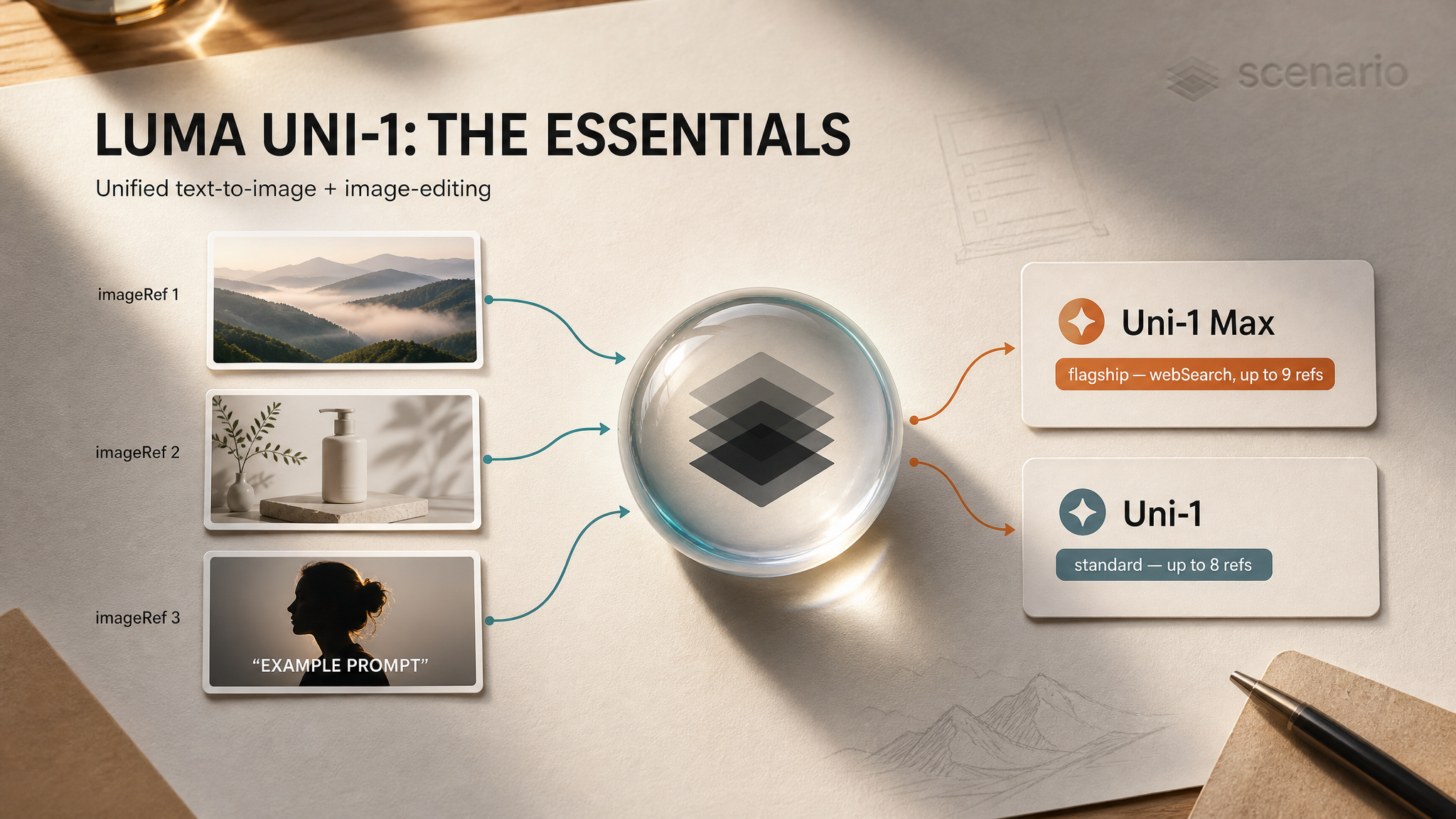
The Luma Uni-1 family from Luma Labs is a unified image model: the same call does both text-to-image generation and image editing. Pass a prompt and you generate. Pass a prompt plus a source image and you edit. Both modes support up to 9 reference images for style and content guidance, an optional web search step that grounds the generation against real-world subjects, and nine aspect ratios spanning 1:3 to 3:1. Reliable on-image text makes the family a strong pick for posters, social key art, packaging mockups, and any brand work where the typography has to be legible.

Hero: Luma Uni-1 Max, generated with web search grounding enabled.
Which Model Should I Use?
Model | ID | Best for |
|---|---|---|
| Flagship tier. Up to 9 reference images (8 when editing), web search grounding, all nine aspect ratios. Pick this for final deliverables, brand campaigns, and dense reference workflows. | |
| Standard tier. Same controls and prompt surface as Max, capped at 8 reference images. Pick this for iteration and exploration before promoting the locked prompt to Max. |
Default to Uni-1 for iteration and Uni-1 Max when the deliverable goes to a brand-team review or needs the 9th reference slot.
How to Use the Models
Generate or Edit in One Call
Both models share a single, unified surface. Pass a prompt alone and the model generates from scratch:
prompt: "Editorial portrait of a chef plating a dish in a copper-clad kitchen,
warm tungsten lighting, shallow depth of field, 35mm film grain"
aspectRatio: "3:2"   // default
outputFormat: "png"  // default
Pass a prompt and a source image and the model edits. Your prompt now describes the change, not the scene:
prompt: "Replace the background with a moody industrial workshop. Keep the
subject and lighting unchanged."
source:  asset_xxx     // the image to edit
// aspectRatio is inferred from the source unless you set it explicitly
No mode switch. No separate edit endpoint. The presence of source is what flips the call from txt2img to img2img.
Reference Images
Up to 9 reference images (Max) or 8 (Uni-1) shape the style or content of the output. Reference images are different from a source image:
source: the image being edited. Its content and composition carry through unless your prompt says otherwise.imageRef: style or content guides. They influence the look (palette, texture, lighting, art direction) or inject specific elements (a product, a character, a typeface sample) into a generated scene.
When editing, the source occupies one slot, so Max accepts 8 reference images and Uni-1 accepts 7 in that mode. Each reference image adds a small amount of compute, so use only the ones that materially change the output.
Web Search Grounding
Set webSearch: true and the model searches the web for relevant reference images before generating. This is the unlock for real-world subjects the base model may not know well: niche products, specific brand designs, current public figures, real locations, recent visual styles. The grounded references shape the result without you having to upload them yourself.
Leave it off for invented scenes, generic concepts, or anything purely imagined. Turning it on adds latency and is wasted compute when there is no real-world referent.
On-Image Text
Both models render headlines and short text strings with good fidelity. Quote the literal text inside the prompt and the model treats the quoted strings as the type to render. Best results come from short headlines, brand names, and packaging text. Paragraph-length text degrades, the same as every other current image model.
prompt: "Premium coffee bag mockup, matte brown kraft paper with embossed cream
typography reading 'OAK & EMBER / SINGLE ORIGIN ETHIOPIA / FILTER ROAST',
soft studio lighting, brand photography"
aspectRatio: "4:5"
Examples
Luma Uni-1 Max
Four pinned outputs from Max. Open each to inspect the prompt and inputs on Scenario.
 |  |
 |  |
More pinned examples on the Luma Uni-1 Max model page.
Luma Uni-1
Four pinned outputs from the standard tier. The control surface matches Max; the cap on reference images is one slot lower.
 |  |
 |  |
More pinned examples on the Luma Uni-1 model page.
Parameters
Shared Across Uni-1 and Uni-1 Max
prompt
Required. Up to 6000 characters. Describes the image you want to generate, or the change you want to make when editing. Specifics on subject, style, mood, and composition outperform short, vague prompts.
source
Optional. An existing image to edit. When provided, your prompt describes the change rather than the scene. The output keeps the source's aspect ratio unless you set aspectRatio explicitly.
imageRef
Optional. Reference images that guide the style or content of the output. Each entry adds compute. Max accepts up to 9 entries for pure generation (8 when editing, since the source occupies one slot); Uni-1 accepts up to 8 (7 when editing).
aspectRatio
One of nine ratios: 1:3, 1:2, 9:16, 2:3, 1:1, 3:2 (default), 16:9, 2:1, 3:1. When editing, this is ignored unless you set it explicitly, in which case the output is reframed to the new ratio.
outputFormat
png (default) or jpeg. PNG is lossless and supports transparency. JPEG is smaller and loads faster; pick it when the output goes straight to web delivery and quality loss is acceptable.
webSearch
Boolean, default false. When true, the model searches the web for relevant reference images before generating. Use for real-world subjects, places, brands, or styles that the base model may not know well. Adds latency, so leave off for invented scenes.
Tier Differences
The two models share every parameter. The differences are:
Reference image cap: Max accepts 9, Uni-1 accepts 8.
Tier: Max is the flagship; Uni-1 is the standard tier for iteration before promoting to Max.
Use Cases
Brand and marketing key art. Hero shots for campaigns, ad banners, social cover art. Reliable on-image text plus reference image stacking makes brand-consistent output achievable in one call.
Packaging mockups. Bottles, bags, boxes, cans, labels with readable brand names and short product copy. Quote the literal label text in the prompt.
Posters and editorial layouts. Movie posters, event posters, magazine cover lines, gallery announcements. Reach for 2:3 or 3:2 ratios for print, 9:16 for social verticals.
Image editing without a separate model. Background replacement, object removal or insertion, color regrade, lighting changes. Pass the source image and describe the change.
Reference-grounded generation. Style transfer across up to 9 references for Max (8 for Uni-1). Useful when the brief is "match these mood boards" or "this character, in this environment, in this lighting".
Real-world subject rendering. Niche products, specific landmarks, recent visual movements. Enable
webSearchto ground the output against current public reference rather than the model's training-time knowledge.Concept art and storyboarding. Iterate at Uni-1, promote the locked prompt to Max for the final hero plate.
Tips for Better Results
Default to Uni-1 for iteration; promote to Max for the deliverable. The control surface is identical, so prompts transfer with no rewrite. Lock the prompt on Uni-1, then re-run on Max at the same aspect ratio for the final asset.
Quote literal on-image text. "
'AURORA / ROAST PROTOCOL'in elegant uppercase serif" beats "the brand name on the bag". The model treats quoted strings as the type to render verbatim.Reach for the 9th reference slot only on Max when it changes the output. Each reference image adds compute; pile them on only when each adds a distinct signal (mood, palette, character, prop, environment).
Turn on
webSearchwhen the subject is real and specific. Real product names, real places, real public figures, current visual movements. Skip it for invented or generic scenes; it just adds latency there.Set
aspectRatioexplicitly when editing. The default behavior preserves the source's ratio, which is usually what you want. Set it only when you intend to reframe.Choose PNG when transparency or fidelity matters. Default to PNG for hero assets and any input that will be re-edited. Switch to JPEG when shipping straight to a web surface where bytes count.
Pair Uni-1 family with downstream models. Generate the still on Uni-1 / Uni-1 Max, then feed it to Veo 3.1 Lite or another video model for img2video. The reliable text and consistent brand framing carry through.
Known Limitations
Long paragraphs of on-image text degrade. Both models do well on headlines and short labels. Multi-sentence paragraphs lose fidelity, the same as every other current image model. Keep on-image type concise.
Aspect ratio is limited to nine named values. For dimensions outside the set, generate at the closest ratio and crop or extend downstream.
Each reference image adds compute. Stacking 9 references on Max is the most expensive Uni-1 call. Use the minimum count that actually changes the output.
Web search adds latency. Turning
webSearchon triggers a search pass before generation, which slows the call. Leave it off for invented scenes.Subprocessor and data retention. Both models flow through Luma Labs as a sub-processor with temporary input retention. Check the Luma licensing terms if your workflow has strict data residency or retention requirements.
Source overrides aspect ratio unless you set it. When editing without an explicit
aspectRatio, the output matches the source. Set it explicitly if you intended to reframe.