Gemini Image Models (Nano Banana Family)
Last updated: July 9, 2026
Last updated: April 22, 2026
Introduction
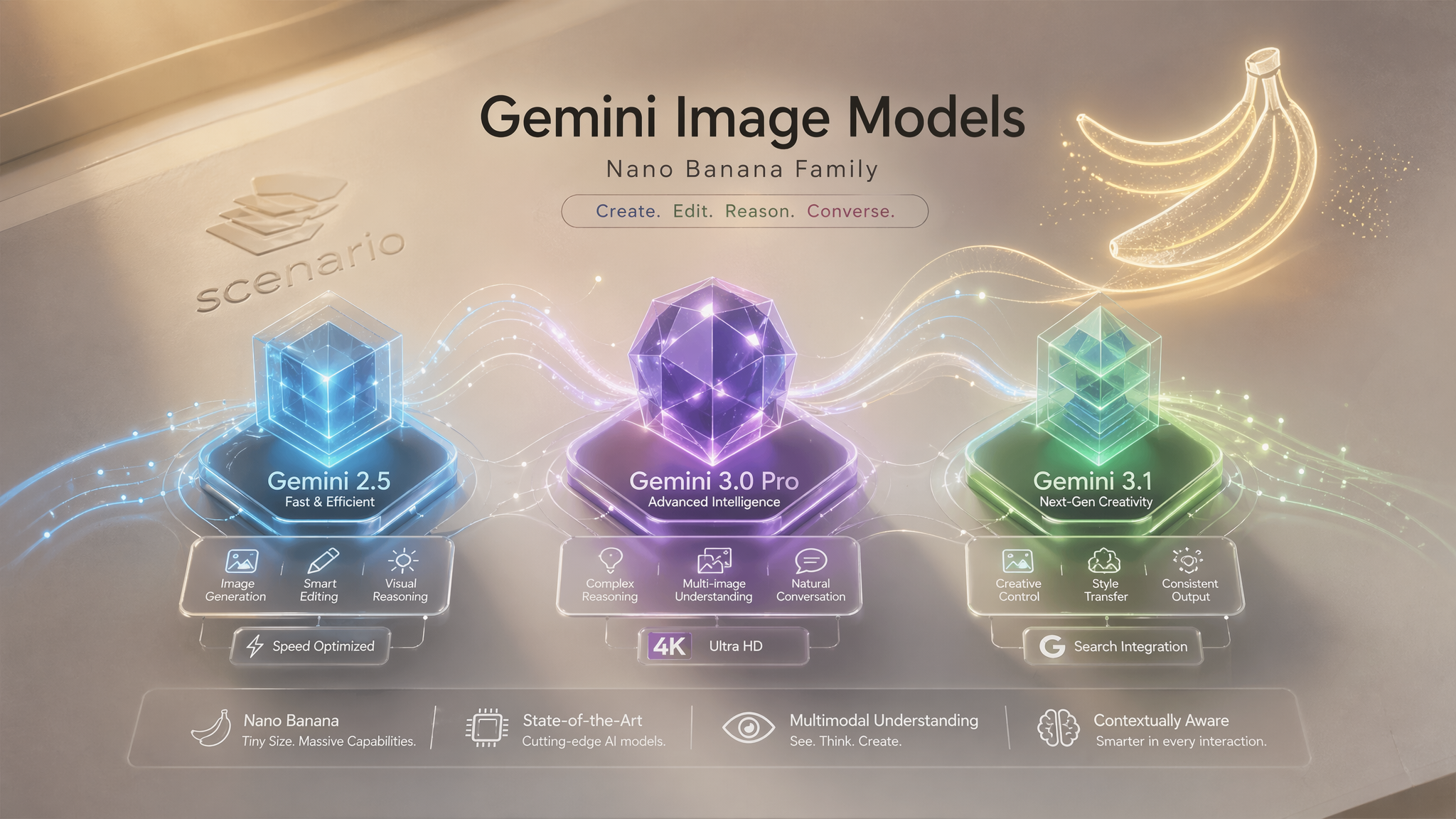
Scenario offers three Gemini image models from Google, collectively known as the Nano Banana family. These models represent a breakthrough in visual reasoning, allowing you to generate and edit images through natural conversation while maintaining strict identity and factual grounding. Gemini 3.1 also supports optional input video for video-to-image generation — use reference images or a video clip, not both in the same run.
Model Overview
Model | Official Name | Reference Images | Max Resolution | Google Search | Best Use Case |
|---|---|---|---|---|---|
Nano Banana | Up to 6 | Auto / 1K | No | Standard edits & fast iteration | |
Nano Banana Pro | Up to 14 | 4K | Yes | Studio-quality & complex scenes | |
Nano Banana 2 | Up to 14 | 4K | Yes | Speed & subject consistency | |
Nano Banana 2 Lite | Up to 14 | 1K | No | Fastest tier & credit efficiency |
All models are accessible via Edit with Prompts and the Generate Image dashboard.
🍌 Gemini 3.1 (Nano Banana 2)
Gemini 3.1 is the recommended model for most workflows. It shares the 14-reference-image capacity and Google Search support of 3.0 Pro but adds a 512px resolution tier and defaults to 1K output, making it the best choice when speed and credit efficiency matter. It is also the only Nano Banana model that accepts an optional input video and exposes a Thinking Level control for balancing speed against reasoning depth.
Parameters
Prompt: required. Natural language description of the desired change or generation.
Reference Images: optional. Up to 14 reference images for style or content guidance. Mutually exclusive with Input video — use one or the other, not both.
Input video: optional. A reference clip for video-to-image generation (for example, a thumbnail derived from footage, or a motion or style anchor). Upload, drag and drop, or select from Library. Mutually exclusive with Reference Images. Video frame rate: 0.1 to 24 fps, default 1. Controls how many frames per second are sampled from the input video. Lower values sample fewer frames — faster and more credit-efficient. Only applies when Input video is provided.
Aspect Ratio: same options as Gemini 2.5.
Resolution: output resolution: 512, 1K (default), 2K, or 4K.
Use Google Search: boolean, default false.
Thinking Level: Minimal (fastest), Low, Medium, or High (best reasoning, default). Use Minimal or Low for quick drafts and high-volume iteration. Use Medium or High when the edit requires complex reasoning, multi-step interpretation, or precise adherence to detailed instructions.
Number of Outputs: 1 to 4 (default 1).
Seed: optional. For reproducible results.
Use Gemini 3.1 for rapid iteration, high-volume workflows, or when 1K output is sufficient. Upgrade to 3.0 Pro when you need 2K or 4K for final delivery.
🍌 Gemini 3.1 Lite (Nano Banana 2 Lite)
Gemini 3.1 Lite is Gemini's fastest and most affordable image model on Scenario. It shares the 14-reference-image capacity of the full 3.1 and Pro tiers but is capped at 1K output and exposes a simplified two-tier Thinking Level. No input video, no Google Search, no higher-resolution options. Best when speed and credit efficiency matter more than ceiling quality: storyboards, thumbnails, ad variants, and any workflow that lives on rapid iteration.
Parameters
Prompt: required. Natural language description of the desired image or edit.
Reference Images: optional. Up to 14 reference images for style locking, identity anchoring, multi-image composites, or edits. Order matters and can be referenced in the prompt ("the character from the first image", "the material from the second").
Aspect Ratio: 21:9, 16:9, 3:2, 4:3, 5:4, 1:1, 4:5, 3:4, 2:3, 9:16, or Auto. Eleven options, matching the rest of the Nano Banana family.
Resolution: fixed at 1K. No 2K or 4K output. Upscale downstream if you need higher.
Thinking Level: Minimal (fastest, cheapest) or High (best reasoning, default). Two tiers instead of the four exposed by Gemini 3.1. Use Minimal for high-volume storyboard passes and quick drafts; use High for hero shots, multi-reference logic, and legible text.
Number of Outputs: 1 to 4 (default 1). Set to 4 when exploring; drop to 1 once the seed and prompt are locked.
Seed: optional. For reproducible results.
Use Gemini 3.1 Lite for high-volume workflows where 1K is enough and iteration speed is the priority. Upgrade to Gemini 3.1 (Nano Banana 2) when you need input video, Google Search grounding, or the finer four-tier Thinking control. Upgrade to Gemini 3.0 Pro when 2K or 4K final output is required.
🍌 Gemini 3.0 Pro (Nano Banana Pro)
Gemini 3.0 Pro is the high-capability model for complex creative tasks. It supports up to 14 reference images, selectable output resolutions up to 4K, and optional Google Search grounding for factually accurate outputs.
Parameters
Prompt: required. Max 4096 characters.
Reference Images: optional. Up to 14 reference images.
Aspect Ratio: same options as Gemini 2.5.
Resolution: output resolution: 1K, 2K (default), or 4K.
Use Google Search: boolean, default false. When enabled, the model accesses real-time information from Google Search to ground outputs in current data. Useful for infographics, factual scenes, and product content with real-world references.
Number of Outputs: 1 to 4 (default 1).
Seed: optional. For reproducible results.
What sets it apart
Accepts up to 14 reference images, enabling consistency across scenes with multiple characters and objects.
Outputs at 1K, 2K, or 4K for print-ready and high-resolution deliverables.
Google Search integration allows generating factually grounded visuals such as real-time data infographics, historically accurate scenes, and product label translations.
Superior text rendering within images, including multilingual text replacement.
Use Gemini 3.0 Pro when you need maximum reference fidelity, high-resolution output, or real-world grounding.
🍌 Gemini 2.5 (Nano Banana)
Gemini 2.5 is the earlier model in the Nano Banana family. It handles core editing and generation tasks with a simpler parameter set, but has fewer reference image slots (up to 6), no resolution control, and no Google Search support. For most new workflows, Gemini 3.1 offers the same speed at lower cost with more capabilities. Gemini 2.5 remains available for teams with existing workflows built around it.
Parameters
Prompt: required. Natural language description of the desired change or generation. Max 4096 characters.
Reference Images: optional. Up to 6 reference images for style or content guidance.
Aspect Ratio: output aspect ratio. Options: 21:9, 16:9, 3:2, 4:3, 5:4, 1:1, 4:5, 3:4, 2:3, 9:16, or auto (default, matches input image).
Number of Outputs: 1 to 4 images per generation (default 1).
Seed: optional. For reproducible results.
Using Reference Images
Gemini 2.5, 3.0 Pro, and 3.1 accept reference images to guide the output. Gemini 3.1 can also accept an input video instead of reference images. The way you use each input type varies by task.
Single reference: provide one image and a prompt describing the edit. The model applies the instruction while preserving the subject.
Multiple references: provide 2 to 6 images (Gemini 2.5) or 2 to 14 images (3.0 Pro and 3.1). Useful for compositing characters into new environments, matching an existing art style, generating new assets consistent with a roster, or blending visual elements from different sources.
Style references: include images that represent the target aesthetic without describing it in text. The model infers the style from the visual context.
To add reference images in Edit with Prompts, click the image slots in the left panel before generating.
Using Input Video (Gemini 3.1 only)
When you need the model to interpret motion, pacing, or visual context from footage rather than stills, attach a short clip in the Input video field.
Common uses:
Thumbnail from clip — prompt the model to produce a still that captures the tone, subject, or key moment of a video.
Style or motion reference — describe how the output should relate to what happens in the clip without manually extracting frames.
Sequential workflow — generate a hero still from video, then use that still as a reference image in a follow-up edit. Adjust Video frame rate to control cost and fidelity. At 1 fps (default), the model samples one frame per second. Increase for fast-cut footage where more temporal detail matters; decrease for longer clips when a coarse sample is enough.
You cannot attach reference images and input video in the same generation. Choose the input type that best matches your source material.
Prompting Guide
Effective prompts for the Gemini family follow a few principles.
Be specific about what changes and what stays. Rather than "make it better," describe the exact modification: "Change the jacket to dark brown leather and keep everything else the same."
Describe desired outcomes, not restrictions. "Add a warm golden-hour glow to the lighting" works better than "don't make it too dark."
Use cinematic or photographic language for composition. Terms like "close-up shot," "drone aerial view," "shallow depth of field," and "three-quarter angle" reliably control framing.
Break complex scenes into steps. For multi-element edits, run sequential prompts. Complete one change, then use the output as the new reference for the next edit.
Video and Thinking Level (Gemini 3.1)
Fast draft vs. precise edit. Run the same prompt at Thinking Level Minimal to explore directions quickly, then rerun at High for the final pass when the instruction is complex or text-heavy.
Practical Examples: A Showcase of Possibilities
The true power of Gemini models is best understood through the diverse and complex tasks it can accomplish. The following examples, compiled from verified official announcements, expert reviews, and early access tests, demonstrate the breadth of its capabilities.
Text, Infographics, and Data Visualization
1. Real-Time Weather Infographic
Concept: This example showcases the model's ability to connect to real-time data via Google Search and visualize it. It moves beyond static image generation to create dynamic, data-driven content. This is a powerful tool for news, reporting, and personalized information.
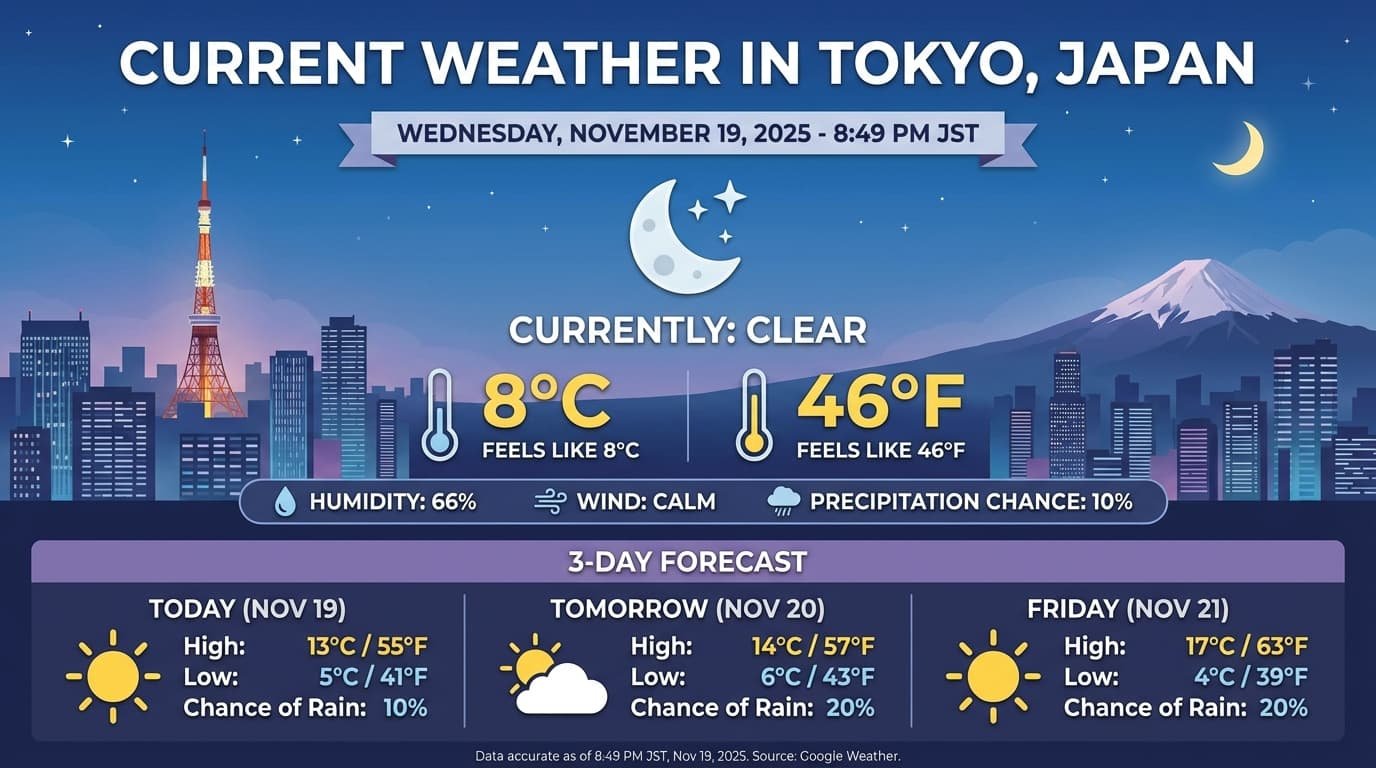
Prompt: "Generate an infographic of the current weather in Tokyo."
2. Technical Project Explainer
Concept: A demonstration of deep reasoning and knowledge grounding. With a very short prompt, the model researches a complex open-source project and generates a comprehensive, accurate infographic. This highlights its ability to synthesize information and present it visually.
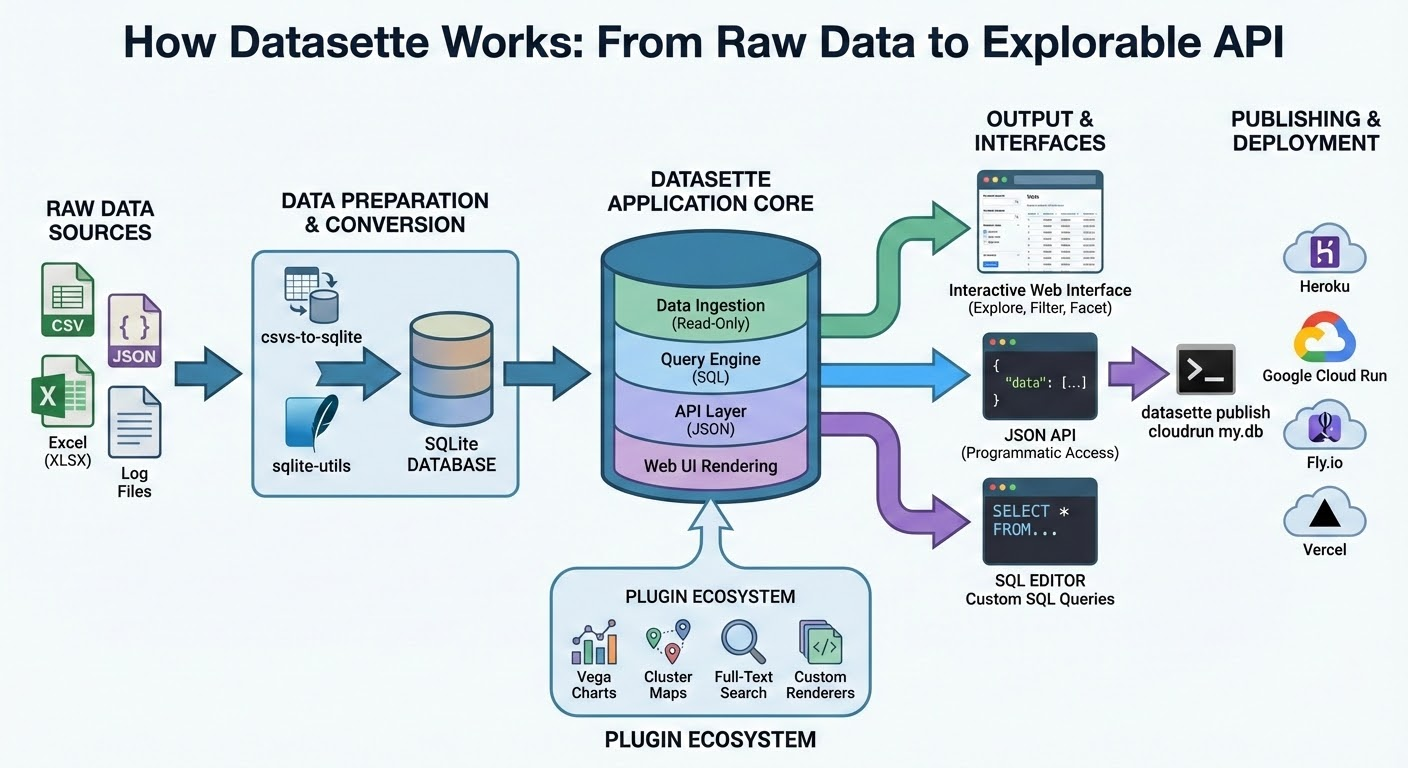
Prompt: "Infographic explaining how the Datasette open source project works"
3. Product Label Translation
Concept: This showcases precise, localized image editing. The model can identify, translate, and re-render text in a different language while perfectly preserving the surrounding image details. This is a game-changer for global marketing and product localization.
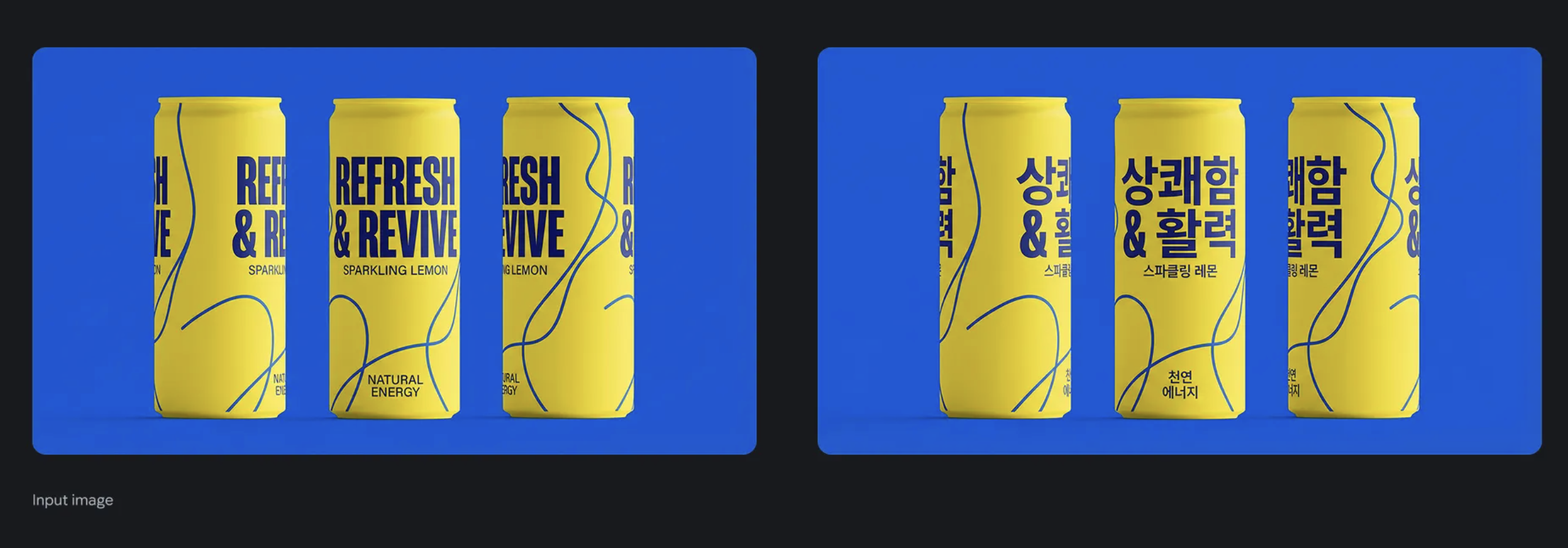
Prompt: "Translate all the English text on the three yellow and blue cans into Korean, while keeping everything else the same"
4. Recipe Flash Cards
Concept: Combining web search with structured content generation. The model can look up information (a recipe) and then reformat it into a different layout (flash cards). This is useful for educational content, study guides, and instructional materials.
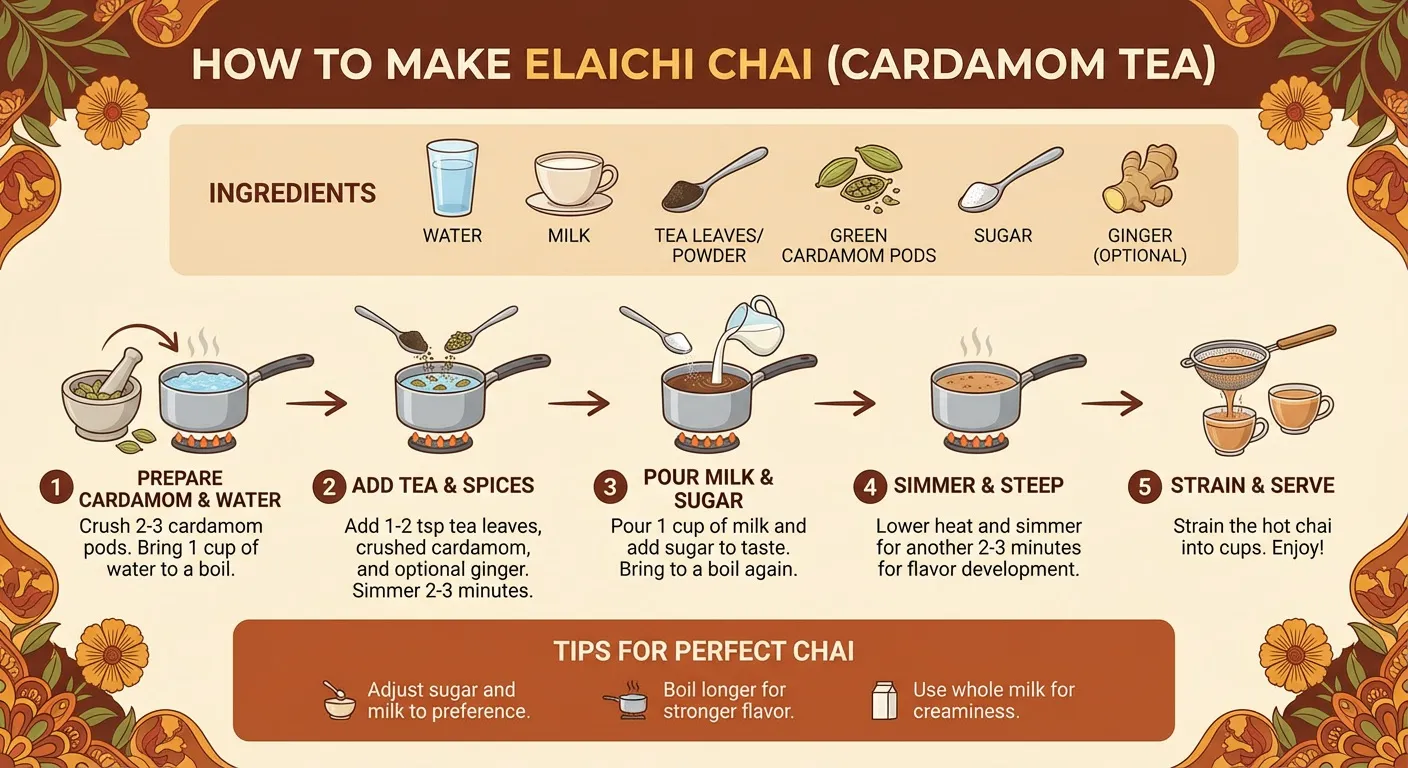
Prompt: "Look up a recipe and generate flash cards"
5. Text on Whiteboard
Concept: A test of fine-motor skill simulation and text rendering accuracy. The model generates an image of a character performing the action of writing, with the resulting text being legible and contextually placed. It even adds relevant environmental details.
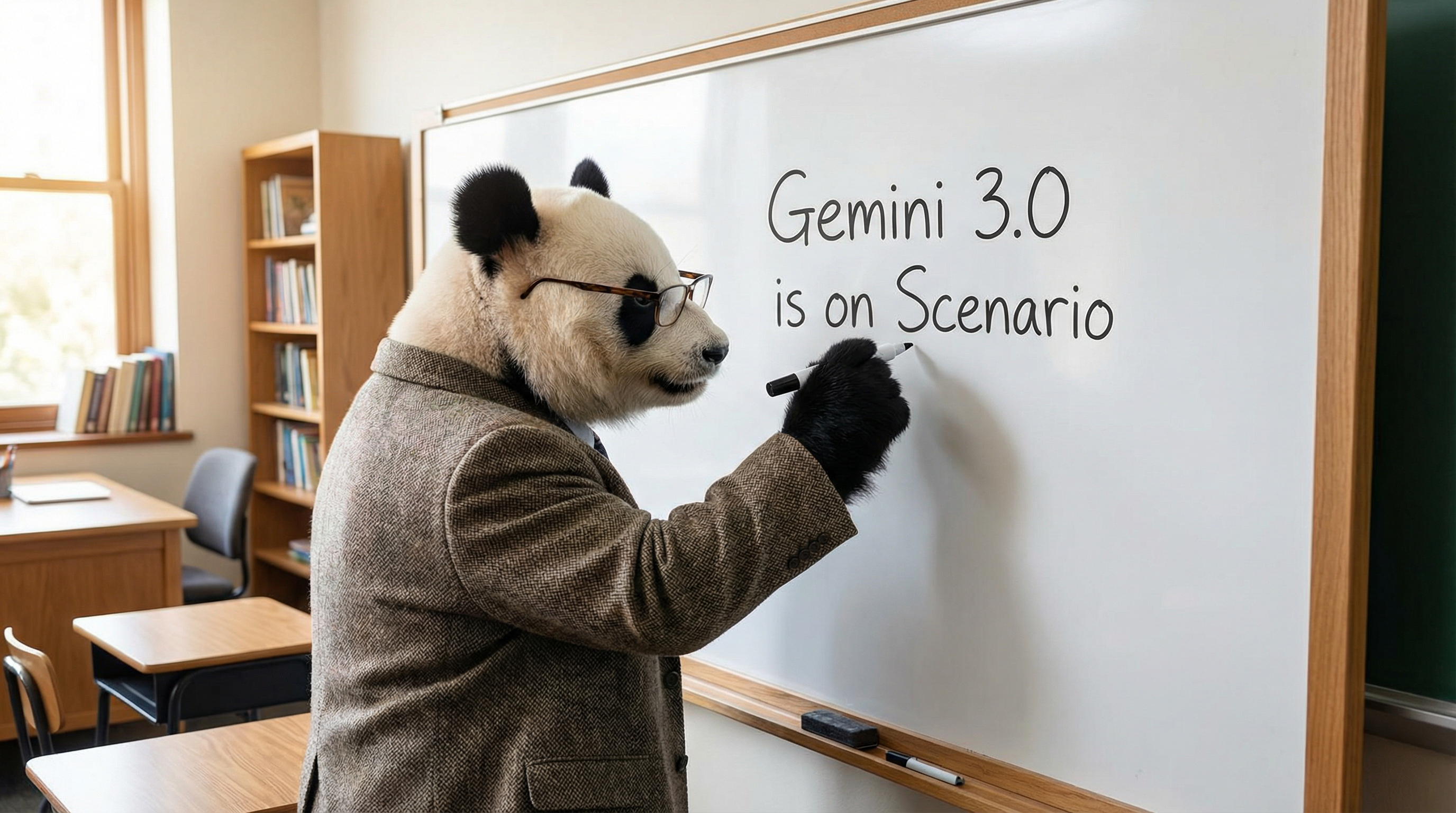
Prompt: "Create a panda writing 'Gemini 3.0 is on Scenario' on a whiteboard
UI/UX and Application Design
6. Modern App UI
Concept: A demonstration of the model's ability to generate modern, professional user interface designs. It understands current design trends and can create assets for different themes (light and dark mode). This can significantly speed up the prototyping and design process.
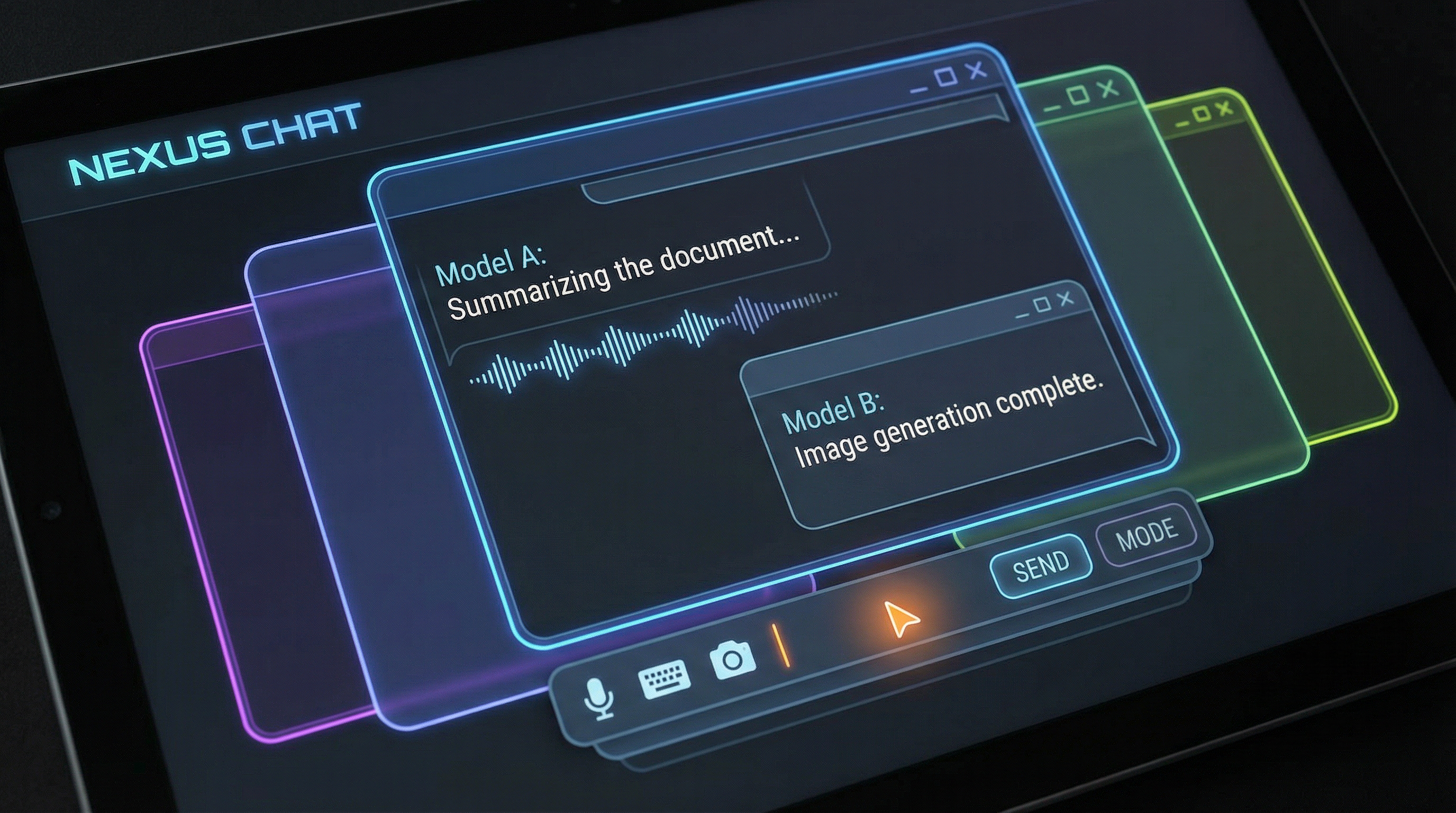
Prompt: "Create a modern application UI in dark mode with neon accents
7. Software Interface Simulation
Concept: The ability to generate realistic mockups of existing software interfaces. While not pixel-perfect, it can create convincing representations of operating systems and applications. This is useful for creating tutorials, marketing materials, or envisioning integrations.
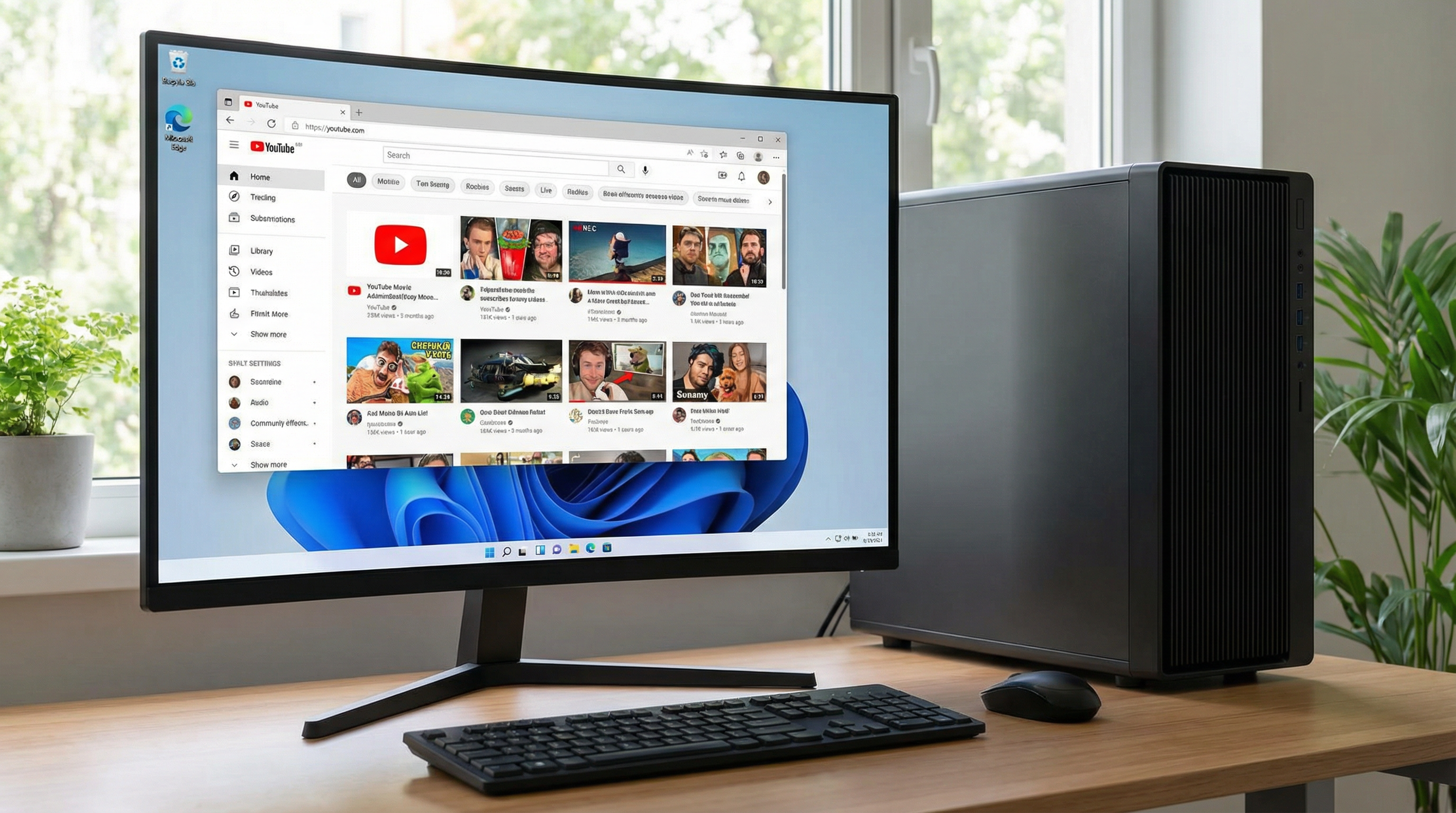
Prompt: "Create a picture of a Windows computer with YouTube tab open
8. Brand Variation with Logo Preservation
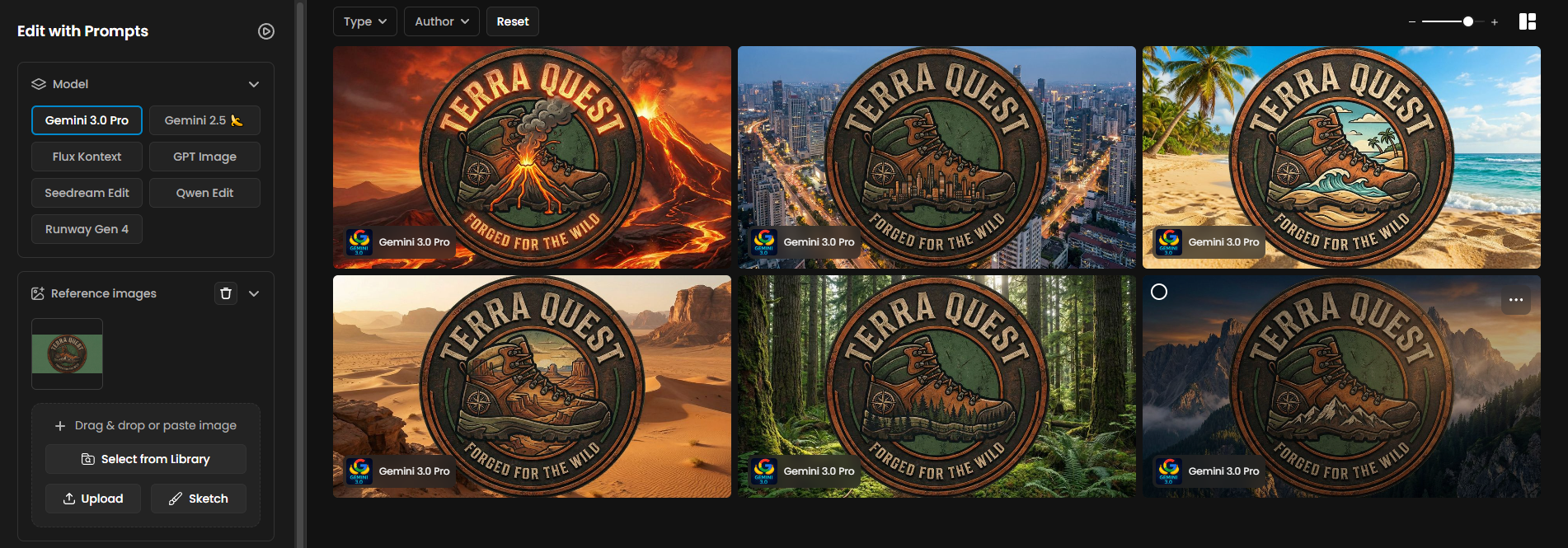
Concept:
This example demonstrates the model’s ability to preserve the Terra Quest logo’s visual identity while generating creative variations across different environments. The model keeps the logo perfectly intact with no distortion in typography or proportions and produces background variations that remain consistent with the original illustrative style. It also updates internal illustrated elements, such as the mountains inside the boot, so they match the theme of the new background. This approach ensures coherent, professional design outputs suitable for brand-safe workflows.
Prompt example:
A descriptive prompt to create creative variations of a social asset featuring the Terra Quest logo placed over a new environment background while preserving the logo’s structure, color palette, and identity. Update the illustrated elements inside the boot so they visually match the new background.
Storyboarding and Scene Composition
9. Cinematic Storyboarding
Concept: Translating a single moment into a narrative sequence. The model can take one image and generate a series of shots with different camera angles, effectively creating a storyboard. This demonstrates an understanding of cinematic language and visual storytelling
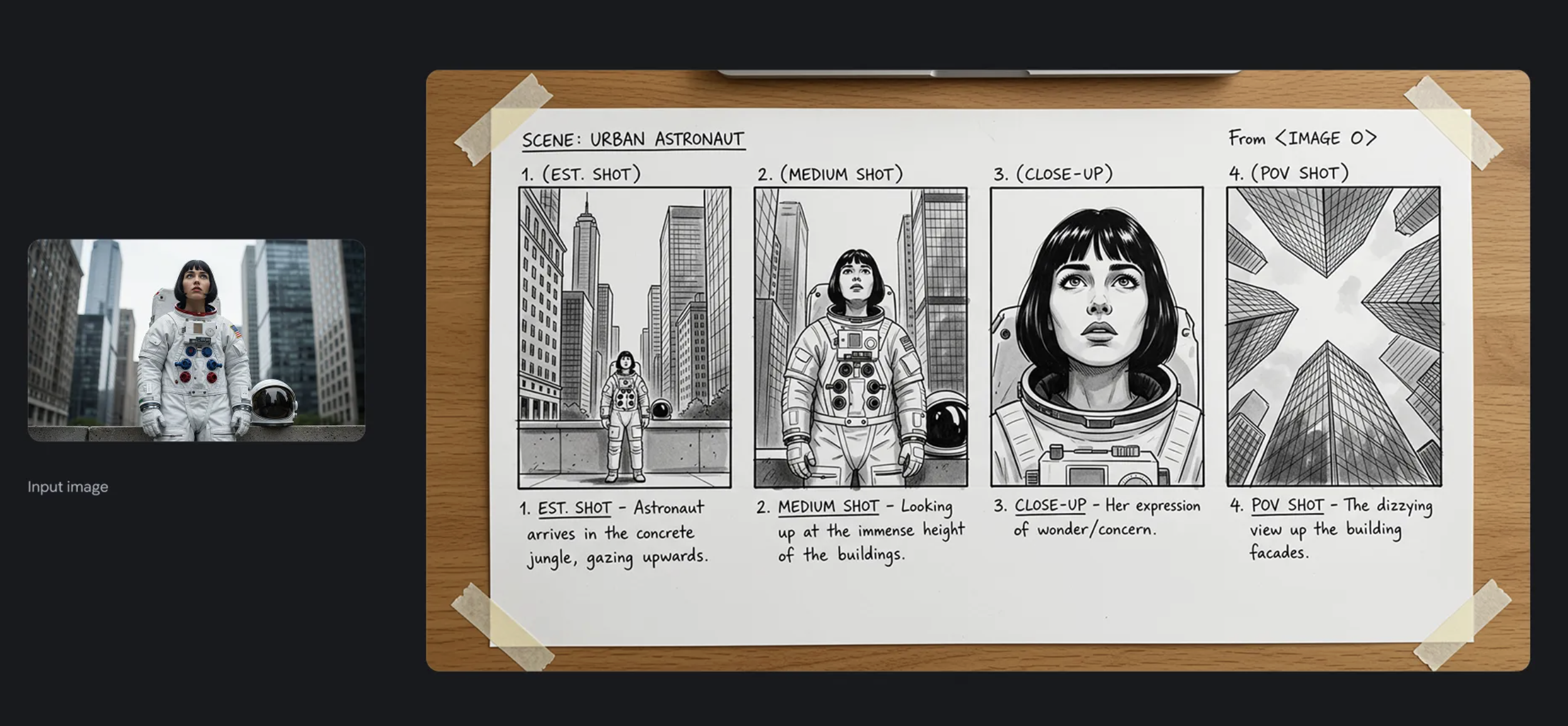
Prompt: "Create a storyboard for this scene"
10. Scene Composition with Mood Matching
Concept: Advanced multi-reference composition. The model can take multiple inputs—an illustration, a phone, and a mood board—and blend them into a single, coherent scene. It intelligently matches the lighting and even adds creative details that fit the mood.
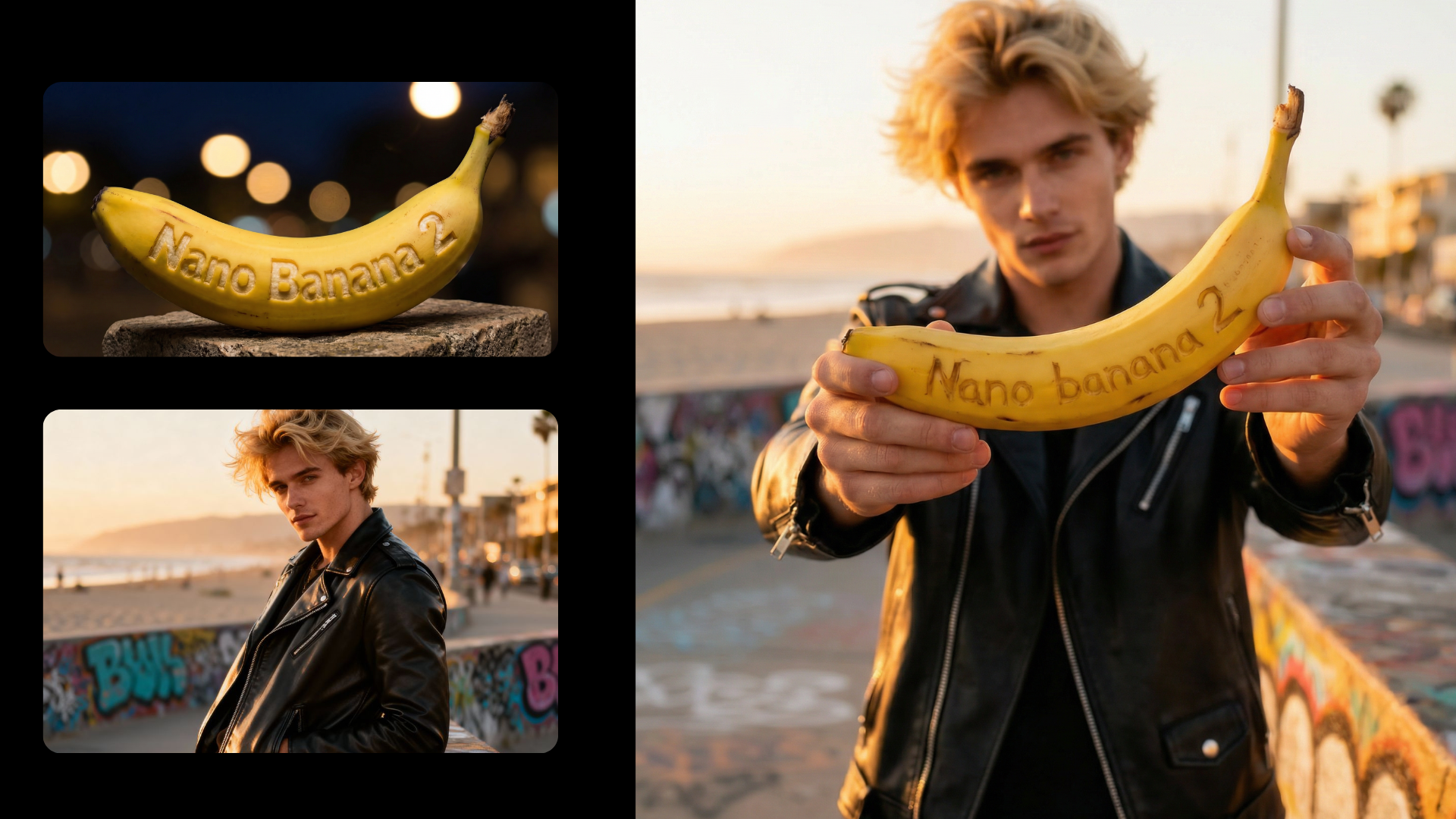
Prompt: Change the man's pose to hold the banana close to the camera
11. 2D to 3D Scene Rendering
Concept: Transforming a flat collection of 2D assets into a cohesive 3D space. This shows the model's ability to interpret brand guidelines and create a dimensional rendering of an environment. It's a powerful tool for event planning, architectural visualization, and marketing.
Prompt: A descriptive prompt to combine 2D brand elements from a mood board into a single 3D rendering.
Character, Style, and Brand Consistency
12. Lion as Superman
Concept: A creative blend of a real-world animal with a fictional character. This example highlights the model's ability to merge concepts and add realistic physical effects, like motion blur on the cape. It's a demonstration of both imagination and technical execution.
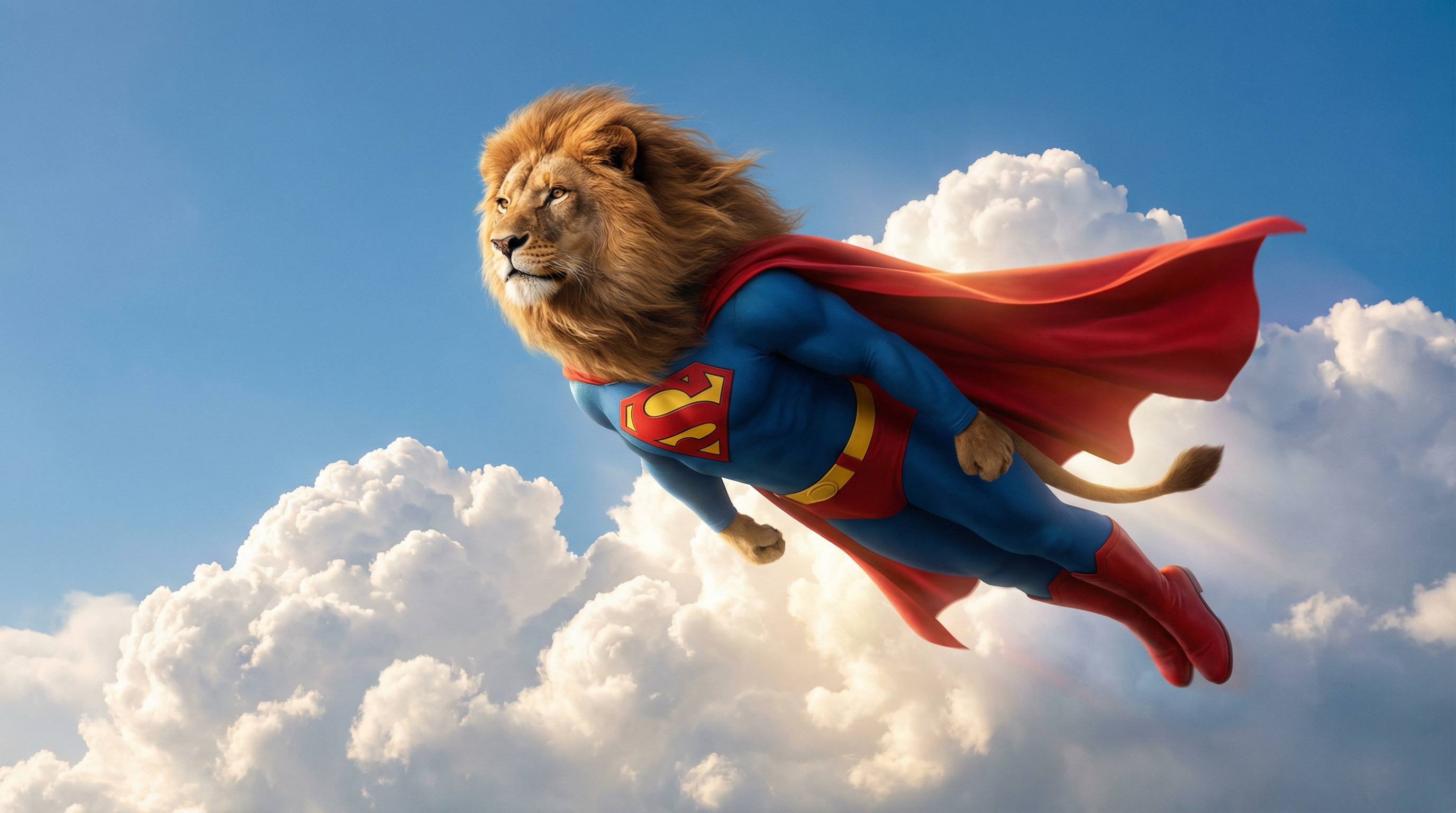
Prompt: A lion as superman flying in the sky"
13. Low-Poly Game Style
Concept: Style transfer for game development. The model can take a concept and render it in a specific, stylized aesthetic like low-poly game art. It can also generate relevant UI elements, showing an understanding of the target medium.
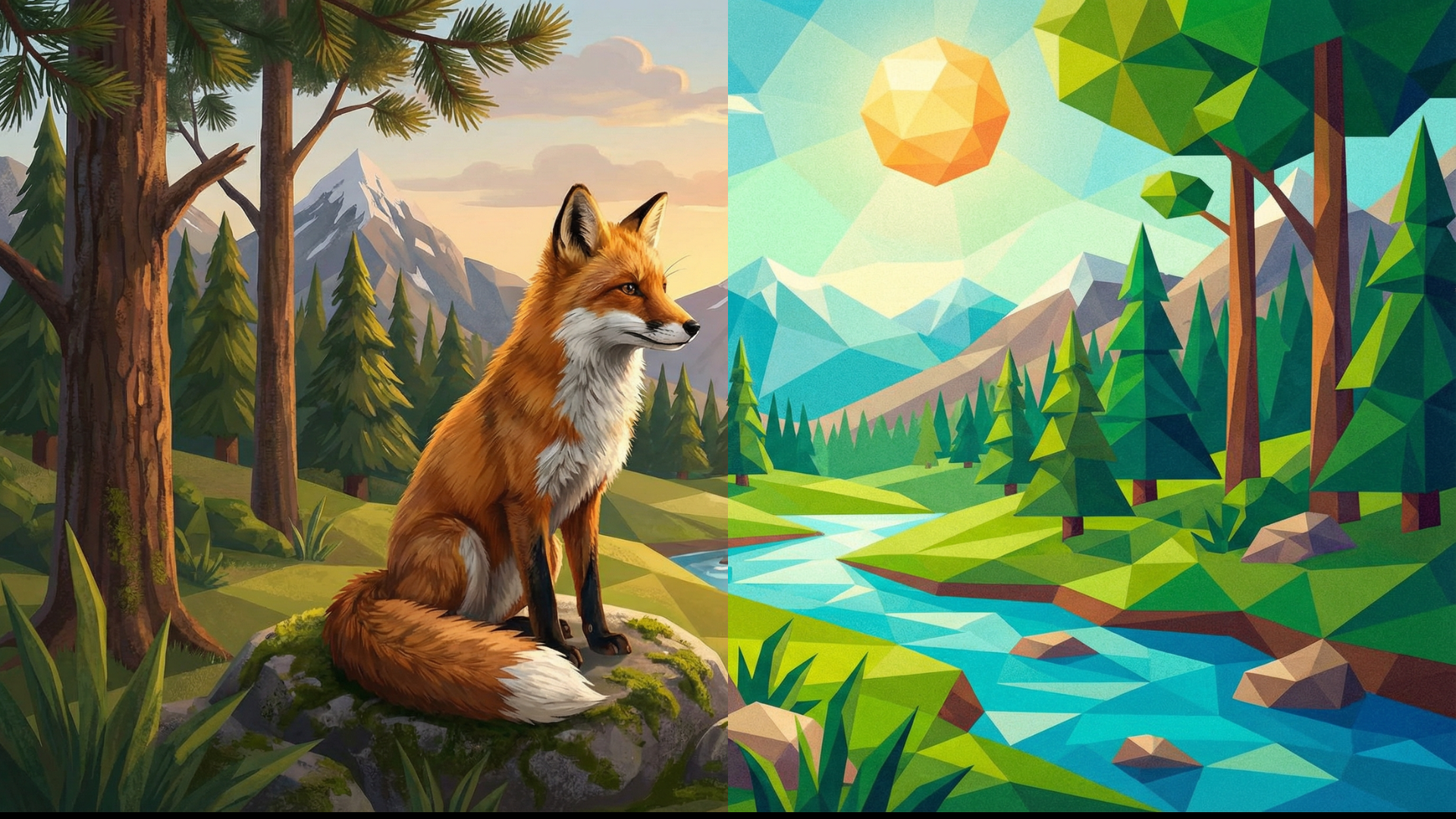
Prompt: Turn into low-poly style
14. Professional Headshot Reframing
Concept: A practical business use case for maintaining brand consistency. The model can take a new employee's headshot and adjust the background, lighting, and framing to match the style of existing team photos. This is a huge time-saver for corporate branding.
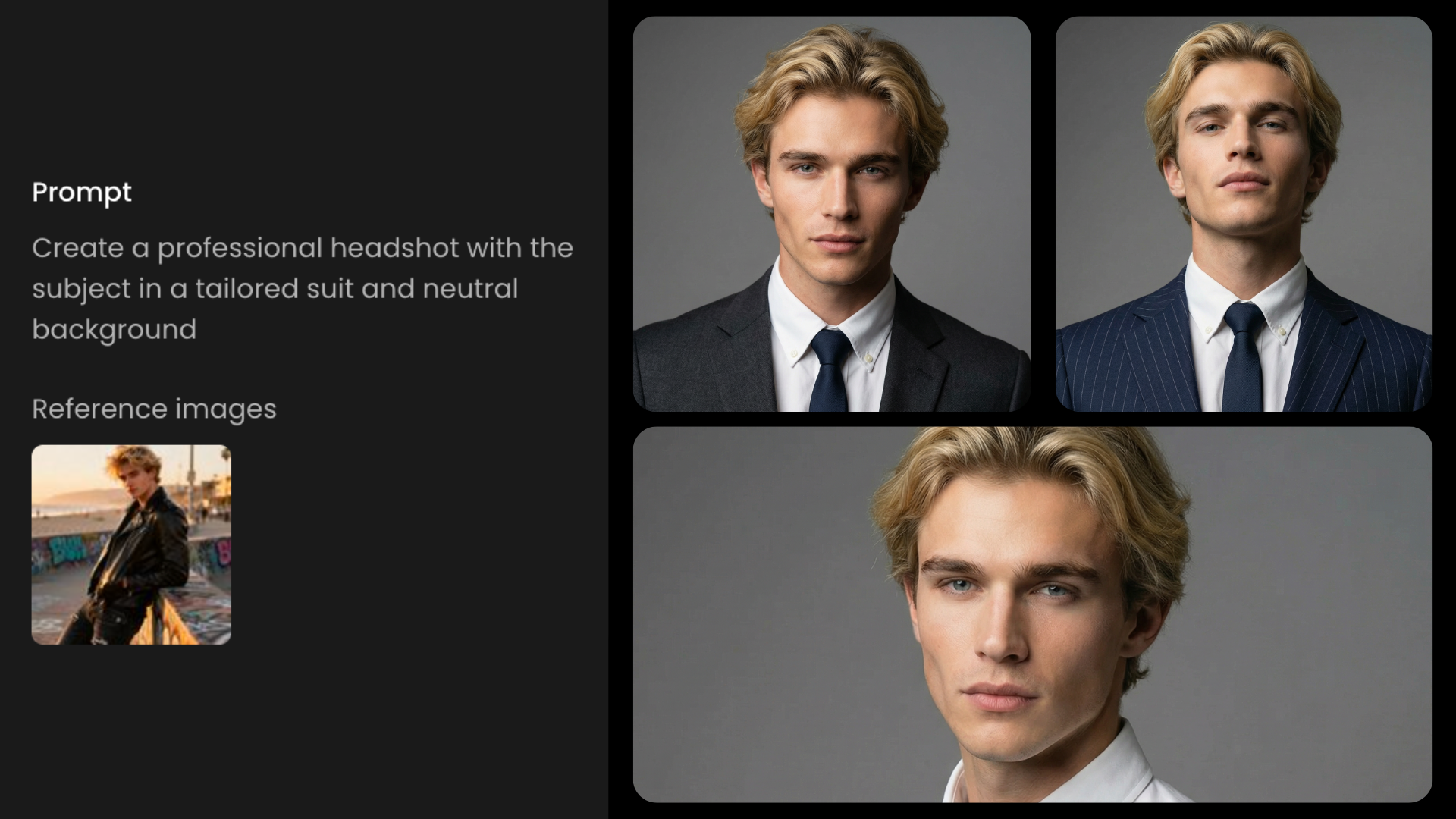
Prompt: Create a professional headshot with the subject in a tailored suit
Advanced Transformation and Creative Control
15. 3D Pancake Skull
Concept: A test of complex object generation and creative interpretation. The model is asked to create a highly unusual object—a pancake shaped like a skull—and then apply realistic food styling. This demonstrates its ability to handle imaginative and detailed prompts.
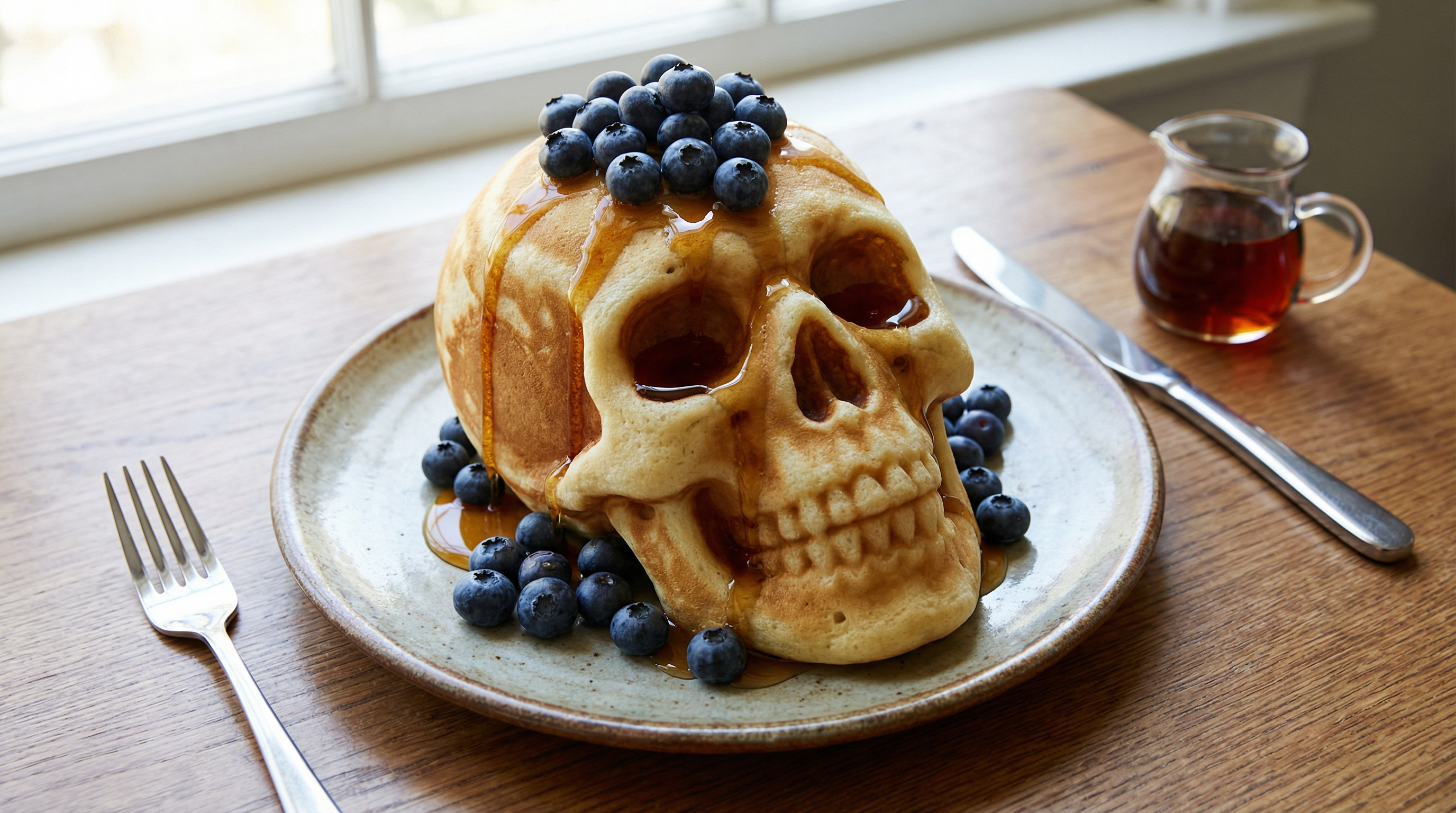
Prompt: Create an image of a three-dimensional pancake in the shape of a skull, garnished on top with blueberries and maple syrup
16. Selective Focus Control
Concept: A demonstration of professional photographic controls. The model can manipulate the depth of field to selectively blur parts of an image, drawing the viewer's attention. This mimics the use of a wide-aperture lens and is a key tool in photography.
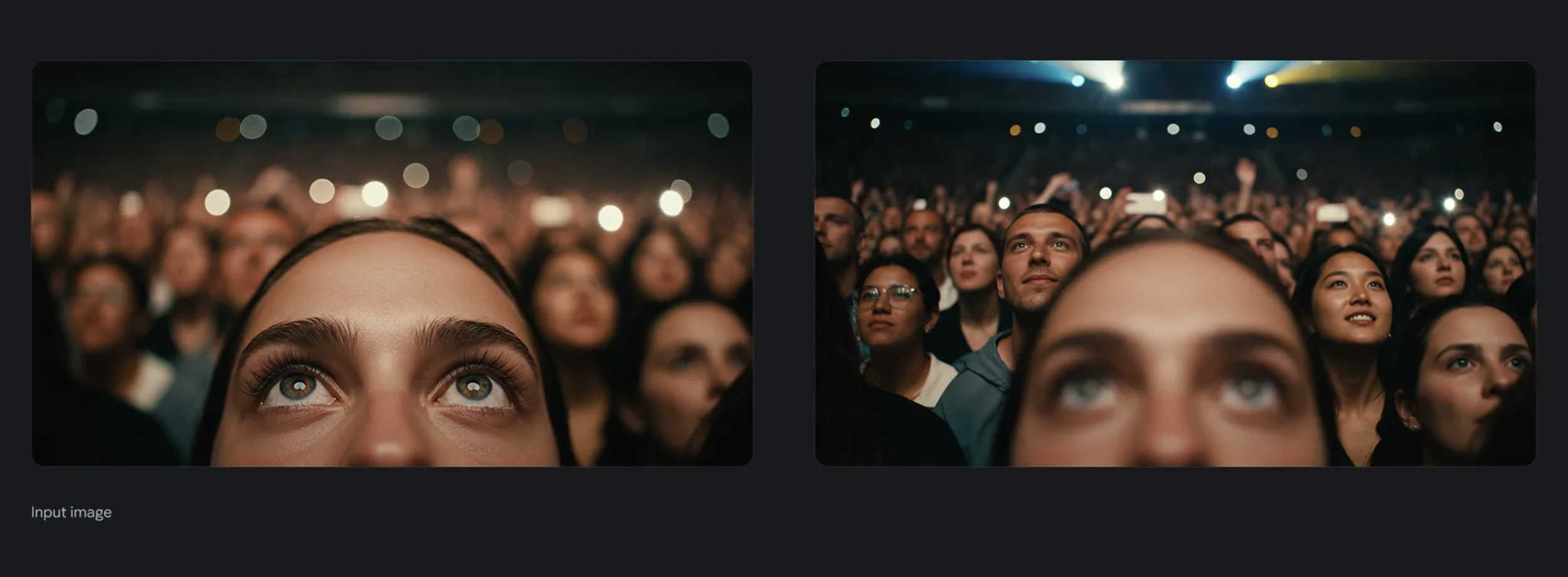
Prompt: "Focus on the faces of the crowd and make woman blurry"
17. Time of Day Change
Concept: A powerful tool for controlling the mood and atmosphere of a scene. The model can realistically transform the lighting of an image to change the time of day. This is invaluable for real estate, film, and marketing.
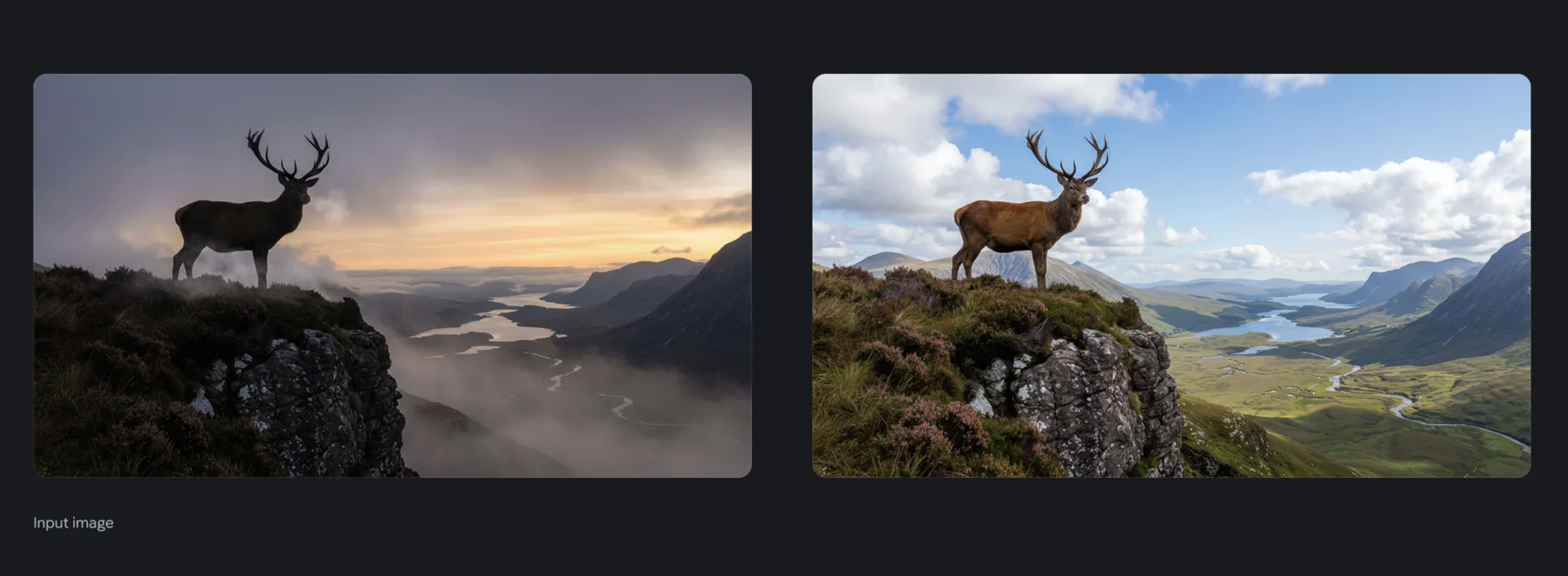
Prompt: "Change to daytime"
18. Aspect Ratio Zoom
Concept: A practical tool for content creation and reframing. The model can zoom in on a specific part of an image while locking the aspect ratio. This is useful for creating social media cut-downs or focusing on a key detail.
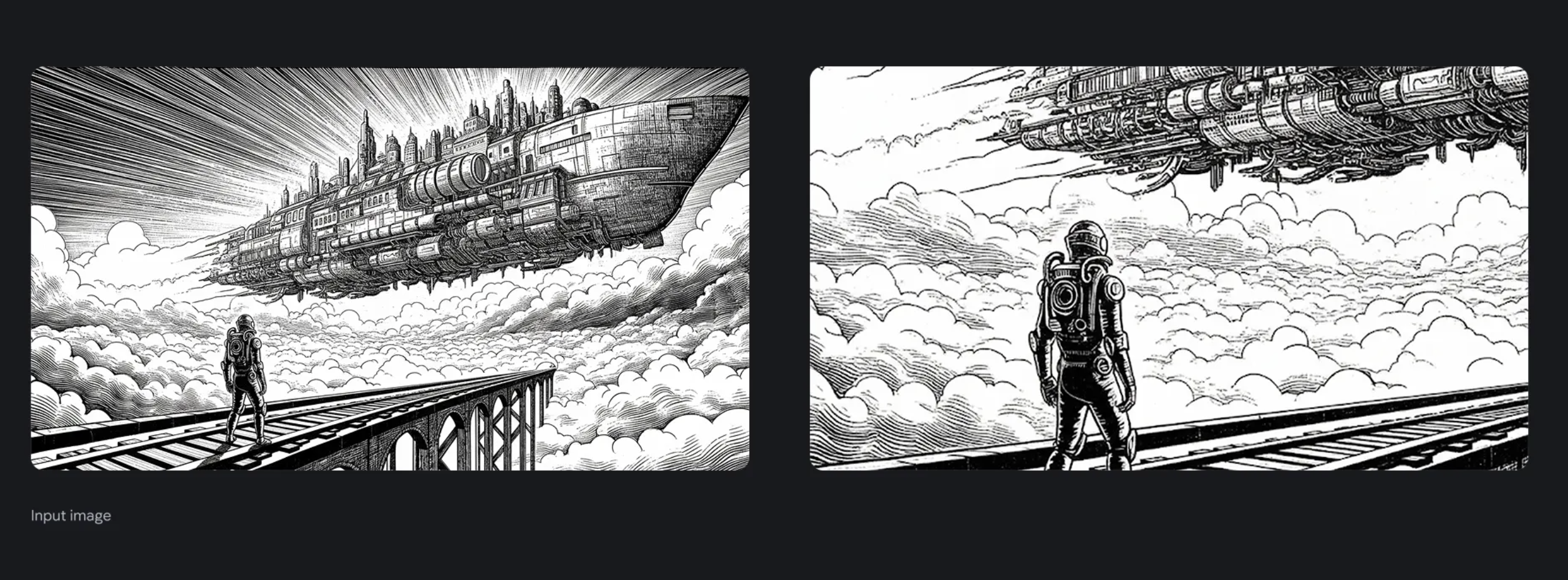
Prompt: "Zoom in on this image, maintaining a 16:9 aspect ratio"
Conclusion
The Nano Banana family covers the full range of image creation and editing needs within Scenario. Gemini 3.1 is the recommended default for most workflows, offering up to 14 reference images or optional input video, resolutions from 512 to 4K, Google Search support, and a Thinking Level control — all at a fast and cost-efficient pace. Gemini 3.0 Pro is the right choice when the work demands maximum resolution, multi-reference identity consistency, or factual grounding through Google Search. Gemini 2.5 is also available for teams with existing workflows built around it.
Across all three models, the quality of your prompt remains the single biggest factor in output quality. Clear, specific instructions with well-chosen reference images or a well-selected input video will consistently outperform elaborate settings with a vague prompt.