Runway Aleph - The Essentials
Last updated: September 23, 2026

The Runway Aleph Family
This article covers the two Runway Aleph video editing models available on Scenario. Both are made by Runway, and both edit existing footage from a text prompt instead of generating video from scratch.
Runway Aleph 2 (released by Runway in May 2026) is the current model and the one to use for new work. It makes precise, localized edits, changing only what you describe and keeping motion, audio, and everything else intact. It accepts clips up to 30 seconds at 1080p, applies one edit consistently across multi-shot sequences, and lets you pin up to 5 keyframe images to show exactly what the edit should look like at specific moments.
Runway Aleph (Gen-4) (released July 2025) is the original model. It works on 5-second clips, takes up to 3 reference images, and is best known for creative reshoots such as new camera angles, scene continuation, and motion transfer. It is documented further down this page.
What changed in Aleph 2: clips go from 5 seconds to up to 30 seconds, output is 1080p, edits are more targeted (the parts of the frame you did not mention stay faithful to the source), a single edit carries across the cuts of a multi-shot sequence, and time-pinned keyframes replace loose reference images. Aleph 2 also adds professional delivery formats (ProRes, PNG sequence, 10-bit SDR Rec.709).
Which Model Should I Use?
Model | ID | Input | Output | Best for |
|---|---|---|---|---|
Runway Aleph 2 (recommended) |
| Video up to 30 s and 16 MB, text prompt, up to 5 keyframe images | Same length as the source (up to 30 s), 1080p | Precise, localized edits on real footage: product swaps, object removal, backgrounds, restyles, multi-shot sequences |
Runway Aleph (Gen-4) (original, 2025) |
| Video under 16 MB (only the first 5 s are used), text prompt, up to 3 reference images | 5 s | Short creative reshoots such as new camera angles, scene continuation, and motion transfer (see its section below) |
Short version: start with Aleph 2 for any edit to real footage (products, objects, backgrounds, wardrobe, lighting, weather, style). Reach for the original Aleph only if you specifically want its camera-angle or scene-continuation behavior on a short clip.
Runway Aleph 2
Runway Aleph 2 rewrites real footage from a plain-language instruction while leaving motion, audio, and scene structure intact. Upload a source clip (up to 30 seconds and 16 MB), describe the change, and optionally pin keyframe images. In our tests the output came back at the same length as the source clip and at 1920x1080, even when the source was 720p.
Key Capabilities
Localized edits: swap a product, remove a sign or a person, or change one element, and everything you did not mention stays as it was.
Up to 30 seconds at 1080p: long enough for full ads, social posts, and short-form sequences.
Multi-shot consistency: one prompt applies across every cut in the clip, so there is no shot-by-shot rework.
Keyframes: pin up to 5 images to specific moments to show the model exactly what the edited frame should look like; Aleph 2 carries that look through the clip.
Restyles and environments: relight, change the season or weather, replace the background, or restyle the whole shot while keeping the original motion.
Delivery formats: MP4, ProRes (.mov), PNG sequence (.zip), or 10-bit SDR Rec.709.
How to Prompt Aleph 2
Runway’s guidance for Aleph 2 is to keep prompts simple, precise, and iterative. A good edit prompt has two parts:
An action verb and a target: what to do, and to what. Runway recommends verbs such as add, remove, change, replace, re-light, and re-style, with short examples like "Make the sneakers red", "Remove the items on the wall behind her", "Change the season to winter", or "Make it dark anime style".
What to keep: for longer or more complex edits, list what must not change (the camera move, the subject’s action, the lighting). Every example below ends with a "keep ... the same" clause.
When words are not specific enough (an exact product, a character, a precise style), edit one frame of the clip with an image model and pin it as a keyframe. If the edit needs movement that does not exist in the original footage, describe that motion in the prompt as well.
Examples (Runway Aleph 2)
All clips below were edited with Runway Aleph 2 on Scenario. Each example shows the source clip first and the Aleph 2 result second, with the exact prompt used.
Product swap with a keyframe
The orange soda can becomes a silver and electric blue energy drink across every shot of a cafe commercial. A keyframe image (the first frame of the source, edited with an image model to show the new can) was pinned at 1 second so Aleph 2 knew exactly what the product should look like. The hand, the ice, the pour, and the warm cafe light carry over untouched.
Prompt: "Replace the orange soda can with the sleek silver and electric blue energy drink can from the reference image in every shot, and make the poured liquid glow with electric blue energy, light crackling through the swirling drink and the glass, high energy commercial look, keep the cuts, camera moves, the hand, the table, the ice and the warm cafe lighting exactly the same"
Keyframe image (pinned at 1 s)

Keyframe reference used to guide the edit · Open on Scenario
Before (source clip)
Source clip · Open on Scenario
After (Runway Aleph 2)
Edited with Runway Aleph 2 · Open on Scenario
Object removal
A single, targeted removal: the circular logo sign behind the presenter disappears and the wall is filled in cleanly, while his gestures, the whiteboard diagrams, and the slow camera push stay identical.
Prompt: "Remove the circular logo sign from the wall behind the presenter, leaving a clean white wall, keep absolutely everything else identical: the man, his gestures, the whiteboard and its diagrams, the office, the lighting and the camera push"
Before (source clip)
Source clip · Open on Scenario
After (Runway Aleph 2)
Edited with Runway Aleph 2 · Open on Scenario
Localized element change
Only one element changes: the stag’s antlers turn into blossoming cherry branches with drifting petals. The misty forest, the god rays, the ferns, and the forward camera glide are preserved.
Prompt: "The stag's antlers are now blossoming cherry tree branches covered in pink flowers, petals gently drifting down through the volumetric god rays, keep the misty pine forest, the ferns, the camera glide forward and the stag's alert movement exactly the same"
Before (source clip)
Source clip · Open on Scenario
After (Runway Aleph 2)
Edited with Runway Aleph 2 · Open on Scenario
Background replacement
The ocean below a coastal road is replaced with a sea of clouds lit by golden light. The road, the silver SUV and its driving line, the cliffs, and the drone move are unchanged.
Prompt: "Replace the ocean with a vast sea of soft white clouds far below the cliffs, the coastal road now winding above the cloudtops in warm golden light, wisps of cloud drifting against the green cliffsides, keep the road, the silver SUV and its drive line, the cliffs and the drone camera movement the same"
Before (source clip)
Source clip · Open on Scenario
After (Runway Aleph 2)
Edited with Runway Aleph 2 · Open on Scenario
Environment transformation
A whole-scene change of environment: the street is now underwater, with fish, light rays, and bubbles, yet the graffiti wall, the parked car, the walking subject, and the camera path are all kept.
Prompt: "The entire street is now deep underwater: schools of tropical fish swim past, soft light rays filter down through clear blue water, gentle bubbles rise from the manhole, his hair and denim jacket sway slightly with the current while he keeps walking calmly along the sidewalk, keep the camera movement, the graffiti wall, the parked car and the composition the same"
Before (source clip)
Source clip · Open on Scenario
After (Runway Aleph 2)
Edited with Runway Aleph 2 · Open on Scenario
Full restyle with a keyframe
The entire shot is restyled into LEGO bricks. A keyframe image showing the LEGO knight was pinned at 10 seconds so the style stays consistent through the end of the clip, while the dolly move, the walk, and the sword draw follow the original.
Prompt: "Transform the entire scene into LEGO brick style as in the reference image: the knight is a glossy plastic LEGO knight, the castle walls, towers and red banners are built from LEGO bricks, the courtyard ground is LEGO baseplate studs, keep the same camera dolly, the knight's walk and sword draw, and the overcast lighting mood"
Keyframe image (pinned at 10 s)

Keyframe reference used to guide the restyle · Open on Scenario
Before (source clip)
Source clip · Open on Scenario
After (Runway Aleph 2)
Edited with Runway Aleph 2 · Open on Scenario
Parameters (Runway Aleph 2)
prompt
Required. Describe the edit in plain language, up to 1000 characters. Lead with the action (replace, remove, change, restyle) and, for longer edits, say what should stay the same.
video
Required. The source clip to edit: up to 30 seconds and 16 MB. The model preserves the original motion and structure and rewrites only what the prompt asks for.
keyframes
Optional. Up to 5 reference images pinned to moments in the video. Each keyframe takes an image (uri) and one timing: either seconds (seconds from the start of the video) or at (a fraction of the clip length: 0 = start, 0.5 = halfway, 1 = end). Set one timing per keyframe, not both.
promptImage
Optional alternative to Keyframes (you cannot use both). Up to 5 images pinned to moments in the output video. Each one takes an image (uri), a positionType (timestamp or position, default position), and then timestampSeconds or positionPercentage (0 to 1).
outputFormat
Delivery format: mp4 (default), prores (returns a .mov), png_sequence (returns a .zip of frames), or sdr_rec709_10bit. Aleph 2 has no HDR formats; to get HDR, convert the result with Runway Ruby.
proresProfile
ProRes codec profile, used only when Output Format is ProRes: 422 Proxy, 422 LT, 422, 422 HQ (default), 4444, or 4444 XQ.
seed
Optional number (0 to 4294967295) that locks the randomness. Reuse the seed of a result you liked to reproduce it, or leave it blank for a new variation each time.
Runway Aleph (Gen-4): The Original Model
The rest of this article covers the original Runway Aleph (Gen-4), released in July 2025. It edits the first 5 seconds of a clip (under 16 MB) and accepts up to 3 reference images. For new projects, Aleph 2 above is the recommended choice; the sections below remain as a reference for the original model and its creative reshoot techniques.
1. Overview (Runway Aleph Gen-4)
Runway Aleph, introduced by Runway ML on July 25, 2025, represents an advanced development in AI-driven video editing technology. Unlike traditional generative video models, Aleph is specifically designed to edit and transform existing video footage using sophisticated AI techniques.
Runway Aleph stands apart from other AI models such as Kling, Veo, and Sora by concentrating on enhancing real footage instead of creating new video content. Where these models generate video from text or images, Aleph excels in performing complex post-production edits traditionally requiring specialized tools, technical knowledge, and substantial time. This positions Aleph as an all-encompassing video editing solution capable of tasks ranging from generating new camera angles to applying detailed visual effects.
The core strength of Aleph lies in its "in-context" editing approach. The model analyzes existing footage to understand the scene's context, including lighting, spatial arrangements, and object relationships, before making modifications. This contextual intelligence ensures edits are visually coherent and realistic, integrating seamlessly with the original footage. As a result, Aleph enables high quality video editing through straightforward text prompts, expanding access to advanced post-production techniques previously limited to skilled professionals with specialized software.
The introduction of Runway Aleph marks a substantial shift from traditional manual, tool-based editing toward AI-assisted, prompt-driven workflows.
2. Key Strengths and Core Capabilities (Runway Aleph Gen-4)
2-1. Generate New Camera Angles
Aleph can generate new camera angles from a single shot by reconstructing the scene’s 3D geometry. Using spatial mapping, depth estimation, and contextual understanding, it simulates alternate viewpoints (such as reverse angles, over-the-shoulder, or aerial perspectives) as if additional cameras were on set. Prompts around “tracking shot following subject” or “medium full shot” deliver cinematic results with consistent lighting and motion. This replaces the need for multi-camera setups or complex rigs.
2.2 Seamless Scene Continuation
Aleph analyzes motion, lighting, and pacing to intelligently extend a scene beyond the original footage. It can continue character movement, simulate a camera pan, or bridge two shots with a smooth transition. Editors can prompt Aleph with instructions like “generate next shot” to create organic extensi
ons that match the tone and timing of the original, helping to sustain emotional beats or improve narrative flow, without reshoots.
2.3 Motion Transfer to Static Images
By extracting motion cues from a video, Aleph can animate a still image to match, simulating pans, zooms, or tracking shots. This feature brings static images to life in a cinematic way, ideal for animating concept art, product photos, or title sequences. A prompt like “apply same motion to desert landscape” animates the image with believable movement, preserving lighting, depth, and composition.
2.4 Relighting and Mood Adjustment
Aleph enables dramatic lighting changes across full video sequences with a single prompt. It recalculates shadows, highlights, reflections, and ambient light to transform time of day or emotional tone. For example, “make it golden hour” or “add streetlights at night” adjusts lighting on faces, backgrounds, and materials alike, creating consistent, photorealistic mood shifts without needing physical lighting setups.
2.5 Environmental & Atmospheric Transformation
Aleph can alter weather, season, or location through text-based instructions while preserving spatial structure and character positioning. Prompts like “add rain,” “turn summer into winter,” or “replace room with outdoor garden” introduce fog, snow, puddles, or new scenery with correct lighting and occlusion. These transformations feel integrated, not superimposed, ideal for worldbuilding or late-stage concept revisions.
2.6 Object Manipulation (Add, Remove, Replace)
With Aleph, users can seamlessly add new props, remove distractions, or replace objects in a scene. Edits like “remove trash can,” “add a vintage car,” or “replace painting with mirror” are rendered with correct lighting, scale, perspective, and shadows. This enables set enhancement or cleanup without re-editing or reshooting, streamlining production and allowing more creative flexibility in post.
2.7 Character Appearance Editing
Aleph modifies a character’s appearance (age, clothing, hairstyle, or other traits) while keeping identity and frame-to-frame continuity intact. A prompt like “make the man older and change outfit to military uniform” adjusts fine details like fabric folds, skin texture, and facial structure, applied consistently across shots. It’s useful for digital casting, continuity fixes, or age progression without VFX or reshoots.
2.8 Green Screen and Background Isolation
Aleph performs precise subject isolation without a green screen, using semantic segmentation to extract people or objects with pixel-level accuracy. It handles motion blur, hair, and transparency, enabling clean exports with transparent backgrounds or solid color fills. These cutouts can then be reused or composited into new environments, reducing dependency on traditional chroma setups.
2.9 Recoloring and Color Swapping
Scene elements (clothing, vehicles, walls, props) can be recolored using text or color values while preserving texture and lighting fidelity. Prompts like “change jacket to navy blue” or “make car metallic silver” produce clean, natural results. This is ideal for rapid visual iteration, branding alignment, or product versioning across marketing variants.
2.10 Style Transfer and Visual Aesthetics
Aleph transforms the entire aesthetic of a video to match a desired artistic or cinematic look. It goes beyond LUTs or filters, adjusting lighting, tone, texture, and visual rhythm to align with styles like “film noir,” “80s VHS,” or “watercolor illustration.” Motion integrity is preserved throughout, making it suitable for storytelling, animation, branding, or mood-based reinterpretation.
2.11 Add Prompt-Based Visual Effects (VFX)
Beyond stylistic edits, Aleph supports cinematic effects that dynamically interact with the environment. Prompts like “add magical sparks,” “ice spreading across the floor,” or “fireworks in the sky” generate complex effects with integrated lighting, occlusion, and environmental response. These edits feel embedded in the scene, not layered on top, making Aleph a powerful tool for narrative enhancement, sci-fi/fantasy content, or visually expressive campaigns.
2.12 Repurpose and Localize Existing Footage
Aleph allows users to adapt old or previously edited content for new contexts: changing aspect ratios (e.g., square to vertical), camera views, lighting, or visual tone to better fit modern platforms or regional needs. For example, footage filmed in a horizontal format can be reframed for mobile with a vertical crop and a new focal point, or transformed from daylight to sunset for seasonal campaigns. This significantly extends the lifecycle and adaptability of existing assets.
3. Potential Use Cases (Both Models)
🎬 Filmmaking & Post-Production
Aleph saves time and budget by generating new angles, extending scenes, and changing environments, with no reshoots needed. It empowers small teams and enhances flexibility in high-end productions.
📢 Commercial & Advertising
Easily swap products, add branding, or tailor visuals to different markets. Style transfer ensures brand consistency across campaigns, and object edits make content instantly adaptable.
📱 Content Creation & Social Media
Creators can generate multi-angle videos, swap backgrounds, and apply consistent aesthetics, all from home setups. Perfect for boosting engagement without a production crew.
🎓 Education & Training
Turn static training or classroom videos into immersive, contextual content. Add tools, environments, or safety visuals to improve clarity and engagement.
🎥 Documentary & Journalism
Enhance archival or limited footage with new angles or weather conditions, ethically and transparently. Great for storytelling when re-filming isn’t possible.
4. Visual Examples and Output Analysis (Runway Aleph Gen-4)
4-1. Camera Angle Generation Examples
Runway Aleph's camera angle generation capabilities are best demonstrated through specific prompting techniques that leverage the model's understanding of cinematic language and spatial relationships. When working with existing footage, users can generate new perspectives by providing clear, descriptive prompts that specify the desired camera position, framing, and movement.
Example Prompt for Medium Shot Generation: "Generate a medium full shot of the subject
This simple prompt, when applied to existing footage, instructs Aleph to create a new camera angle that frames the subject from approximately the waist up, maintaining the original scene's lighting, background, and atmospheric conditions while providing a different perspective. The generated output demonstrates Aleph's ability to understand standard cinematographic terminology and translate it into accurate visual representations.
Example Prompt for Reverse Shot Creation: "Create a reverse shot showing the opposite angle
This prompt is particularly valuable for dialogue scenes or interview footage where traditional coverage might be limited [1]. Aleph analyzes the spatial relationships in the original shot and generates a corresponding reverse angle that maintains continuity of lighting, background elements, and overall scene coherence. The resulting footage can be seamlessly integrated with the original material to create more dynamic and engaging sequences.
4-2. Advanced Camera Movement Prompts:
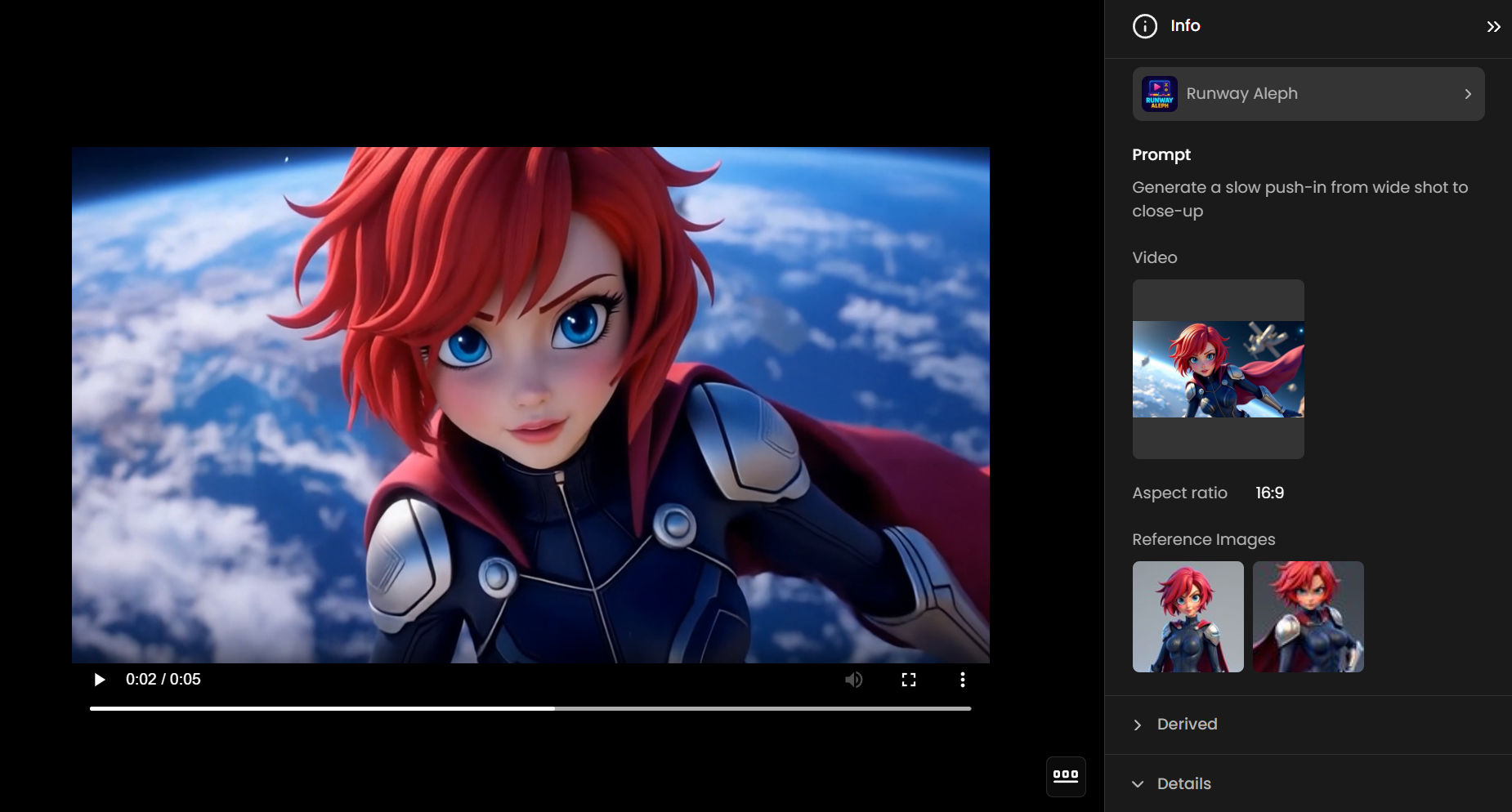
"Generate a slow push-in from wide shot to close-up" "Create a tracking shot following the subject from the side" "Generate an overhead establishing shot of the scene"
These more complex prompts demonstrate Aleph's ability to understand and execute sophisticated camera movements and positioning. The model's spatial understanding allows it to generate smooth, professional-quality camera movements that enhance storytelling and visual interest while maintaining the integrity of the original scene's content and performance.
In this example, it was important to use images of the character as references to reduce style variation and deformation.
4-3. Environmental Modification Examples
The environmental control capabilities of Runway Aleph are particularly impressive when demonstrated through before-and-after comparisons that show the model's ability to transform atmospheric conditions while maintaining scene integrity. These modifications go beyond simple filter applications to include comprehensive environmental changes that affect lighting, shadows, reflections, and overall mood.
Weather Transformation Example: "Add rain to this scene"
When applied to clear, sunny footage, this prompt generates realistic rainfall effects that include appropriate lighting changes, surface reflections, and atmospheric haze [1]. The model understands how rain affects various surfaces differently, creating convincing water effects on pavement, windows, and other materials while adjusting the overall lighting to match overcast conditions. The resulting footage maintains the original action and performance while completely transforming the environmental context and emotional tone.
Time of Day Modifications: "Change this to golden hour lighting" "Transform this scene to nighttime with street lighting" "Create a foggy morning atmosphere"
Prompt Example: Transform the bright daytime forest scenes into nighttime settings with deep blue tones. Add multiple glowing orbs floating gently in the air throughout the environment, casting soft light on the surroundings. Preserve all original elements, motion, and camera movements, maintaining the cartoon style and atmospheric consistency.
These prompts demonstrate Aleph's sophisticated understanding of how different lighting conditions affect scene appearance and mood [1]. The golden hour transformation involves warming the color temperature, creating longer shadows, and adding the characteristic soft, directional lighting associated with sunset or sunrise. Nighttime conversions require more complex modifications, including the addition of artificial light sources, adjustment of contrast ratios, and creation of appropriate shadow patterns.
Seasonal and Location Changes: "Transform this landscape into a lush forest" "Change this indoor scene to an outdoor garden setting" "Add autumn foliage to this park scene
These more dramatic environmental modifications showcase Aleph's ability to understand and implement complex contextual changes [1]. Seasonal transformations involve not only color palette adjustments but also the addition or modification of environmental elements like snow, fallen leaves, or seasonal decorations. Location changes require sophisticated understanding of architectural styles, lighting conditions, and spatial relationships to maintain believability and visual coherence.
Prompt Example: Transform the scene so the ethereal, feathered creature is flying high in a radiant sky filled with clouds and sunlight. Replace the underwater environment with a vast, luminous sky, keeping the creature’s elegant, flowing motion and glowing feathers. Add soft, shimmering light effects and a celestial atmosphere, preserving the original movement and maintaining an otherworldly, ethereal quality.
4-4. Object Manipulation and Integration
Runway Aleph's object manipulation capabilities are demonstrated most effectively through examples that show the model's ability to seamlessly integrate new elements or remove existing ones while maintaining realistic lighting, shadows, and spatial relationships [1]. These modifications require sophisticated understanding of three-dimensional space, material properties, and lighting physics.
Object Addition Examples: "Add a crowd of people in the background" "Place a red sports car in the parking space" "Add floating balloons to this party scene
These prompts demonstrate Aleph's ability to understand object placement requests and execute them with appropriate attention to scale, perspective, and environmental integration [1]. When adding crowds, the model considers the spatial constraints of the scene, the lighting conditions, and the appropriate scale relationships to create believable human figures that enhance rather than distract from the original content. Vehicle placement requires understanding of perspective, shadow casting, and surface reflections to create convincing integrations.
Object Removal Examples: "Remove people in the audience" "Eliminate the construction equipment from this scene" "Remove all visible power lines from this landscape
Object removal demonstrates Aleph's ability to intelligently fill gaps left by removed elements with contextually appropriate background content [1]. The model analyzes surrounding areas to understand patterns, textures, and structural elements that should logically continue behind the removed object. This process requires sophisticated understanding of perspective, architectural continuity, and natural patterns to create seamless results that don't reveal the modification.
Complex Integration Examples: "Replace the existing furniture with modern minimalist pieces" "Add professional lighting equipment to this studio scene" "Transform water into lava
These more complex modifications showcase Aleph's ability to understand and execute comprehensive scene transformations that involve multiple object additions, removals, and modifications [1]. The model must consider how different elements interact with each other, how lighting affects various materials, and how spatial relationships change when multiple modifications are applied simultaneously.
Example: Change the character’s hair to bright red, transform the jacket to black, and make the pants white while preserving the character’s pose, expression, and original cartoon style.
4-5. Style Transfer and Aesthetic Modifications
Runway Aleph's style transfer capabilities extend beyond simple color grading to include comprehensive aesthetic transformations that can fundamentally alter the visual character of footage while preserving content integrity [1]. These modifications demonstrate the model's understanding of artistic styles, cinematic techniques, and visual aesthetics.
Cinematic Style Examples: "Apply a film noir aesthetic with high contrast and dramatic shadows" "Transform this to a vintage 1970s film look" "Create a modern sci-fi aesthetic with cool tones and metallic highlights"
These style transformations involve complex modifications to color grading, contrast ratios, lighting characteristics, and overall visual treatment [1]. Film noir styling requires understanding of dramatic lighting techniques, shadow placement, and the characteristic high-contrast black and white aesthetic. Vintage film looks involve color palette adjustments, grain addition, and the subtle imperfections associated with older film stocks and processing techniques.
Artistic Style Applications: "Apply an impressionist painting style to this footage" "Transform this scene to look like a watercolor illustration" "Create an animated cartoon aesthetic
These more dramatic style transformations demonstrate Aleph's ability to understand and apply artistic techniques to video content [1]. Impressionist styling involves softening edges, emphasizing color relationships, and creating the characteristic brushstroke-like textures associated with the artistic movement. Watercolor effects require understanding of transparency, color bleeding, and the organic flow characteristics of water-based media.
Tips and Limitations
Runway Aleph 2
Keep each prompt to one clear edit. If you need several changes, run them one after another and feed each result back in.
Name what must stay the same (camera move, subject action, lighting). It keeps Aleph 2 from drifting on the parts of the frame you want untouched.
For exact products, characters, or styles, use a keyframe: edit one frame with an image model and pin it at the matching second (or position).
Use either Keyframes or Prompt Images, not both.
Source clips must be 30 seconds or shorter and 16 MB or smaller. Trim or compress longer footage before uploading.
Aleph 2 edits the footage you supply. For new camera angles or scene continuation, the original Aleph is the model built around those techniques.
No HDR output: deliver in MP4, ProRes, PNG sequence, or 10-bit SDR, and use Runway Ruby if you need HDR.
Runway Aleph (Gen-4)
Only the first 5 seconds of the input video are used, and the file must be under 16 MB.
Up to 3 reference images; use them to reduce style drift and character deformation on angle changes.
Complex camera moves and large scene changes can deform characters. Keep prompts focused and iterate.
5. Conclusion
Together, the two Aleph models cover the full range of edit-first video work: Aleph 2 for precise, longer, multi-shot edits on real footage, and the original Aleph for short creative reshoots.
Runway Aleph represents a major leap in AI-driven video editing, empowering creators to produce cinematic, context-aware edits from existing footage, all through simple prompts. Whether you're reframing shots, altering lighting, or adding complex visual effects, Aleph streamlines what once required days of manual work into minutes. Its ability to adapt, localize, and elevate footage makes it an essential tool for filmmakers, marketers, educators, and content creators alike.
👉 Try Runway Aleph 2 in Scenario
👉 Try the original Runway Aleph model in Scenario